Explore Other Agentic AI Frameworks
15 minutesIn earlier sections of this workshop, we focused on instrumenting Agentic AI applications built with LangChain and LangGraph using OpenTelemetry.
In this section, we broaden the scope to cover other popular Agentic AI frameworks and outline the available instrumentation approaches.
At a high level, there are two primary options for instrumenting Agentic AI applications with OpenTelemetry. The best approach depends on the framework used and whether the application already includes existing instrumentation.
Choosing the Right Instrumentation Approach
Option 1: Splunk OpenTelemetry Instrumentation (Recommended When Available)
Splunk provides OpenTelemetry instrumentation packages for several widely used Agentic AI frameworks, including:
- CrewAI
- LangChain/LangGraph
- LlamaIndex
- OpenAI SDK
- OpenAI Agents SDK
When to use this option
Choose this approach when:
- Your application uses one of the frameworks listed above.
- You want OpenTelemetry instrumentation optimized for Splunk Observability Cloud with minimal configuration.
- You prefer a zero-code instrumentation experience.
How it works
Follow the steps in Zero-code instrumentation integrations to instrument your application.
Depending on the framework, you may need to:
- Install additional Splunk OpenTelemetry packages
- Set specific environment variables to enable optional features such as:
- Capturing LLM prompts and completions
- Evaluating semantic quality of LLM responses
- Integrating with Cisco AI Defense
Note: This is the same approach used earlier in the workshop for LangChain and LangGraph, including optional prompt and completion capture.
Option 2: Third-Party Instrumentation Libraries
If your framework is not directly supported by Splunk OpenTelemetry instrumentation, you can use a third-party library that provides broader framework coverage.
Commonly used third-party instrumentation libraries include:
When to use this option
This approach is well suited when:
- Your application uses an Agentic AI framework not listed in Option 1
- The application is already instrumented with a third-party instrumentation library
- You want to avoid re-instrumenting existing code
How it works
Third-party libraries typically emit telemetry in their own formats or earlier OpenTelemetry schemas. To integrate this data with Splunk Observability Cloud:
- Enable a translation layer that converts the emitted telemetry into the latest OpenTelemetry semantic conventions.
- Configure the OpenTelemetry Collector to:
- Receive the translated data
- Export it to Splunk Observability Cloud
For step-by-step instructions, see: Translate and collect data from AI applications instrumented with third-party libraries.
Summary
| Scenario | Recommended Option |
|---|---|
| Supported framework, minimal setup | Splunk OpenTelemetry Instrumentation |
| Unsupported framework | Third-party instrumentation library |
| Existing third-party instrumentation | Third-party + OpenTelemetry translation |
CrewAI Example
Let’s walkthrough an example using CrewAI. The travel planner application we’ve
been using during the workshop has been re-written using CrewAI. You can find
the source code in the ~/workshop/agentic-ai/crewai folder.
Note that CrewAI uses a declarative approach to define agents and tasks. For example,
the ~/workshop/agentic-ai/crewai/config/agents.yaml file defines agents such as the
following:
And the ~/workshop/agentic-ai/crewai/config/tasks.yaml file defines tasks such as the
following:
Notice that the following packages were added to the requirements.txt file
to instrument the CrewAI application:
Deploy the CrewAI Example
Let’s deploy the CrewAI example by first building new Docker images:
Tip: if the image is taking too long to build, consider using the pre-built image instead. To do so, update the image name in the
~/workshop/agentic-ai/crewai/k8s.yamlfile toghcr.io/splunk/agentic-ai-app:crewaiinstead oflocalhost:9999/agentic-ai-app:crewai.
Let’s use a different environment name for this version of the application:
We can then deploy the CrewAI application using the manifest file as follows:
Test the Application in Kubernetes
Ensure the new application pod has started successfully and the old pod is no longer present:
Then, run the following command to test the application:
View Data in Splunk Observability Cloud
Let’s return to Splunk Observability Cloud to view traces for the CrewAI application.
Navigate to APM and then select AI agents. Ensure your environment name
is selected (e.g. agentic-ai-crewai-$INSTANCE). You’ll notice that the agent
names are slightly different:
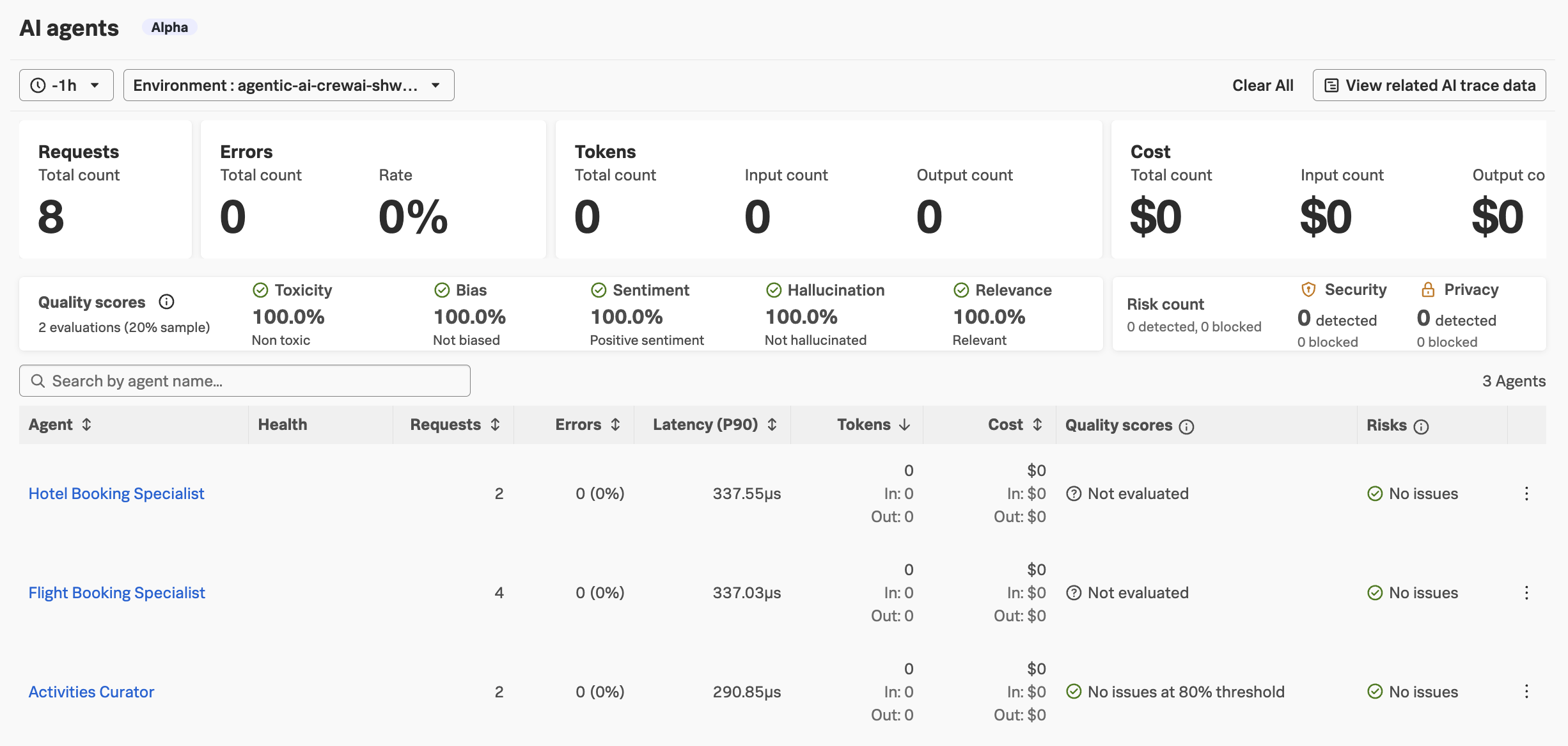
Navigate to APM -> AI trace data and load the most recent trace.
In the trace, we should see similar details that we captured with the LangChain/LangGraph version of the application:
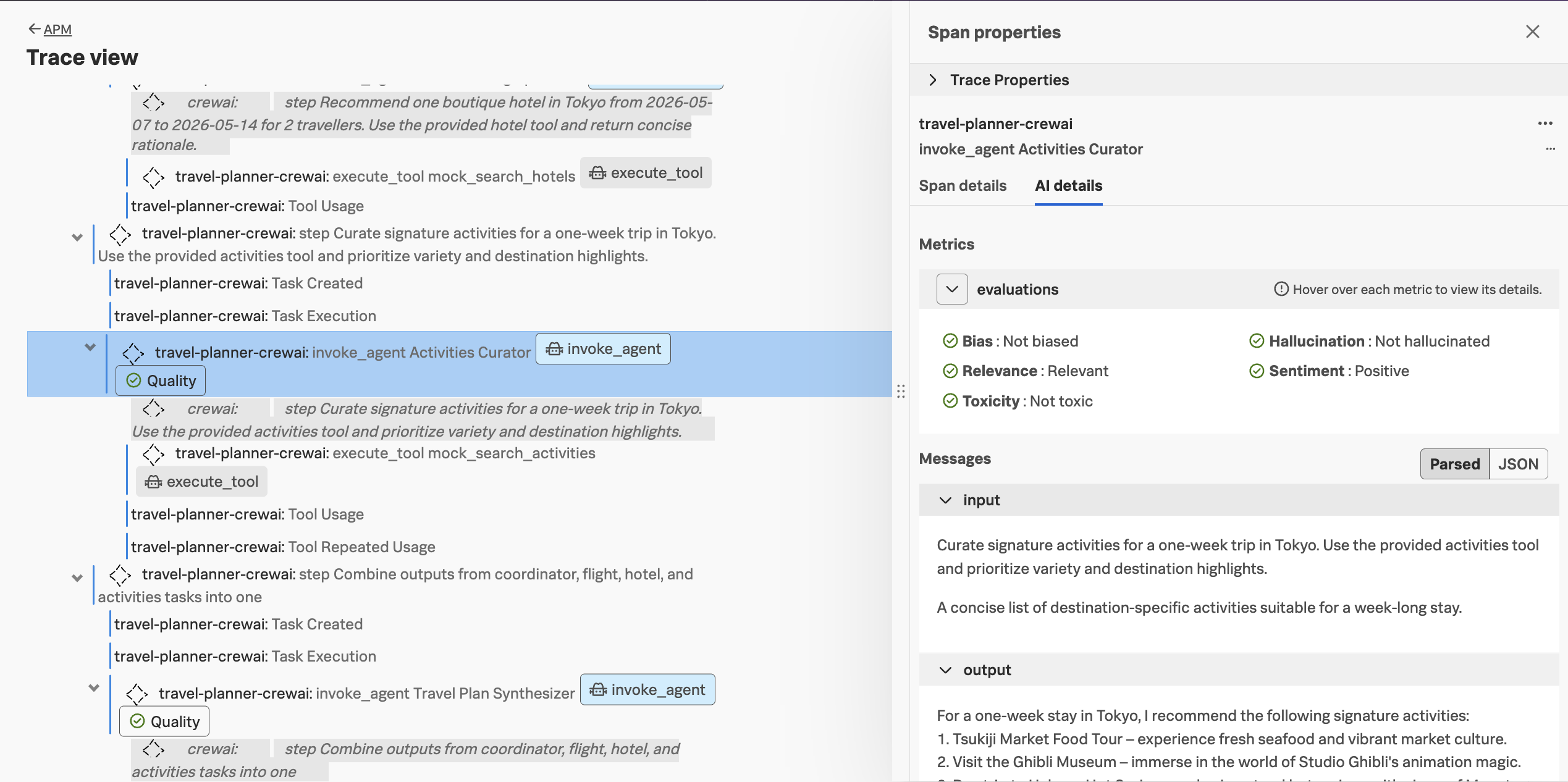
Do you notice anything different about the CrewAI traces compared to LangChain/LangGraph traces?
Click here to see the answer
There are a few differences:
- The agent names are different (
Hotel Booking Specialistvs.hotel_specialist) - The coordinator and plan synthesizer agents aren’t listed for the CrewAI version
- The spans for the
crewaiinferred service include the agent instructions as part of the waterfall view