Note: this section of the workshop requires changes to multiple files.
If you’re not sure where to make the changes, or your application is no
longer working, please refer to the model solution for this section
which is in the ~/workshop/agentic-ai/app-with-agents-and-tools folder.
In the previous section, we discovered that our agents aren’t appearing on the new
Agents page, nor in the Agent flow at the top of the trace.
The reason is that our application isn’t currently using agents, but is instead invoking
the LLM directly.
In other words, right now, our app is like a scripted play. Every line and every action is written
in the code. When we call the LLM, we are just asking it to read a specific line.
Because the LLM isn’t making choices, the Observability for AI instrumentation doesn’t
recognize it as an autonomous agent.
In this next section, we are going to give the LLM tools and the authority
to decide how to use them. By moving to an agentic model, the LLM will start
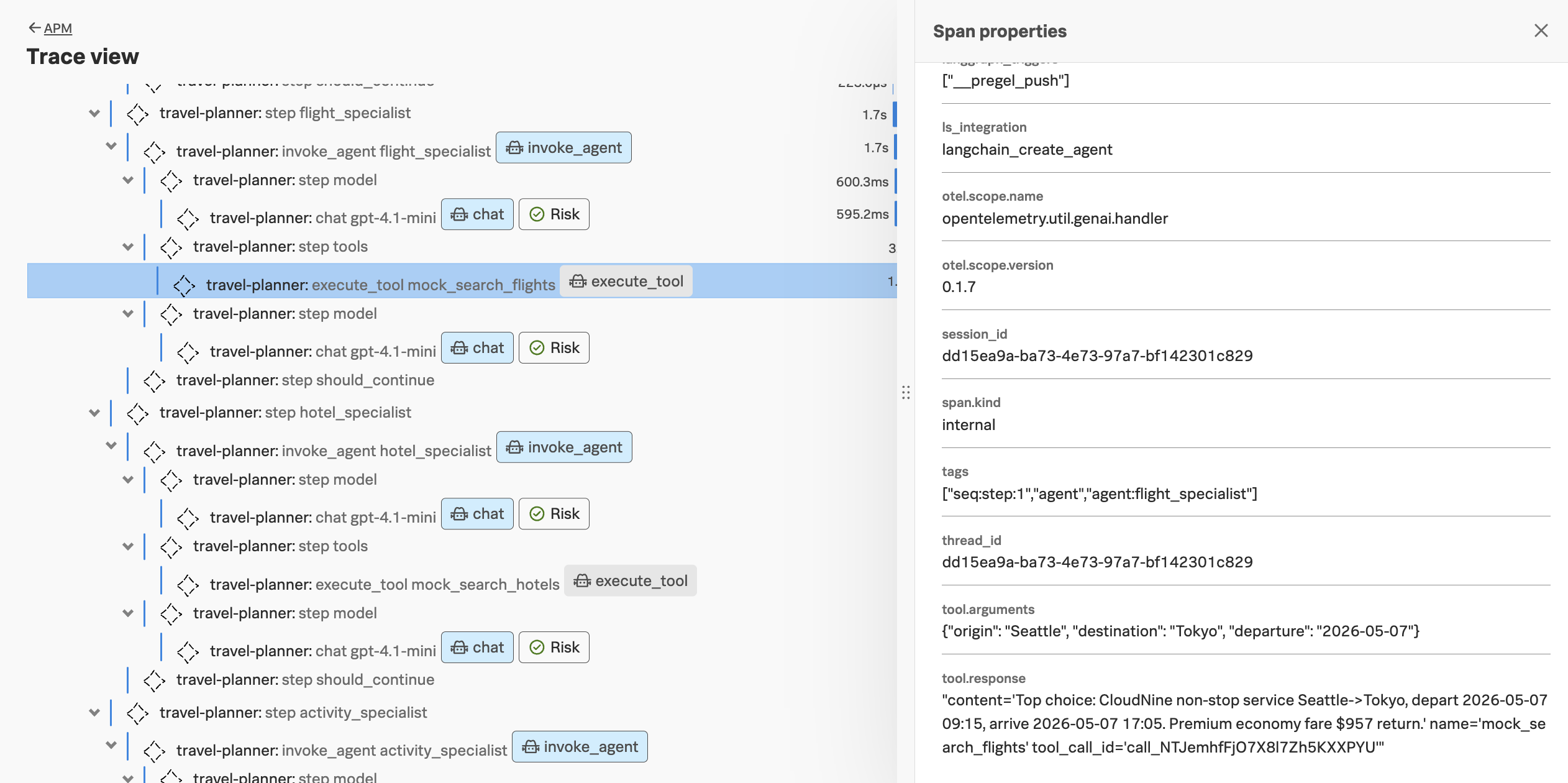
generating Tool Calls. Our OpenTelemetry instrumentation will capture these
interactions, allowing us to see the LLM’s thought process and
tool usage, and each of our agents will be represented in Splunk Observability Cloud.
Direct Invocation vs. Agentic Traces
Before making these changes, let’s dive deeper into how traces are captured
when the LLM is invoked directly vs. via an agent.
Direct Invocation Traces:
When you call llm.invoke(), the instrumentation sees a standard “Chat” or “Completion” span.
It records the prompt and the response. Because there is no “loop” or “tool-calling” logic
managed by the agent framework, Splunk Observability Cloud doesn’t see the metadata required
to categorize the span as an “Agent.”
Agentic Traces:
When you use an agent (e.g., create_react_agent),
the framework wraps the execution in specific “Agent” and “Tool” spans. These
spans contain metadata that tells OpenTelemetry: “This isn’t
just a chat; this is a reasoning loop with specific tools.” This is what
populates the Agents Page and the Agent Flow diagrams in the trace visualization.
Make a Backup
Before making changes to the Python code, make a backup of the main.py file
using the following command:
In the same main.py file, add the tool definitions between the lines that
say Begin: Tool Definitions and End: Tool Definitions:
# Begin: Tool Definitions@tooldefmock_search_flights(origin:str,destination:str,departure:str)->str:"""Return mock flight options for a given origin/destination pair."""# create a local random.Random instanceseed=hash((origin,destination,departure))%(2**32)rng=random.Random(seed)airline=rng.choice(["SkyLine","AeroJet","CloudNine"])fare=rng.randint(700,1250)return(f"Top choice: {airline} non-stop service {origin}->{destination}, "f"depart {departure} 09:15, arrive {departure} 17:05. "f"Premium economy fare ${fare} return.")@tooldefmock_search_hotels(destination:str,check_in:str,check_out:str)->str:"""Return mock hotel recommendation for the stay."""seed=hash((destination,check_in,check_out))%(2**32)rng=random.Random(seed)name=rng.choice(["Grand Meridian","Hotel Lumière","The Atlas"])rate=rng.randint(240,410)return(f"{name} near the historic centre. Boutique suites, rooftop bar, "f"average nightly rate ${rate} including breakfast.")@tooldefmock_search_activities(destination:str)->str:"""Return a short list of signature activities for the destination."""data=DESTINATIONS.get(destination.lower(),DESTINATIONS["paris"])bullets="\n".join(f"- {item}"foritemindata["highlights"])returnf"Signature experiences in {destination.title()}:\n{bullets}"# End: Tool Definitions
Configure the Application for AI Agent Monitoring
Currently, our application creates an LLM and invokes it as follows:
“Agents combine language models with tools to create systems that
can reason about tasks, decide which tools to use, and iteratively
work towards solutions.”
In practice, this means the model is no longer limited to generating text. Instead,
it can choose from a set of available tools (such as APIs, databases, or code execution)
to help complete a task.
This style of agent is often called a LangChain ReAct agent.
ReAct stands for Reasoning + Acting. The agent works through a loop where it:
briefly reasons about the task,
selects and calls a relevant tool,
observes the result, and
uses that new information to decide the next step.
This process repeats until the agent has gathered enough information to produce a final answer.
Replace the definitions for the coordinator_node, flight_specialist_node, hotel_specialist_node,
activity_specialist_node, and plan_synthesizer_node functions with the following:
Tip: to delete a large number of lines in bulk using the vi editor, press Shift + v to ensure Visual Line mode, then use the down arrow to select all the lines you want to delete, then press d
to delete the selected lines.
defcoordinator_node(state:PlannerState)->PlannerState:llm=_create_llm("coordinator",temperature=0.2,session_id=state["session_id"])agent=_create_react_agent(llm,tools=[]).with_config({"run_name":"coordinator","tags":["agent","agent:coordinator"],"metadata":{"agent_name":"coordinator","session_id":state["session_id"],},})system_message=SystemMessage(content=("You are the lead travel coordinator. Extract the key details from the ""traveller's request and describe the plan for the specialist agents."))result=agent.invoke({"messages":[system_message]+list(state["messages"])})final_message=result["messages"][-1]state["messages"].append(final_messageifisinstance(final_message,BaseMessage)elseAIMessage(content=str(final_message)))state["current_agent"]="flight_specialist"returnstatedefflight_specialist_node(state:PlannerState)->PlannerState:llm=_create_llm("flight_specialist",temperature=0.4,session_id=state["session_id"])agent=_create_react_agent(llm,tools=[mock_search_flights]).with_config({"run_name":"flight_specialist","tags":["agent","agent:flight_specialist"],"metadata":{"agent_name":"flight_specialist","session_id":state["session_id"],},})step=(f"Find an appealing flight from {state['origin']} to {state['destination']} "f"departing {state['departure']} for {state['travellers']} travellers.")# IMPORTANT: pass a proper list of messages (not stringified)messages=[SystemMessage(content="You are a flight booking specialist. Provide concise options."),HumanMessage(content=step),]result=agent.invoke({"messages":messages})final_message=result["messages"][-1]state["flight_summary"]=final_message.contentifisinstance(final_message,BaseMessage)elsestr(final_message)state["messages"].append(final_messageifisinstance(final_message,BaseMessage)elseAIMessage(content=str(final_message)))state["current_agent"]="hotel_specialist"returnstatedefhotel_specialist_node(state:PlannerState)->PlannerState:llm=_create_llm("hotel_specialist",temperature=0.5,session_id=state["session_id"])agent=_create_react_agent(llm,tools=[mock_search_hotels]).with_config({"run_name":"hotel_specialist","tags":["agent","agent:hotel_specialist"],"metadata":{"agent_name":"hotel_specialist","session_id":state["session_id"],},})step=(f"Recommend a boutique hotel in {state['destination']} between {state['departure']} "f"and {state['return_date']} for {state['travellers']} travellers.")# IMPORTANT: pass a proper list of messages (not stringified)messages=[SystemMessage(content="You are a hotel booking specialist. Provide concise options."),HumanMessage(content=step),]result=agent.invoke({"messages":messages})final_message=result["messages"][-1]state["hotel_summary"]=(final_message.contentifisinstance(final_message,BaseMessage)elsestr(final_message))state["messages"].append(final_messageifisinstance(final_message,BaseMessage)elseAIMessage(content=str(final_message)))state["current_agent"]="activity_specialist"returnstatedefactivity_specialist_node(state:PlannerState)->PlannerState:llm=_create_llm("activity_specialist",temperature=0.6,session_id=state["session_id"])agent=_create_react_agent(llm,tools=[mock_search_activities]).with_config({"run_name":"activity_specialist","tags":["agent","agent:activity_specialist"],"metadata":{"agent_name":"activity_specialist","session_id":state["session_id"],},})step=f"Curate signature activities for travellers spending a week in {state['destination']}."# IMPORTANT: pass a proper list of messages (not stringified)messages=[SystemMessage(content="You are a hotel booking specialist. Provide concise options."),HumanMessage(content=step),]result=agent.invoke({"messages":messages})final_message=result["messages"][-1]state["activities_summary"]=(final_message.contentifisinstance(final_message,BaseMessage)elsestr(final_message))state["messages"].append(final_messageifisinstance(final_message,BaseMessage)elseAIMessage(content=str(final_message)))state["current_agent"]="plan_synthesizer"returnstatedefplan_synthesizer_node(state:PlannerState)->PlannerState:llm=_create_llm("plan_synthesizer",temperature=0.3,session_id=state["session_id"])agent=_create_react_agent(llm,tools=[]).with_config({"run_name":"plan_synthesizer","tags":["agent","agent:plan_synthesizer"],"metadata":{"agent_name":"plan_synthesizer","session_id":state["session_id"],},})system_content=("You are the travel plan synthesiser. Combine the specialist insights into a ""concise, structured itinerary covering flights, accommodation and activities.")content=json.dumps({"flight":state["flight_summary"],"hotel":state["hotel_summary"],"activities":state["activities_summary"],},indent=2,)out=agent.invoke({"messages":[SystemMessage(content=system_content),HumanMessage(content=(f"Traveller request: {state['user_request']}\n\n"f"Origin: {state['origin']} | Destination: {state['destination']}\n"f"Dates: {state['departure']} to {state['return_date']}\n\n"f"Specialist summaries:\n{content}")),]})# 1) Extract the assistant’s final textfinal_msg=next(mforminreversed(out["messages"])ifisinstance(m,AIMessage))state["final_itinerary"]=final_msg.content# 2) Append the new messages to your ongoing conversationstate["messages"].extend(out["messages"])# or append just final_msgstate["current_agent"]="completed"returnstate
Notice how we passed a tool when creating the flight, hotel, and activity specialist agents.
When the agent is invoked, the LLM will decide whether the tool should be invoked to fulfill
the request.
Hint: run the following command to compare your changes with the model solution:
Tip: if the image is taking too long to build, consider using the pre-built
image instead. To do so, update the image name in
the ~/workshop/agentic-ai/base-app/k8s.yaml file to ghcr.io/splunk/agentic-ai-app:app-with-agents-and-tools
instead of localhost:9999/agentic-ai-app:app-with-agents-and-tools.
Update the Kubernetes Manifest
Open the ~/workshop/agentic-ai/base-app/k8s.yaml file for editing and
update the image to ensure we’re using the one with the
agents and tools:
Ensure the new application pod has started successfully and the old pod is no longer present:
kubectl get pods -n travel-agent
NAME                                        READY   STATUS    RESTARTS   AGE
travel-planner-langchain-68977dc5c4-4w7p9   1/1     Running   0          41s
Then, run the following command to test the application:
curl http://travel-planner.localhost/travel/plan \
-H "Content-Type: application/json"\
-d '{
"origin": "Seattle",
"destination": "Tokyo",
"user_request": "We are planning a week-long trip to Seattle from Tokyo. Looking for boutique hotel, business-class flights and unique experiences.",
"travelers": 2
}'
View Data in Splunk Observability Cloud
Let’s return to Splunk Observability Cloud to see how the trace looks now.
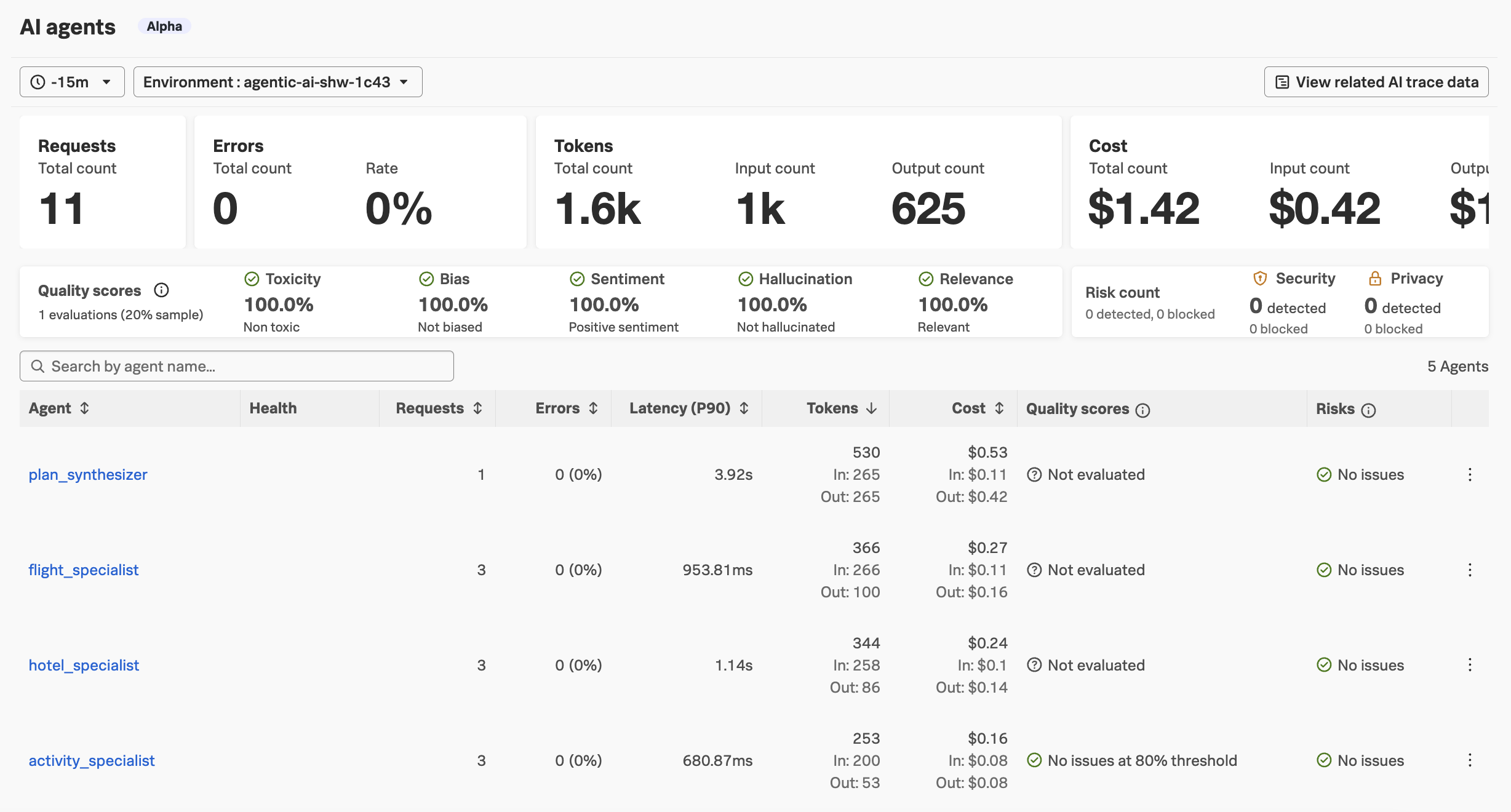
Navigate to APM and then select AI agents. Ensure your environment name
is selected (e.g. agentic-ai-$INSTANCE). You’ll notice that the page
populated now!
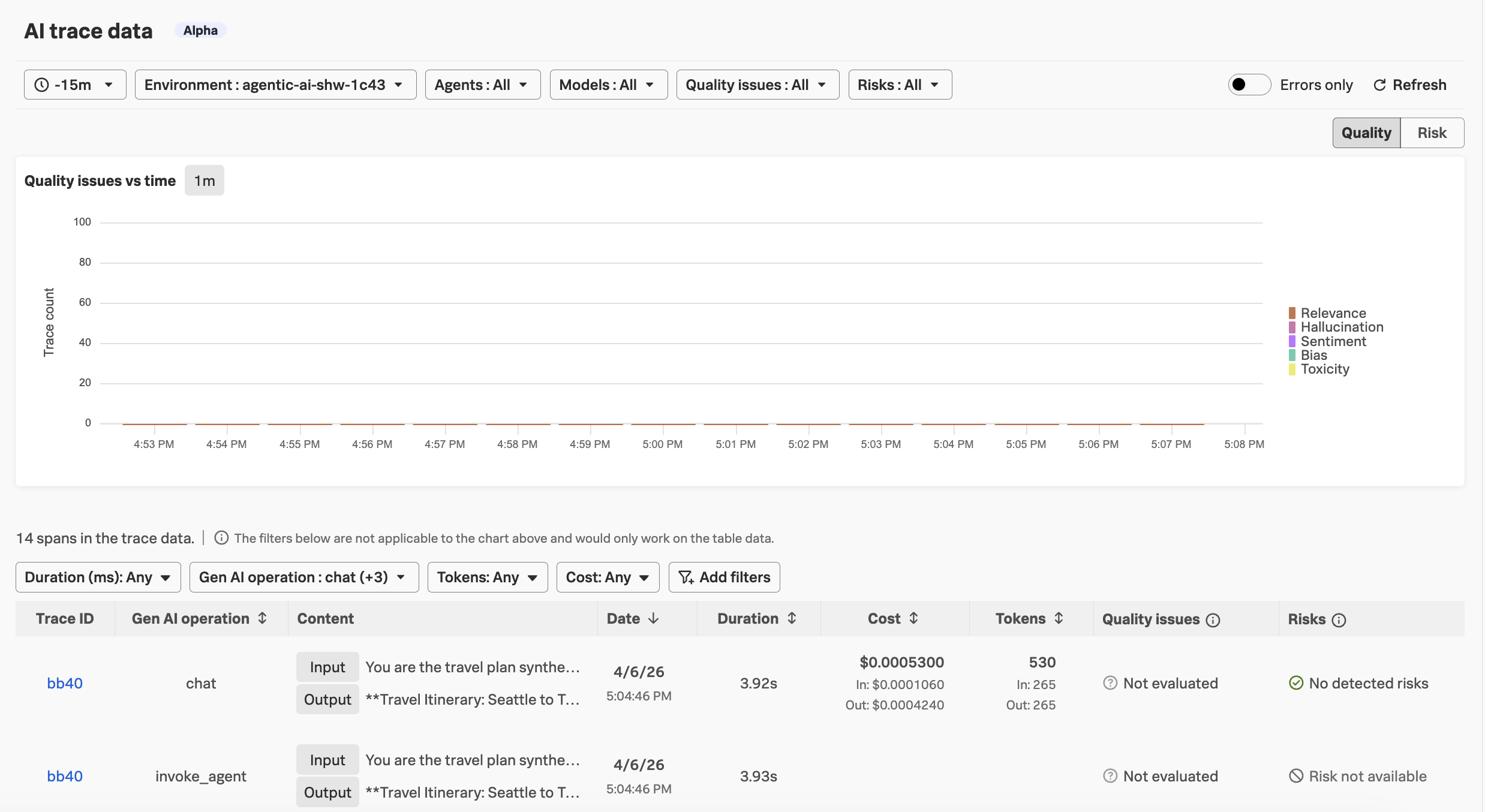
Navigate to APM -> AI trace data. This is a new page that lets us search
for traces that include AI-related content:
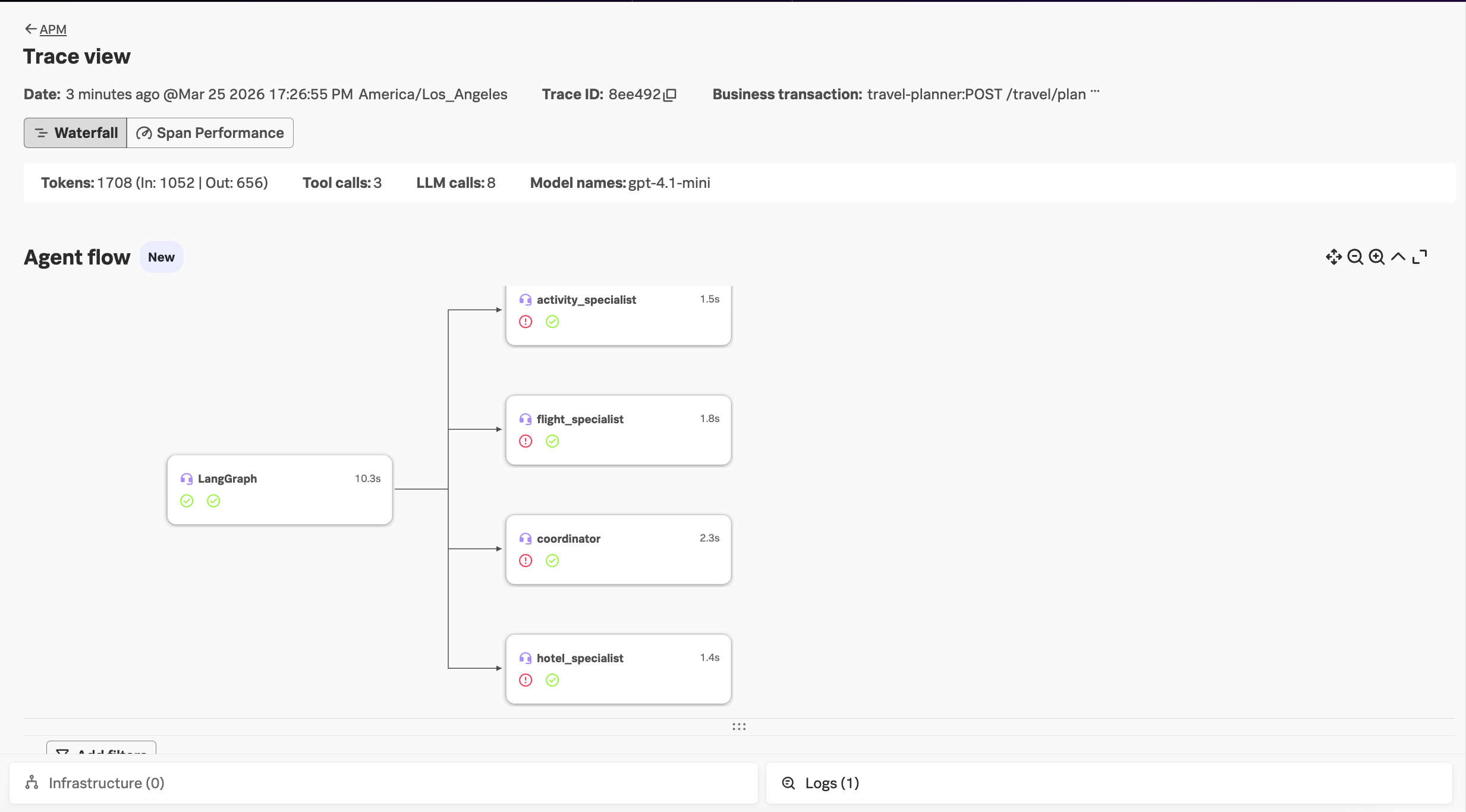
Ensure your environment name is selected (e.g. agentic-ai-$INSTANCE). Select one of the newer traces. We see all of our agents represented in the Agent flow now!