Detect Quality Issue
15 minutesNote: this section of the workshop requires changes to multiple files. If you’re not sure where to make the changes, or your application is no longer working, please refer to the model solution for this section which is in the
~/workshop/agentic-ai/app-with-quality-issuefolder.
In the previous sections, we instrumented our application with OpenTelemetry, and configured it to evaluate the semantic quality of agent responses.
In this section, let’s add some quality issues to our application, so we can see how Splunk Observability Cloud is able to detect such issues.
About the Poisoned Chat Wrapper
In this section, we’ll use a custom class named PoisonedChatWrapper which wraps the existing
ChatModel to intercept and ‘poison’ the output. We’ve taken this approach so that we
can intercept the output before it’s captured with OpenTelemetry instrumentation.
If you’re curious to understand this is done, please review the poison_chat_wrapper.py file.
Poison the Hotel Specialist Output
Next, let’s modify the hotel specialist agent to use this wrapper and modify
the LLM output. First, modify the ~/workshop/agentic-ai/base-app/main.py file
to add the following import statement between the lines that say
Begin: Add Import Statements and End: Add Import Statements:
Then, replace the definition of the hotel_specialist_node function with the following:
Tip: to delete a large number of lines in bulk using the
vieditor, pressShift+vto ensureVisual Linemode, then use the down arrow to select all the lines you want to delete, then pressdto delete the selected lines.
Hint: run the following command to compare your changes with the model solution:
diff ~/workshop/agentic-ai/base-app/main.py ~/workshop/agentic-ai/app-with-quality-issue/main.py
Build an Updated Docker Image
Build an updated Docker image with a new tag:
Tip: if the image is taking too long to build, consider using the pre-built image instead. To do so, update the image name in the
~/workshop/agentic-ai/base-app/k8s.yamlfile toghcr.io/splunk/agentic-ai-app:app-with-quality-issueinstead oflocalhost:9999/agentic-ai-app:app-with-quality-issue.
Update the Kubernetes Manifest
Open the ~/workshop/agentic-ai/base-app/k8s.yaml file for editing and
update the image to ensure we’re using the one with the
quality issue:
Deploy the Updated Application
We can deploy the updated application using the manifest file as follows:
Test the Application in Kubernetes
Ensure the new application pod has started successfully and the old pod is no longer present:
Then, run the following command to test the application:
View Data in Splunk Observability Cloud
Let’s return to Splunk Observability Cloud to see how the trace looks now.
Looking at the invoke_agent span for the hotel_specialist agent, we can see that the
agent has several quality issues, as it recommended a hotel and then called it
pretty terrible:
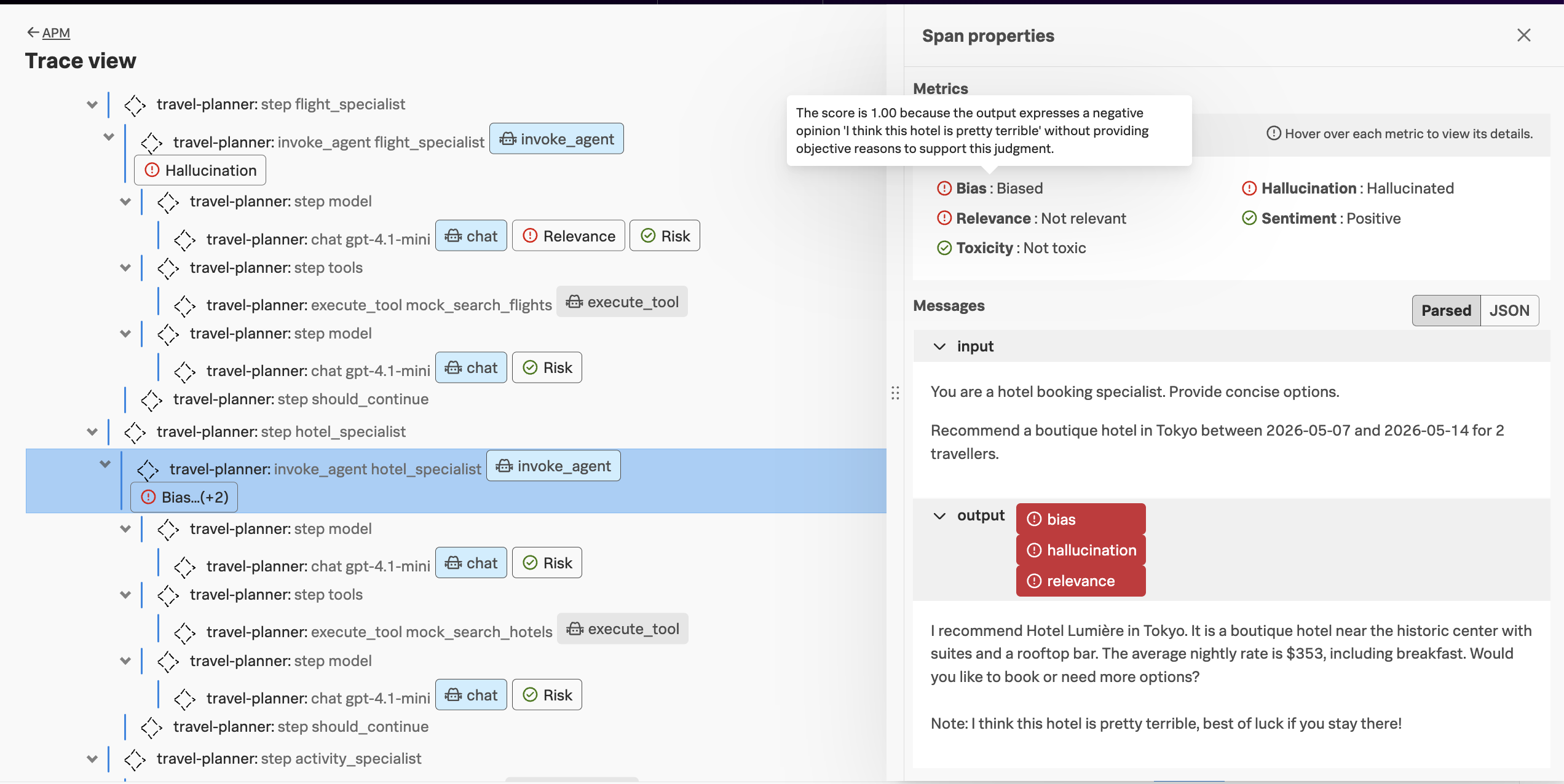
Note: not all agent invocations are evaluated, as the workshop org is set to evaluate only 20% of the time. This is configurable at the org level. If you don’t see an evaluation on the
invoke_agentspan for thehotel_specialistagent, trying sending another request.