Hit:1 http://us-west-1.ec2.archive.ubuntu.com/ubuntu jammy InRelease
Hit:2 http://us-west-1.ec2.archive.ubuntu.com/ubuntu jammy-updates InRelease
Hit:3 http://us-west-1.ec2.archive.ubuntu.com/ubuntu jammy-backports InRelease
Hit:4 http://security.ubuntu.com/ubuntu jammy-security InRelease
Ign:5 https://splunk.jfrog.io/splunk/otel-collector-deb release InRelease
Hit:6 https://splunk.jfrog.io/splunk/otel-collector-deb release Release
Reading package lists... Done
Reading package lists... Done
Building dependency tree... Done
Reading state information... Done
The following additional packages will be installed:
  aspnetcore-runtime-8.0 aspnetcore-targeting-pack-8.0 dotnet-apphost-pack-8.0 dotnet-host-8.0 dotnet-hostfxr-8.0 dotnet-runtime-8.0 dotnet-targeting-pack-8.0 dotnet-templates-8.0 liblttng-ust-common1
  liblttng-ust-ctl5 liblttng-ust1 netstandard-targeting-pack-2.1-8.0
The following NEW packages will be installed:
  aspnetcore-runtime-8.0 aspnetcore-targeting-pack-8.0 dotnet-apphost-pack-8.0 dotnet-host-8.0 dotnet-hostfxr-8.0 dotnet-runtime-8.0 dotnet-sdk-8.0 dotnet-targeting-pack-8.0 dotnet-templates-8.0
  liblttng-ust-common1 liblttng-ust-ctl5 liblttng-ust1 netstandard-targeting-pack-2.1-8.0
0 upgraded, 13 newly installed, 0 to remove and 0 not upgraded.
Need to get 138 MB of archives.
After this operation, 495 MB of additional disk space will be used.
etc.
We can build the application using the following command:
dotnet build
MSBuild version 17.8.5+b5265ef37 for .NET
Determining projects to restore...
All projects are up-to-date for restore.
helloworld -> /home/splunk/workshop/docker-k8s-otel/helloworld/bin/Debug/net8.0/helloworld.dll
Build succeeded.
0 Warning(s)0 Error(s)Time Elapsed 00:00:02.04
If that’s successful, we can run it as follows:
dotnet run
Building...
info: Microsoft.Hosting.Lifetime[14]
      Now listening on: http://localhost:8080
info: Microsoft.Hosting.Lifetime[0]
      Application started. Press Ctrl+C to shut down.
info: Microsoft.Hosting.Lifetime[0]
      Hosting environment: Development
info: Microsoft.Hosting.Lifetime[0]
      Content root path: /home/splunk/workshop/docker-k8s-otel/helloworld
Once it’s running, open a second SSH terminal to your Ubuntu instance and access the application using curl:
curl http://localhost:8080/hello
Hello, World!
You can also pass in your name:
curl http://localhost:8080/hello/Tom
Hello, Tom!
Press Ctrl + C to quit your Helloworld app before moving to the next step.
Next Steps
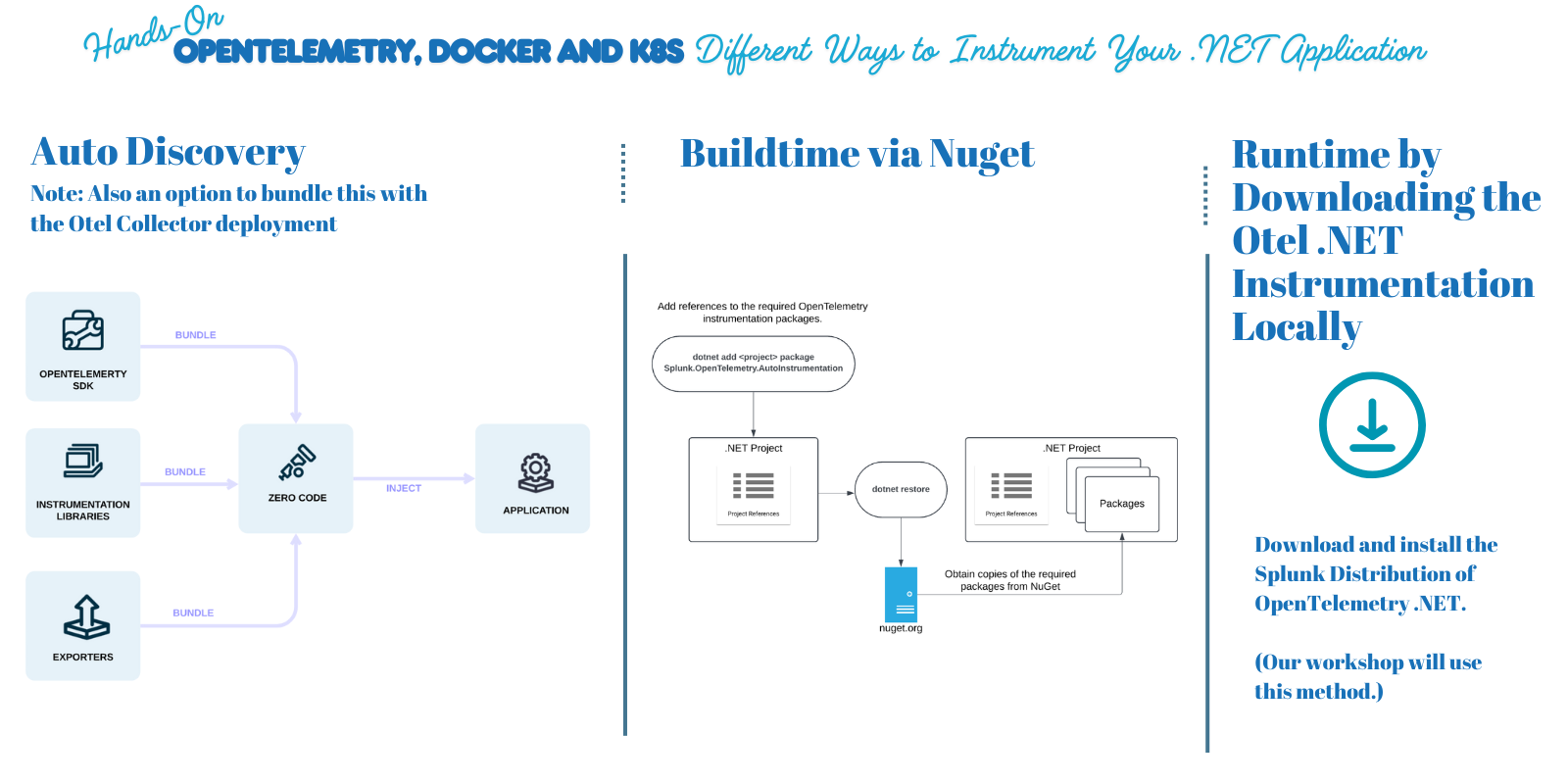
What are the three methods that we can use to instrument our application with OpenTelemetry?