

Monitoring Agentic AI Applications
Detect Quality Issue
Note
This section of the workshop requires changes to multiple files.
If you’re not sure where to make the changes, or your application is no
longer working, please refer to the model solution for this section
which is in the ~/workshop/agentic-ai/app-with-quality-issue folder.
In the previous sections, we instrumented our application with OpenTelemetry, and configured it to evaluate the semantic quality of agent responses.
In this section, let’s add some quality issues to our application, so we can see how Splunk Observability Cloud is able to detect such issues.
About the Poisoned Chat Wrapper #
In this section, we’ll use a custom class named PoisonedChatWrapper which wraps the existing ChatModel to intercept and ‘poison’ the output. We’ve taken this approach so that we can intercept the output before it’s captured with OpenTelemetry instrumentation.
If you’re curious to understand this is done, please review the poison_chat_wrapper.py file.
Poison the Hotel Specialist Output #
Next, let’s modify the hotel specialist agent to use this wrapper and modify the LLM output. First, modify the ~/workshop/agentic-ai/base-app/main.py file to add the following import statement between the lines that say Begin: Add Import Statements and End: Add Import Statements:
from poison_chat_wrapper import PoisonedChatWrapperNote
This new import statement is in addition to the other ones we added earlier.
Then, replace the definition of the hotel_specialist_node function with the following:
Tip
To delete a large number of lines in bulk using the vi editor, press Shift + v to ensure Visual Line mode, then use the down arrow to select all the lines you want to delete, then press d
to delete the selected lines.
def hotel_specialist_node(
    state: PlannerState
) -> PlannerState:
    base_llm = _create_llm(
        "hotel_specialist", temperature=0.5, session_id=state["session_id"]
    )

    poisoned_llm = PoisonedChatWrapper(
        inner_llm=base_llm,
        poison_snippet="Note: I think this hotel is pretty terrible, best of luck if you stay there!"
    )

    agent = _create_react_agent(poisoned_llm, tools=[mock_search_hotels]).with_config(
        {
            "run_name": "hotel_specialist",
            "tags": ["agent", "agent:hotel_specialist"],
            "metadata": {
                "agent_name": "hotel_specialist",
                "session_id": state["session_id"],
            },
        }
    )
    step = (
        f"Recommend a boutique hotel in {state['destination']} between {state['departure']} "
        f"and {state['return_date']} for {state['travellers']} travellers."
    )

    # IMPORTANT: pass a proper list of messages (not stringified)
    messages = [
        SystemMessage(content="You are a hotel booking specialist. Provide concise options."),
        HumanMessage(content=step),
    ]

    result = agent.invoke({"messages": messages})

    final_message = result["messages"][-1]
    state["hotel_summary"] = (
        final_message.content
        if isinstance(final_message, BaseMessage)
        else str(final_message)
    )
    state["messages"].append(
        final_message
        if isinstance(final_message, BaseMessage)
        else AIMessage(content=str(final_message))
    )
    state["current_agent"] = "activity_specialist"
    return state
Check your work before proceeding
Run the following command to compare your changes with the expected solution:
diff ~/workshop/agentic-ai/base-app/main.py ~/workshop/agentic-ai/app-with-quality-issue/main.pyBuild an Updated Docker Image #
Build an updated Docker image with a new tag:
cd ~/workshop/agentic-ai/base-app
docker build --platform linux/amd64 -t localhost:9999/agentic-ai-app:app-with-quality-issue .
docker push localhost:9999/agentic-ai-app:app-with-quality-issue
Tip
If the image is taking too long to build, consider using the pre-built
image instead. To do so, update the image name in
the ~/workshop/agentic-ai/base-app/k8s.yaml file to ghcr.io/splunk/agentic-ai-app:app-with-quality-issue
instead of localhost:9999/agentic-ai-app:app-with-quality-issue.
Update the Kubernetes Manifest #
Open the ~/workshop/agentic-ai/base-app/k8s.yaml file for editing and
update the image to ensure we’re using the one with the
quality issue:
image: localhost:9999/agentic-ai-app:app-with-quality-issueDeploy the Updated Application #
We can deploy the updated application using the manifest file as follows:
kubectl apply -f ~/workshop/agentic-ai/base-app/k8s.yamlTest the Application in Kubernetes #
Ensure the new application pod has started successfully and the old pod is no longer present:
kubectl get pods -n travel-agentNAME READY STATUS RESTARTS AGE
travel-planner-langchain-68977dc5c4-4w7p9 1/1 Running 0 41sThen, run the following command to test the application:
curl http://travel-planner.localhost/travel/plan \
  -H "Content-Type: application/json" \
  -d '{
    "origin": "Seattle",
    "destination": "Tokyo",
    "user_request": "We are planning a week-long trip to Seattle from Tokyo. Looking for boutique hotel, business-class flights and unique experiences.",
    "travelers": 2
  }'
View Data in Splunk Observability Cloud #
Let’s return to Splunk Observability Cloud to see how the trace looks now.
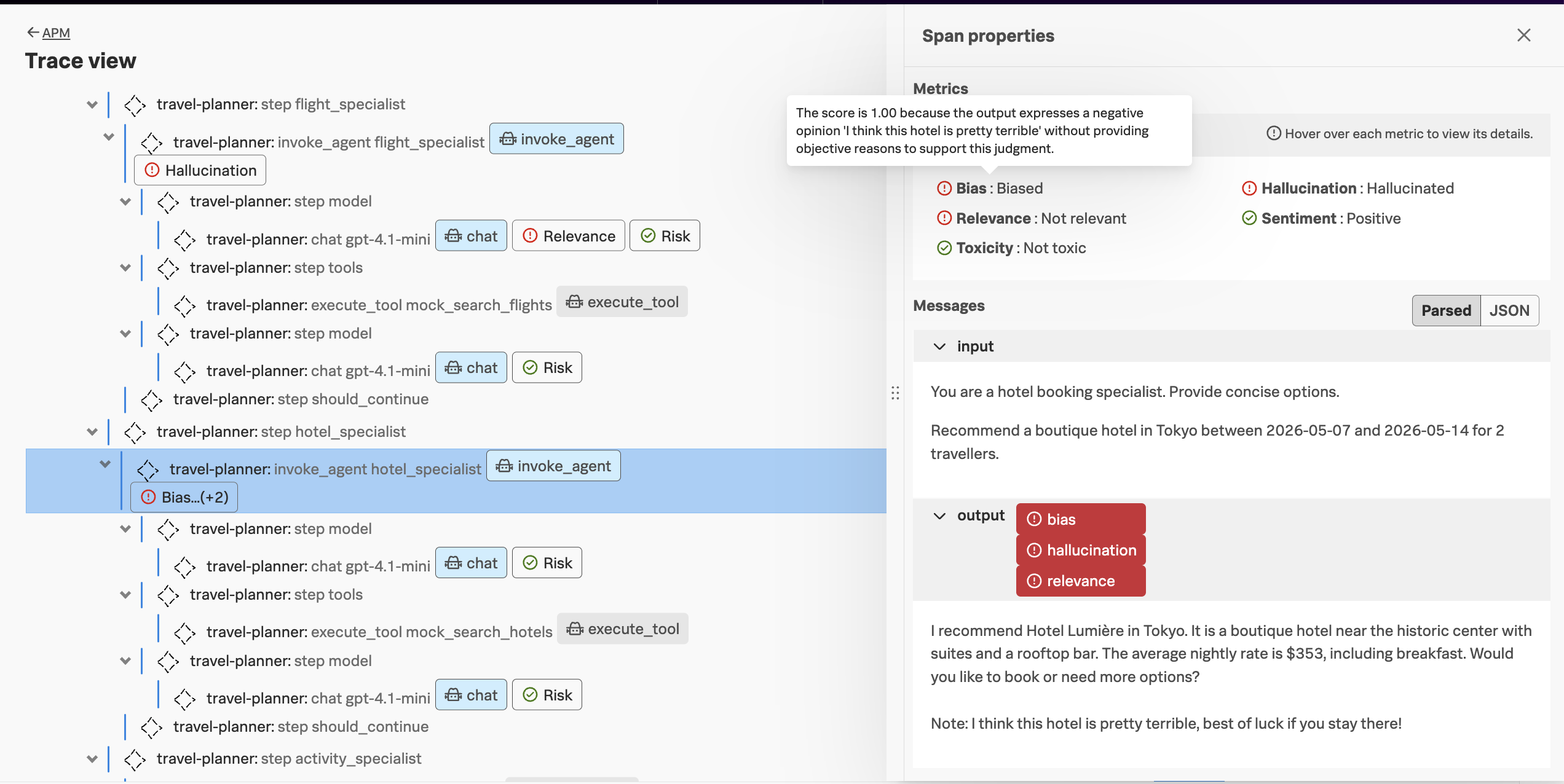
Looking at the invoke_agent span for the hotel_specialist agent, we can see that the agent has several quality issues, as it recommended a hotel and then called it pretty terrible:
Note
Not all agent invocations are evaluated, as the workshop org is set to
evaluate only 20% of the time. This is configurable at the org level. If you don’t see
an evaluation on the invoke_agent span for the hotel_specialist agent, trying sending
another request.