

Introduction
The Healthcare Assistant Application
The application you’ll observe is Careful Health Provider’s healthcare assistant. It runs an end-to-end chat experience with retrieval-augmented generation (RAG) and text-to-SQL tools, but the base version ships with no observability instrumentation. That’s what you’ll add.
Tech stack #
| Layer | Technology |
|---|---|
| UI | Streamlit (app.py) |
| Agent runtime | LangGraph (agent.py) |
| LLM | OpenAI via LangChain (ChatOpenAI) |
| Vector store | PostgreSQL + pgvector via LangChain PGVector |
| Relational data | PostgreSQL tables loaded from CSV |
| Config | config.yaml, system_prompt.json, .streamlit/secrets.toml |
Architecture #
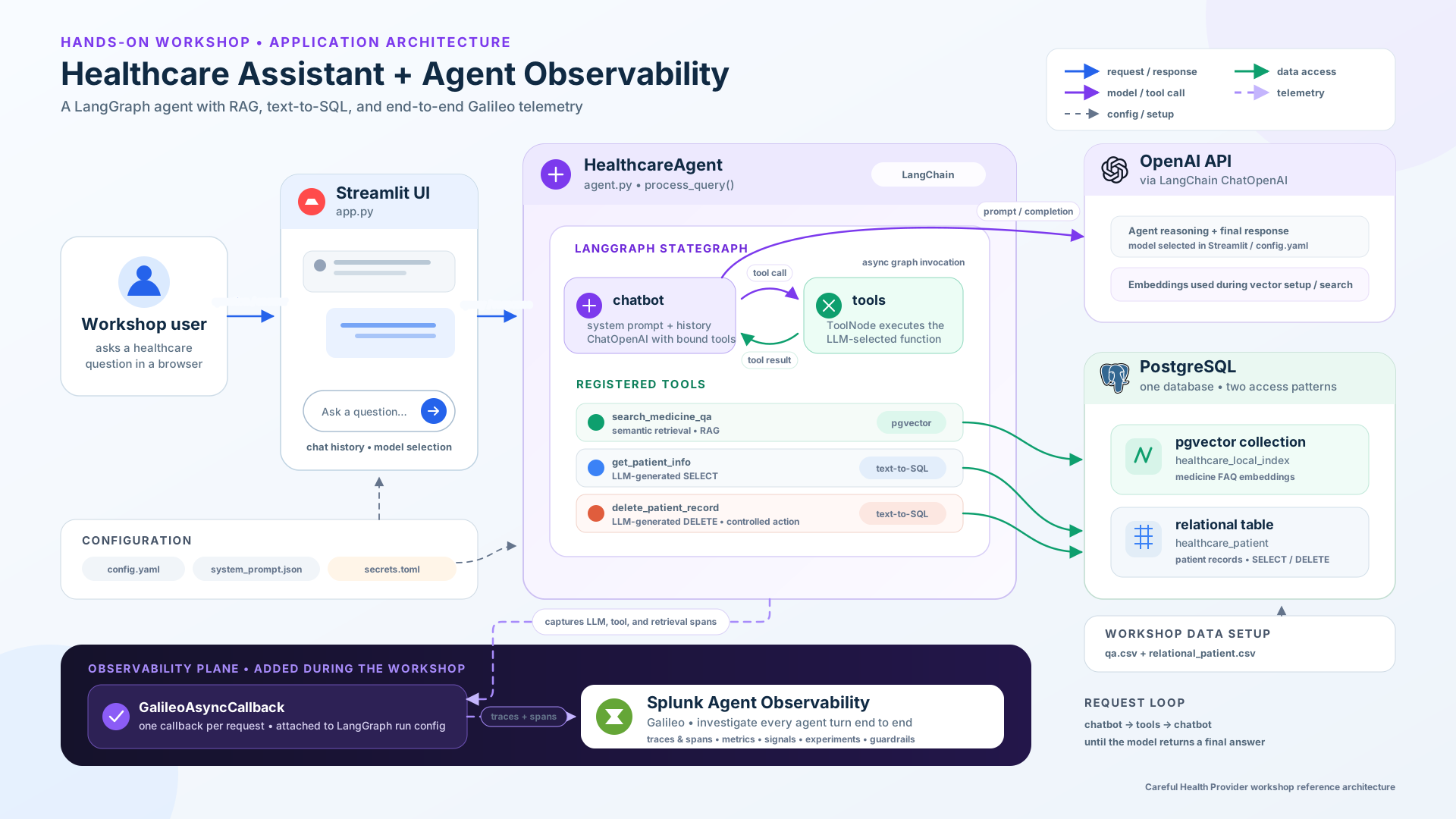
The Streamlit UI collects a user message and passes the conversation to the
HealthcareAgent. The agent runs a LangGraph state graph with two nodes: a chatbot
node that calls the LLM, and a tools node that runs whichever tool the LLM requested,
looping until the LLM produces a final answer.
Request flow #
- Streamlit collects user input and keeps chat history in session state.
HealthcareAgent.process_query()converts messages to LangChain format and invokes the LangGraph graph.- The chatbot node calls the LLM with the system prompt and the bound tools.
- If the LLM requests a tool, the tools node runs the matching function, then returns control to the chatbot node.
- The loop continues until the LLM produces a final answer for the user.
Tools #
The agent has three tools, which map directly to the spans you’ll see in a trace:
| Tool | Purpose | Backend |
|---|---|---|
search_medicine_qa | Answer medicine questions (dosage, side effects, interactions) | RAG over pgvector |
get_patient_info | Look up a patient by ID | Text-to-SQL → healthcare_patient |
delete_patient_record | Delete a patient by ID | Text-to-SQL → healthcare_patient |
Two example queries exercise the main paths and are worth remembering, and you’ll use them throughout the workshop:
- “What is the dosage and common side effects of Lisinopril?” exercises the RAG tool
(
search_medicine_qa). This is the path behind the dangerous “double the dose” answer: if retrieval or grounding fails, the agent can confidently state the wrong dosage. - “Can you look up information for patient P001?” exercises the text-to-SQL tool
(
get_patient_info).
Two risks to keep in mind
- Hallucinated medical guidance: the medicine Q&A path is where a wrong dosage or interaction could slip through. You’ll catch this with metrics and signals, and stop it with guardrails.
- Sensitive, irreversible actions:
delete_patient_recordcan permanently remove a patient. It’s a textbook case for runtime guardrails. You’ll return to both later.
The staged folders #
The application ships in four progressive folders on your instance. Each maps to a stage of the workshop, and each folder also serves as the completed reference for its stage:
~/workshop/healthcare-assistant/
├── 1-base-app/                  # Deploy (Chapter 3): uninstrumented starting point
├── 2-app-with-instrumentation/  # Instrument, trace, metrics, signals (Chapters 4–7)
├── 3-app-with-experiments/      # Experiments (not used in this workshop)
└── 4-app-with-controls/         # Guardrails / agent controls (Chapter 8)
Using the staged folders