

API Test
Search Request
Add the search request #
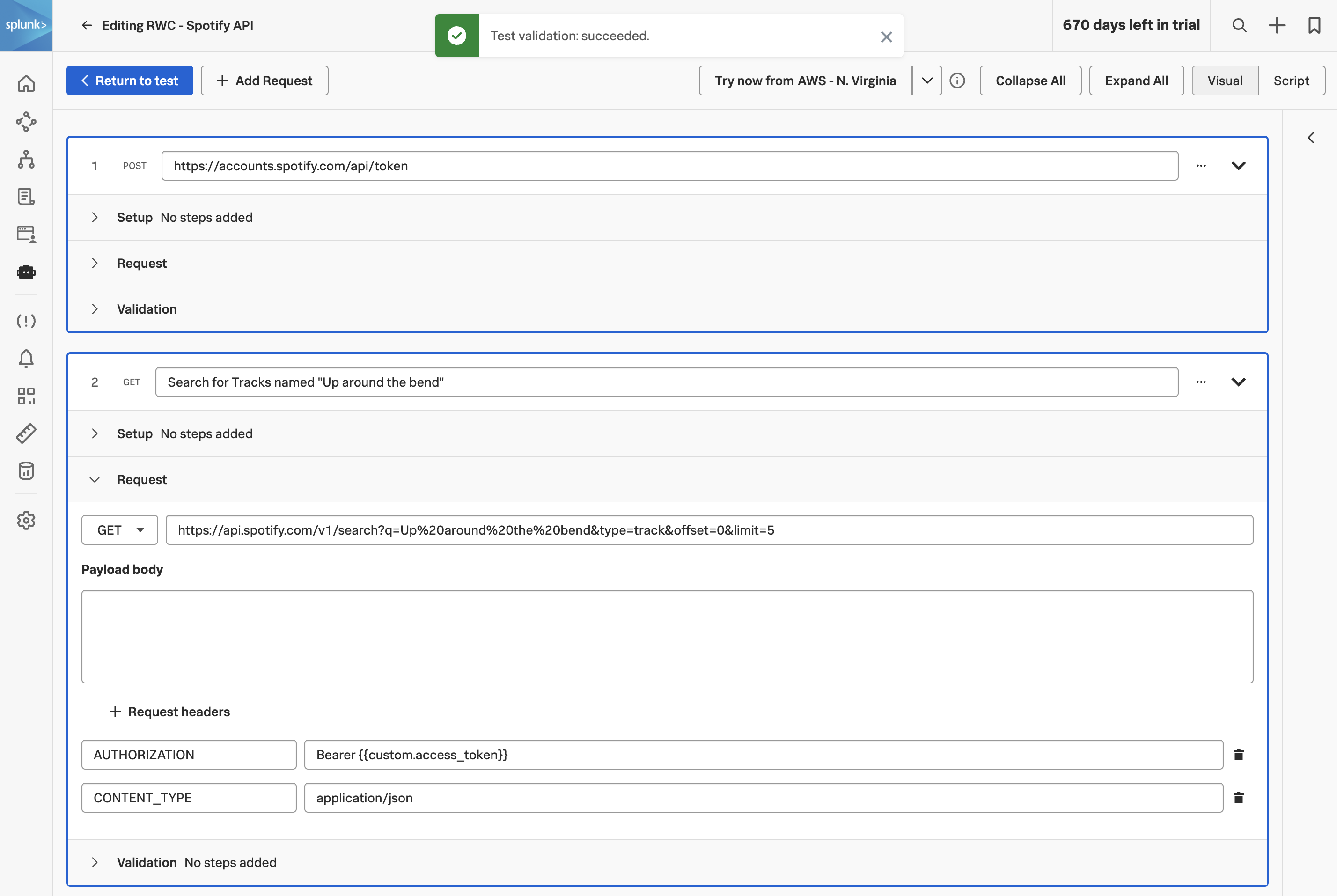
Now that we have a valid access token, we’ll use it. Click to add the next step. Name the step Search for tracks named “Up around the bend”.
This is the Spotify Search endpoint
. The query string parameters say: search for tracks (type=track) matching the phrase “Up around the bend”, starting from the first result (offset=0), and return at most 5 (limit=5). Spotify URL-encodes the query phrase, so spaces become %20.
Expand the Request section, change the request method to GET, and enter the URL:
https://api.spotify.com/v1/search?q=Up%20around%20the%20bend&type=track&offset=0&limit=5Next, add two request headers with the following key/value pairings:
- CONTENT-TYPE: application/json — declares the request body format. Strictly speaking, GET requests don’t carry a body and so this header is informational only here, but it’s polite to send and Spotify won’t object.
- AUTHORIZATION: Bearer {{custom.access_token}} — this is where the magic happens.
{{custom.access_token}}expands at run time to the token we extracted in the previous step, so the chain “auth → use token” is now wired up.
This is the core of the multi-step pattern: any value extracted in step N is available by name in step N+1, N+2, etc. You can extract as many values per step as you need, and you can chain arbitrarily deep — auth, then user lookup, then resource fetch, then asserted state change, then cleanup.
Extract a track ID #
The search response is a JSON document with a tracks.items array, each entry containing a track ID, name, artist, album, and so on. We’ll extract the ID of the first matching track.
Expand the Validation section and add the following extraction:
- Extract from Response body JSON $.tracks.items[0].id as track.id.
The JSONPath $.tracks.items[0].id walks the response: start at the root ($), go into the tracks object, then into the items array, take the first element ([0]), and read its id field. JSONPath’s array syntax also supports negative indices ([-1] for the last), slices ([0:5]), and filter expressions, which is useful when you want to assert a property of a specific item rather than just the first.
In this workshop we extract the ID but don’t use it again — in a production check you’d typically add a third step that calls GET /v1/tracks/{{custom.track.id}} and asserts that the response body contains the artist and album you expect. That would catch a regression where Spotify’s catalogue changes or where the search ranking degrades.
![Validation panel with JSONPath extraction for $.tracks.items[0].id configured](../../img/add-search-payload.png)
Click to return to the test configuration page, then click to save the API test.