

Fix Payment Gateway Propagation
In this step, you’ll edit application code in the payment gateway proxy so it forwards W3C Trace Context to payment-api then rebuild and redeploy the service.
Note
After fixing the edge NGINX gateway (step 06), traces may connect from the browser through frontend-api and into order-api. But when frontend-api submits payment via payment-gateway, the proxy forwards to payment-api without W3C trace headers.
This break is a common Node.js proxy bug: the service is instrumented and visible in APM, but the outbound fetch does not propagate trace context.
In Splunk APM you’ll see this behavior:
frontend-api→payment-gateway- connectedpayment-gateway→payment-api- disconnected
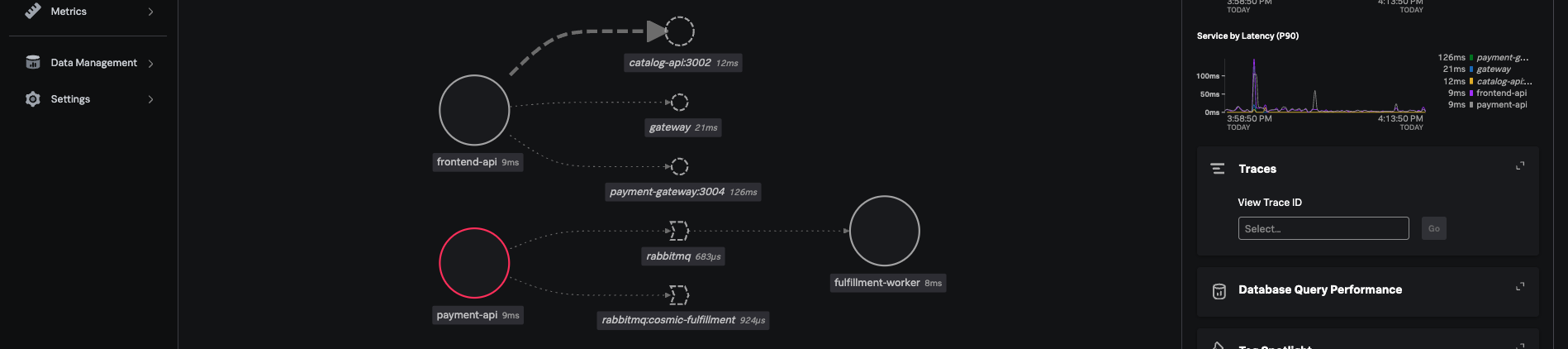
The payment gateway still creates its own spans (so it shows in the service map), but the upstream call starts a new trace on payment-api. This mirrors real teams who add a custom BFF/proxy and forget to propagate context on outbound HTTP calls - or when code uses suppressTracing() trying to avoid “double spans” which accidentally breaks propagation.
The Fix #
Open the server.js file and locate buildUpstreamHeaders().
cd ~/workshop/context-propagation
vi services/payment-gateway/server.js
Inject W3C trace context into upstream headers #
- Uncomment/add
propagation.inject()before the return: - Remove
suppressTracingon the upstream fetch
function buildUpstreamHeaders() {
  const headers = {
    'Content-Type': 'application/json',
  };
  return headers;
}

const upstreamContext = suppressTracing(context.active());function buildUpstreamHeaders() {
const headers = {
'Content-Type': 'application/json',
};
propagation.inject(context.active(), headers, {
set: (carrier, key, value) => {
carrier[key] = value;
},
});
return headers;
}
const upstreamContext = context.active();cp ./services/payment-gateway/server-fixed.js ./services/payment-gateway/server.jsCheck your work before proceeding
Run the following command from ./workshop/context-propagation folder to compare your changes with the expected solution:
diff ./services/payment-gateway/server.js ./services/payment-gateway/server-fixed.js