

Distributed Tracing for AWS Lambda Functions
Setup
Prerequisites #
Observability Workshop Instance #
The Observability Workshop uses the Splunk4Ninjas - Observability workshop template in Splunk Show,
which provides a pre-configured EC2 instance running Ubuntu.
Your workshop instructor will provide you with the credentials to your assigned workshop instance.
Your instance should have the following environment variables already set:
- ACCESS_TOKEN
- REALM
- These are the Splunk Observability Cloud Access Token and Realm for your workshop.
- They will be used by the OpenTelemetry Collector to forward your data to the correct Splunk Observability Cloud organization.
Note
Alternatively, you can deploy a local observability workshop instance using Multipass.
AWS Command Line Interface (awscli) #
The AWS Command Line Interface, or awscli, is an API used to interact with AWS resources. In this workshop, it is used by certain scripts to interact with the resource you’ll deploy.
Your Splunk-issued workshop instance should already have the awscli installed.
Check if the aws command is installed on your instance with the following command:
bashwhich aws- The expected output would be /usr/local/bin/aws
If the aws command is not installed on your instance, run the following command:
bashsudo apt install awscli
Terraform #
Terraform is an Infrastructure as Code (IaC) platform, used to deploy, manage and destroy resource by defining them in configuration files. Terraform employs HCL to define those resources, and supports multiple providers for various platforms and technologies.
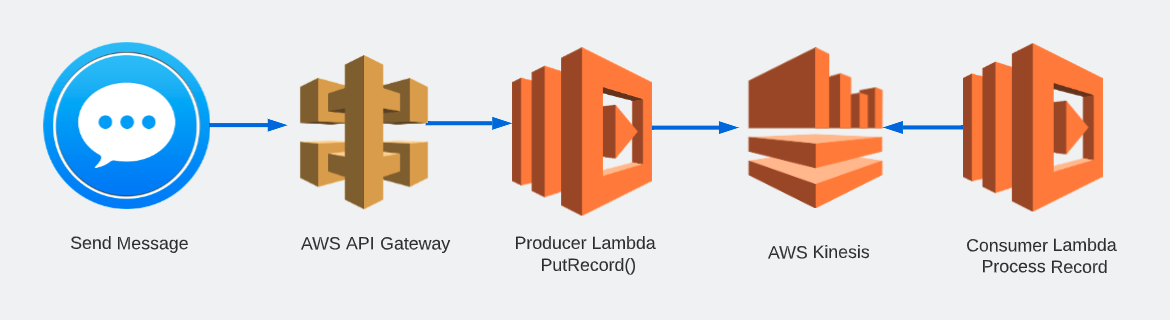
We will be using Terraform at the command line in this workshop to deploy the following resources:
- AWS API Gateway
- Lambda Functions
- Kinesis Stream
- CloudWatch Log Groups
- S3 Bucket
- and other supporting resources
Your Splunk-issued workshop instance should already have terraform installed.
Check if the terraform command is installed on your instance:
bashwhich terraform- The expected output would be /usr/local/bin/terraform
If the terraform command is not installed on your instance, follow Terraform’s recommended installation commands listed below:
bashwget -O- https://apt.releases.hashicorp.com/gpg | sudo gpg --dearmor -o /usr/share/keyrings/hashicorp-archive-keyring.gpg echo "deb [signed-by=/usr/share/keyrings/hashicorp-archive-keyring.gpg] https://apt.releases.hashicorp.com $(lsb_release -cs) main" | sudo tee /etc/apt/sources.list.d/hashicorp.list sudo apt update && sudo apt install terraform
Workshop Directory (lambda) #
The Workshop Directory lambda is a repository that contains all the configuration files and scripts to complete both the auto-instrumentation and manual instrumentation of the example Lambda-based application we will be using today.
- Confirm you have the workshop directory in your home directory:bash
cd ~/workshop && ls- The expected output would include lambda
AWS & Terraform Variables #
AWS #
Note to the workshop instructor: create a new user in the target AWS account called
lambda-workshop-user. Ensure it has full permissions to perform the required actions via Terraform. Create an access token for thelambda-workshop-useruser and share the Access Key ID and Secret Access Key with the workshop participants. Delete the user when the workshop is complete.
The AWS CLI requires that you have credentials to be able to access and manage resources deployed by their services. Both Terraform and the Python scripts in this workshop require these variables to perform their tasks.
Configure the awscli with the access key ID, secret access key and region for this workshop:
bashaws configure- This command should provide a prompt similar to the one below:bash
AWS Access Key ID [None]: XXXXXXXXXXXXXXXX
AWS Secret Access Key [None]: XXXXXXXXXXXXXXXXXXXXXXXXXXXXXXXXXXX
Default region name [None]: us-east-1
Default outoput format [None]:
- This command should provide a prompt similar to the one below:
If the awscli is not configured on your instance, run the following command and provide the values your instructor would provide you with.
bashaws configure
Create an IAM Role (Workshop Instructor Only) #
Note to the workshop instructor: This step only needs to be completed once, as the IAM role created in this step will be shared by all workshop participants:
cd ~/workshop/lambda/iam_role
terraform init
terraform plan
terraform apply
Note to the workshop instructor: After the workshop is complete, cleanup the role as follows:
cd ~/workshop/lambda/iam_role
terraform destroy
Terraform #
Terraform supports the passing of variables to ensure sensitive or dynamic data is not hard-coded in your .tf configuration files, as well as to make those values reusable throughout your resource definitions.
In our workshop, Terraform requires variables necessary for deploying the Lambda functions with the right values for the OpenTelemetry Lambda layer; For the ingest values for Splunk Observability Cloud; And to make your environment and resources unique and immediatley recognizable.
Terraform variables are defined in the following manner:
- Define the variables in your main.tf file or a variables.tf
- Set the values for those variables in either of the following ways:
- setting environment variables at the host level, with the same variable names as in their definition, and with TF_VAR_ as a prefix
- setting the values for your variables in a terraform.tfvars file
- passing the values as arguments when running terraform apply
We will be using a combination of variables.tf and terraform.tfvars files to set our variables in this workshop.
- Using either vi or nano, open the terraform.tfvars file in either the auto or manual directorybash
vi ~/workshop/lambda/auto/terraform.tfvars - Set the variables with their values. Replace the CHANGEME placeholders with those provided by your instructor.bash
o11y_access_token = "CHANGEME" o11y_realm = "CHANGEME" otel_lambda_layer = ["CHANGEME"] prefix = "CHANGEME"- Ensure you change only the placeholders, leaving the quotes and brackets intact, where applicable.
- _For the otel_lambda_layer, use the value for us-east-1 found here
- The prefix is a unique identifier you can choose for yourself, to make your resources distinct from other participants’ resources. We suggest using a short form of your name, for example.
- Also, please only lowercase letters for the prefix. Certain resources in AWS, such as S3, would through an error if you use uppercase letters.
- Save your file and exit the editor.
- Finally, copy the terraform.tfvars file you just edited to the other directory.bash
cp ~/workshop/lambda/auto/terraform.tfvars ~/workshop/lambda/manual- We do this as we will be using the same values for both the autoinstrumentation and manual instrumentation protions of the workshop
File Permissions #
While all other files are fine as they are, the send_message.py script in both the auto and manual will have to be executed as part of our workshop. As a result, it needs to have the appropriate permissions to run as expected. Follow these instructions to set them.
First, ensure you are in the
lambdadirectory:bashcd ~/workshop/lambdaNext, run the following command to set executable permissions on the
send_message.pyscript:bashsudo chmod 755 auto/send_message.py manual/send_message.py
Now that we’ve squared off the prerequisites, we can get started with the workshop!