

Hands-On OpenTelemetry, Docker, and K8s
Deploy a .NET Application
Prerequisites #
Before deploying the application, we’ll need to install the .NET 8 SDK on our instance.
sudo apt-get update && \
sudo apt-get install -y dotnet-sdk-8.0Hit:1 http://us-west-1.ec2.archive.ubuntu.com/ubuntu jammy InRelease
Hit:2 http://us-west-1.ec2.archive.ubuntu.com/ubuntu jammy-updates InRelease
Hit:3 http://us-west-1.ec2.archive.ubuntu.com/ubuntu jammy-backports InRelease
Hit:4 http://security.ubuntu.com/ubuntu jammy-security InRelease
Ign:5 https://splunk.jfrog.io/splunk/otel-collector-deb release InRelease
Hit:6 https://splunk.jfrog.io/splunk/otel-collector-deb release Release
Reading package lists... Done
Reading package lists... Done
Building dependency tree... Done
Reading state information... Done
The following additional packages will be installed:
aspnetcore-runtime-8.0 aspnetcore-targeting-pack-8.0 dotnet-apphost-pack-8.0 dotnet-host-8.0 dotnet-hostfxr-8.0 dotnet-runtime-8.0 dotnet-targeting-pack-8.0 dotnet-templates-8.0 liblttng-ust-common1
liblttng-ust-ctl5 liblttng-ust1 netstandard-targeting-pack-2.1-8.0
The following NEW packages will be installed:
aspnetcore-runtime-8.0 aspnetcore-targeting-pack-8.0 dotnet-apphost-pack-8.0 dotnet-host-8.0 dotnet-hostfxr-8.0 dotnet-runtime-8.0 dotnet-sdk-8.0 dotnet-targeting-pack-8.0 dotnet-templates-8.0
liblttng-ust-common1 liblttng-ust-ctl5 liblttng-ust1 netstandard-targeting-pack-2.1-8.0
0 upgraded, 13 newly installed, 0 to remove and 0 not upgraded.
Need to get 138 MB of archives.
After this operation, 495 MB of additional disk space will be used.
etc. Refer to Install .NET SDK or .NET Runtime on Ubuntu for further details.
Review the .NET Application #
In the terminal, navigate to the application directory:
cd ~/workshop/docker-k8s-otel/helloworldWe’ll use a simple “Hello World” .NET application for this workshop. The main logic is found in the HelloWorldController.cs file:
public class HelloWorldController : ControllerBase
{
    private ILogger<HelloWorldController> logger;

    public HelloWorldController(ILogger<HelloWorldController> logger)
    {
        this.logger = logger;
    }

    [HttpGet("/hello/{name?}")]
    public string Hello(string name)
    {
        if (string.IsNullOrEmpty(name))
        {
           logger.LogInformation("/hello endpoint invoked anonymously");
           return "Hello, World!";
        }
        else
        {
            logger.LogInformation("/hello endpoint invoked by {name}", name);
            return String.Format("Hello, {0}!", name);
        }
    }
}
Build and Run the .NET Application #
We can build the application using the following command:
dotnet buildMSBuild version 17.8.5+b5265ef37 for .NET
Determining projects to restore...
All projects are up-to-date for restore.
helloworld -> /home/splunk/workshop/docker-k8s-otel/helloworld/bin/Debug/net8.0/helloworld.dll
Build succeeded.
0 Warning(s)
0 Error(s)
Time Elapsed 00:00:02.04If that’s successful, we can run it as follows:
dotnet runBuilding...
info: Microsoft.Hosting.Lifetime[14]
Now listening on: http://localhost:8080
info: Microsoft.Hosting.Lifetime[0]
Application started. Press Ctrl+C to shut down.
info: Microsoft.Hosting.Lifetime[0]
Hosting environment: Development
info: Microsoft.Hosting.Lifetime[0]
Content root path: /home/splunk/workshop/docker-k8s-otel/helloworldOnce it’s running, open a second SSH terminal to your Ubuntu instance and access the application using curl:
curl http://localhost:8080/helloHello, World! You can also pass in your name:
curl http://localhost:8080/hello/TomHello, Tom! Press Ctrl + C to quit your Helloworld app before moving to the next step.
Next Steps #
What are the three methods that we can use to instrument our application with OpenTelemetry?
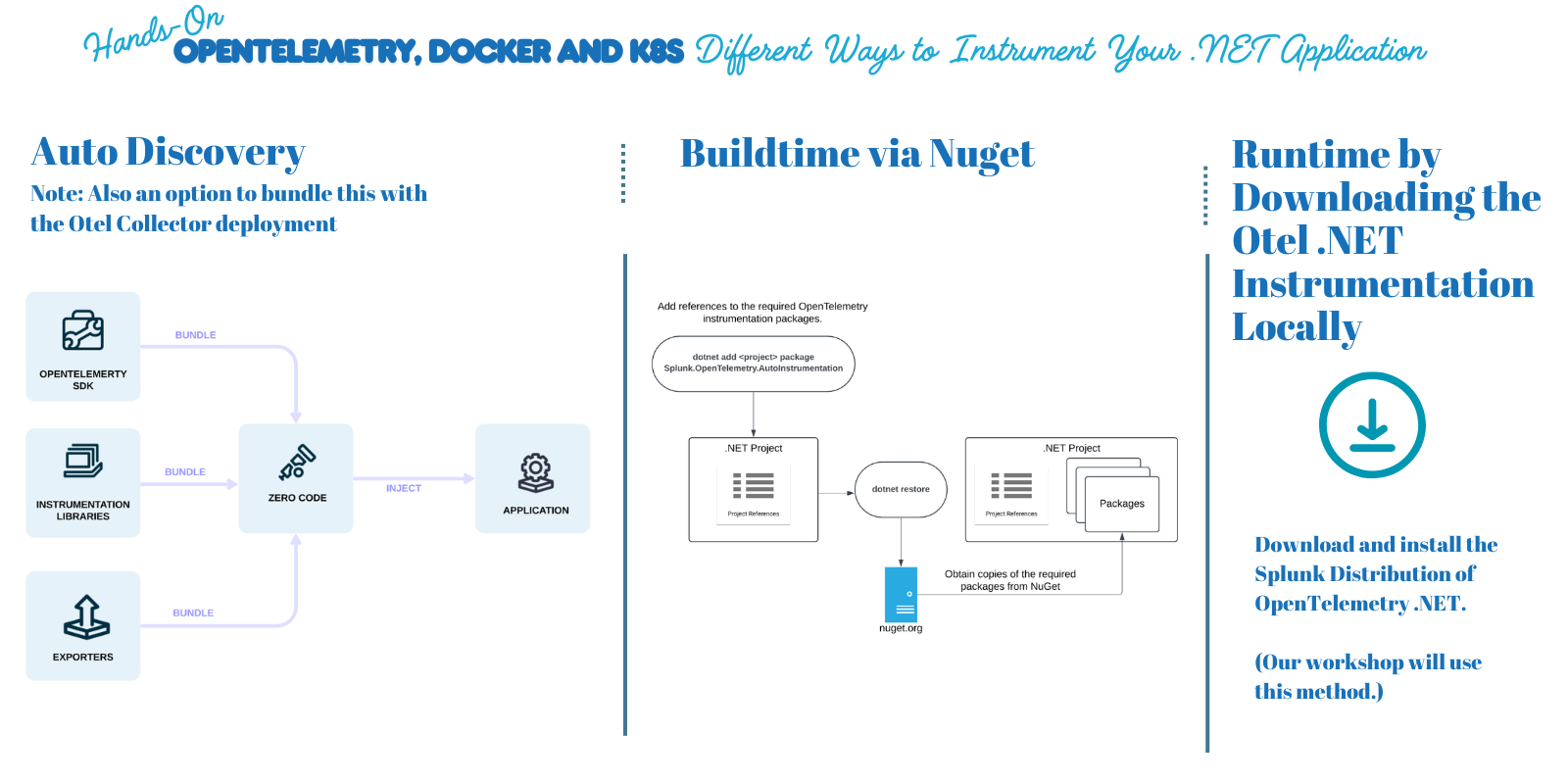
See: Instrument your .NET application for Splunk Observability Cloud for a discussion of the options.