Let’s add some tags to our traces, so we can find out why some customers receive a poor experience from our application.
Identify Useful Tags
We’ll start by reviewing the code for the creditCheck function of creditcheckservice (which can be found in the file /home/splunk/workshop/tagging/creditcheckservice-java/src/main/java/com/example/creditcheckservice/CreditCheckController.java):
@GetMapping("/check")publicResponseEntity<String>creditCheck(@RequestParam("customernum")StringcustomerNum){// Get Credit ScoreintcreditScore;try{StringcreditScoreUrl="http://creditprocessorservice:8899/getScore?customernum="+customerNum;creditScore=Integer.parseInt(restTemplate.getForObject(creditScoreUrl,String.class));}catch(HttpClientErrorExceptione){returnResponseEntity.status(HttpStatus.INTERNAL_SERVER_ERROR).body("Error getting credit score");}StringcreditScoreCategory=getCreditCategoryFromScore(creditScore);// Run Credit CheckStringcreditCheckUrl="http://creditprocessorservice:8899/runCreditCheck?customernum="+customerNum+"&score="+creditScore;StringcheckResult;try{checkResult=restTemplate.getForObject(creditCheckUrl,String.class);}catch(HttpClientErrorExceptione){returnResponseEntity.status(HttpStatus.INTERNAL_SERVER_ERROR).body("Error running credit check");}returnResponseEntity.ok(checkResult);}
We can see that this function accepts a customer number as an input. This would be helpful to capture as part of a trace. What else would be helpful?
Well, the credit score returned for this customer by the creditprocessorservice may be interesting (we want to ensure we don’t capture any PII data though). It would also be helpful to capture the credit score category, and the credit check result.
Great, we’ve identified four tags to capture from this service that could help with our investigation. But how do we capture these?
Capture Tags
We start by adding OpenTelemetry imports to the top of the CreditCheckController.java file:
That was pretty easy, right? Let’s capture some more, with the final result looking like this:
@GetMapping("/check")@WithSpan(kind=SpanKind.SERVER)publicResponseEntity<String>creditCheck(@RequestParam("customernum")@SpanAttribute("customer.num")StringcustomerNum){// Get Credit ScoreintcreditScore;try{StringcreditScoreUrl="http://creditprocessorservice:8899/getScore?customernum="+customerNum;creditScore=Integer.parseInt(restTemplate.getForObject(creditScoreUrl,String.class));}catch(HttpClientErrorExceptione){returnResponseEntity.status(HttpStatus.INTERNAL_SERVER_ERROR).body("Error getting credit score");}SpancurrentSpan=Span.current();currentSpan.setAttribute("credit.score",creditScore);StringcreditScoreCategory=getCreditCategoryFromScore(creditScore);currentSpan.setAttribute("credit.score.category",creditScoreCategory);// Run Credit CheckStringcreditCheckUrl="http://creditprocessorservice:8899/runCreditCheck?customernum="+customerNum+"&score="+creditScore;StringcheckResult;try{checkResult=restTemplate.getForObject(creditCheckUrl,String.class);}catch(HttpClientErrorExceptione){returnResponseEntity.status(HttpStatus.INTERNAL_SERVER_ERROR).body("Error running credit check");}currentSpan.setAttribute("credit.check.result",checkResult);returnResponseEntity.ok(checkResult);}
Redeploy Service
Once these changes are made, let’s run the following script to rebuild the Docker image used for creditcheckservice and redeploy it to our Kubernetes cluster:
./5-redeploy-creditcheckservice.sh java
Confirm Tag is Captured Successfully
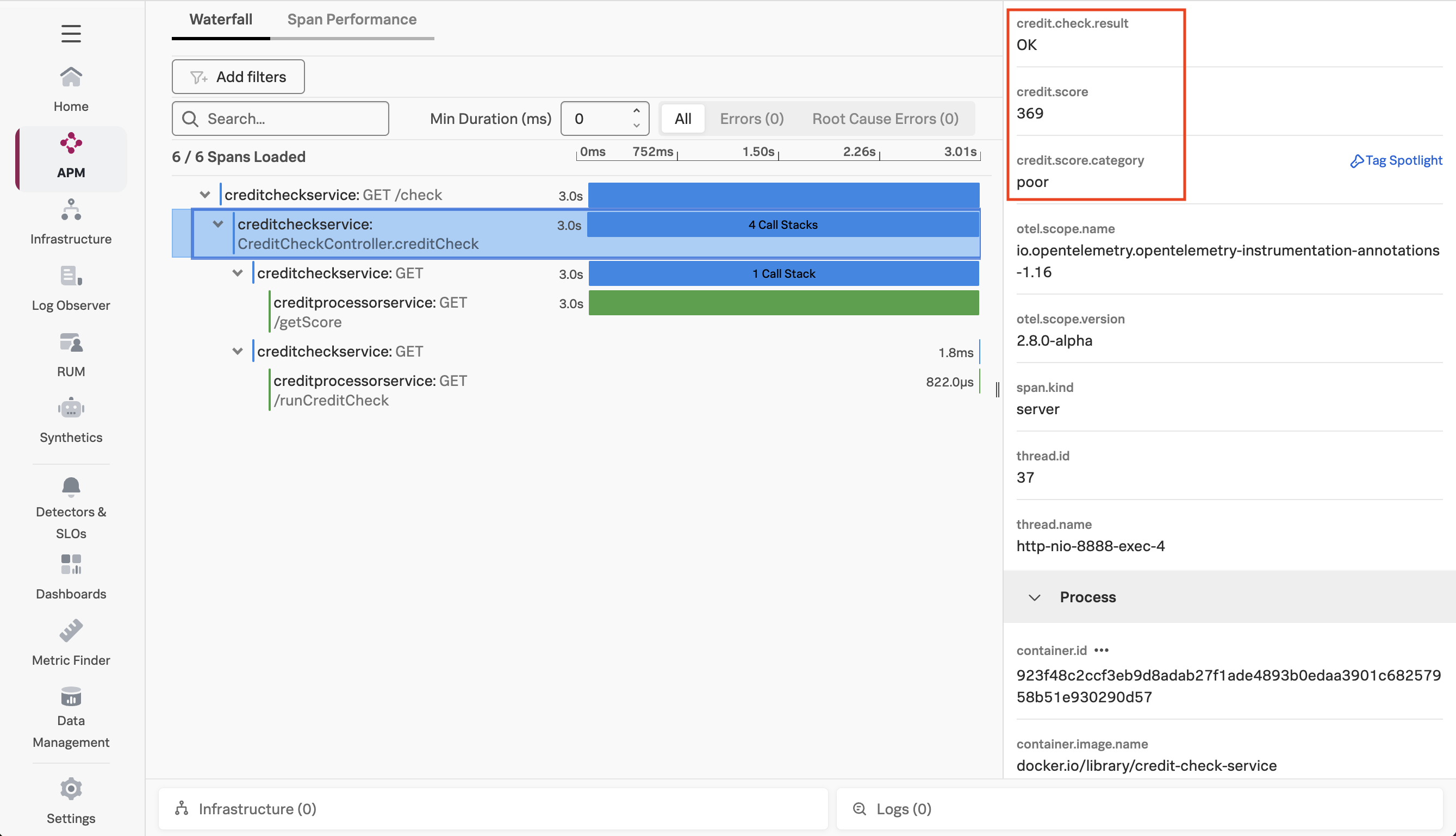
After a few minutes, return to Splunk Observability Cloud and load one of the latest traces to confirm that the tags were captured successfully (hint: sort by the timestamp to find the latest traces):
Well done, you’ve leveled up your OpenTelemetry game and have added context to traces using tags.
Next, we’re ready to see how you can use these tags with Splunk Observability Cloud!