Deployment
20 minutesThis section guides you through deploying the ThousandEyes Enterprise Agent in your Kubernetes cluster.
Components
The deployment consists of two files:
1. Secrets File (credentialsSecret.yaml)
Contains your ThousandEyes agent token (base64 encoded). This secret is referenced by the deployment to authenticate the agent with ThousandEyes Cloud.
2. Deployment Manifest (thousandEyesDeploy.yaml)
Defines the Enterprise Agent pod configuration with the following key settings:
- Namespace:
te-demo(customize as needed) - Image:
thousandeyes/enterprise-agent:latestfrom Docker Hub - Hostname:
te-agent-aleccham(appears in ThousandEyes dashboard) - Capabilities: Requires
NET_ADMINandSYS_ADMINfor network testing - Resources:
- Memory limit: 3584Mi
- Memory request: 2000Mi
Important Notes
- The agent requires elevated privileges (
NET_ADMIN,SYS_ADMIN) to perform network tests - The
TEAGENT_INET: "4"environment variable forces IPv4-only mode (required for some network configurations) - The
/sbin/my_initcommand is required for proper agent initialization and service management - The
imagePullPolicy: Alwaysensures you always pull the latest image version - Adjust the
hostnamefield to uniquely identify your agent in the ThousandEyes dashboard - Modify the
namespaceto match your Kubernetes environment - The ThousandEyes Enterprise Agent has relatively high hardware requirements; you may need to adjust these depending on your environment
Installation Steps
Step 1: Create the ThousandEyes Token
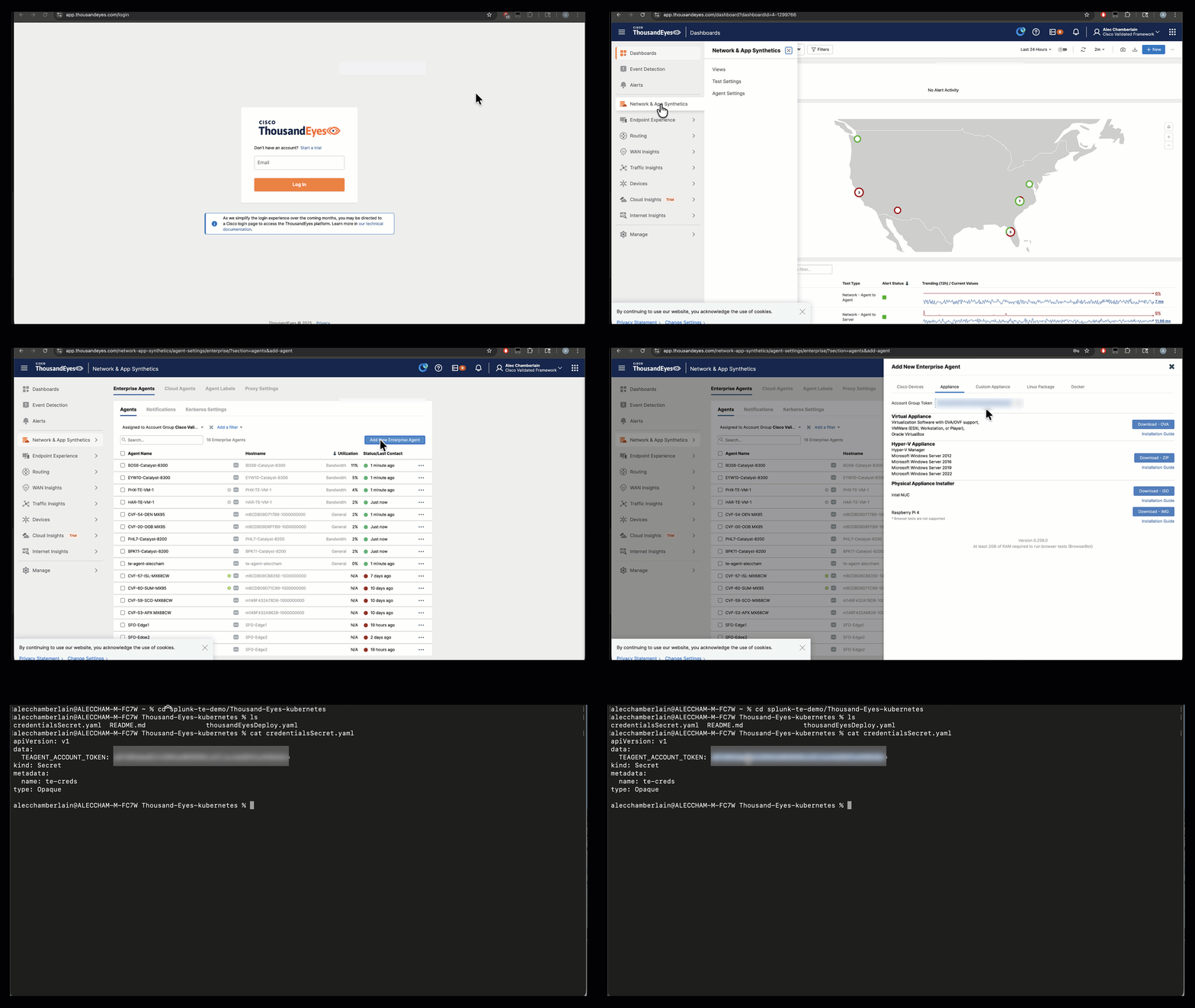
Log in to the ThousandEyes platform at app.thousandeyes.com/login
Navigate to Cloud & Enterprise Agents > Agent Settings > Add New Enterprise Agent
Copy your Account Group Token
Base64 encode the token:
Save the base64-encoded output for the next step
Step 2: Create the Namespace
Create the namespace (if it doesn’t exist):
Step 3: Create the Secret
Create a file named credentialsSecret.yaml with your base64-encoded token:
Apply the secret:
Step 4: Create the Deployment
Create a file named thousandEyesDeploy.yaml with the deployment manifest shown above (customize the hostname and namespace as needed).
Apply the deployment:
Step 5: Verify the Deployment
Verify the agent is running:
Expected output:
Check the logs to ensure the agent is connecting:
Step 6: Verify in ThousandEyes Dashboard
Verify in the ThousandEyes dashboard that the agent has registered successfully:
Navigate to Cloud & Enterprise Agents > Agent Settings to see your newly registered agent.
Success
Your ThousandEyes Enterprise Agent is now running in Kubernetes! Next, we’ll integrate it with Splunk Observability Cloud.
Background
ThousandEyes does not provide official Kubernetes deployment documentation. Their standard deployment method uses docker run commands, which makes it challenging to translate into reusable Kubernetes manifests. This guide bridges that gap by providing production-ready Kubernetes configurations.