

Application Security
Getting Started
During this workshop, we’ll explore:
- How to navigate Application Security entry points.
- How to inventory runtime vulnerabilities and correlate security posture with application health.
- How to prioritize findings using threat-informed risk scoring.
- How to guide remediation, manage vulnerability status, and review library hygiene.
- How to investigate runtime attacks and integrate notifications with SecOps.
For the workshop, a shared tenant is provided that contains Application Security telemetry (runtime vulnerabilities, library inventory, and attack events).
Note
The tenant has been pre-configured with APM-instrumented microservices without requiring to deploy additional agents beyond existing Observability instrumentation.
Access Splunk Observability Cloud #
Exercise
- Open your browser and sign in to Splunk Workshop Realm (credentials provided by your workshop facilitator).
- Confirm you land on the Splunk Observability Cloud home experience.
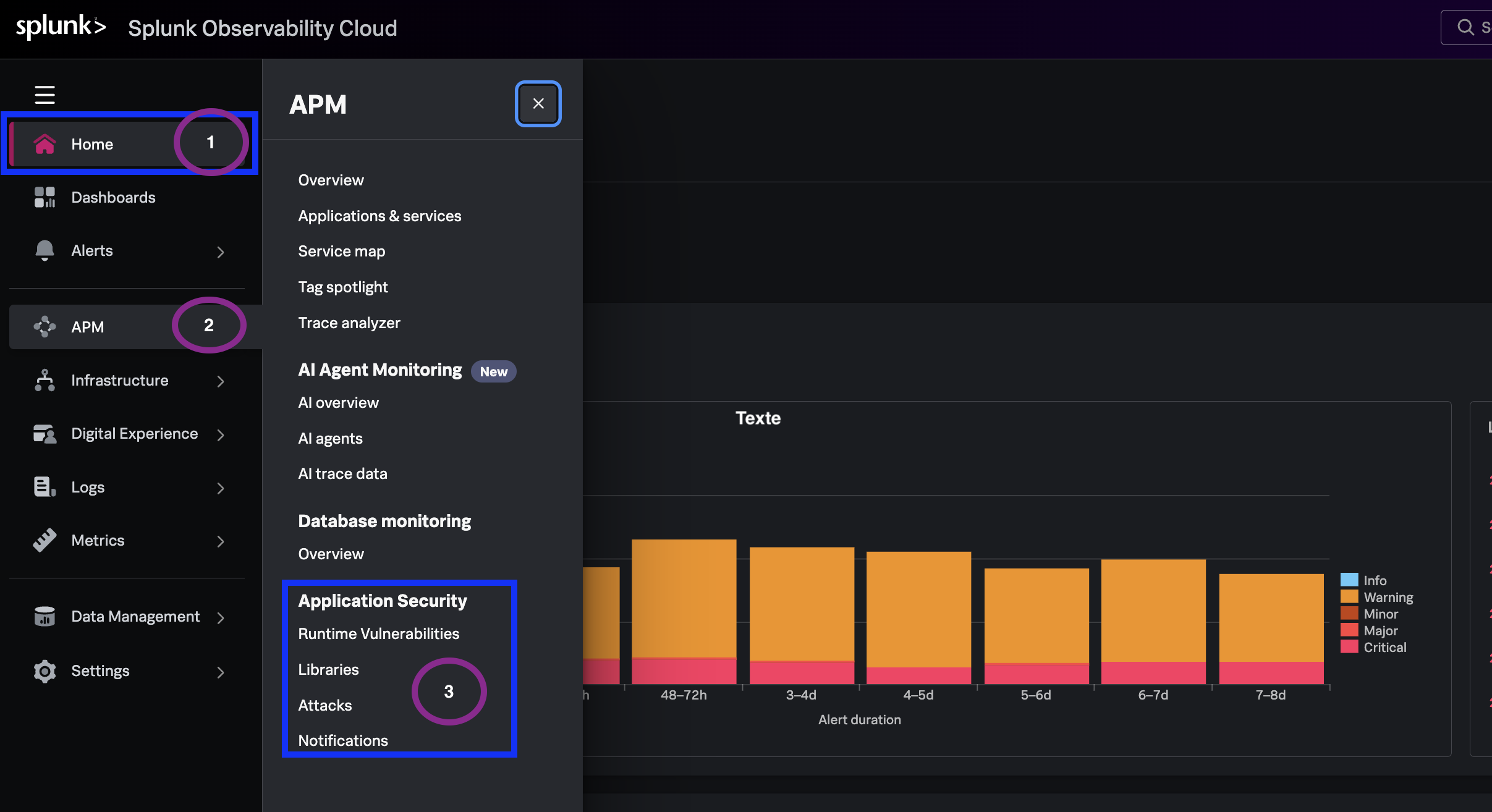
- From the left navigation, expand APM - you will see the Application Security menu option.
- Note the workshop environment filter you will use:
astronomy-shop-*& ‘ad’
What you learned #
- How to access the workshop tenant and confirm Application Security entitlements.
- Which core capabilities you will exercise across the remaining modules.
- Which environment and service anchor the workshop walkthrough.