1. APM Service Map
The APM Service Map displays the dependencies and connections among your instrumented and inferred services in APM. The map is dynamically generated based on your selections in the time range, environment, workflow, service, and tag filters.
When we clicked on the APM link in the RUM waterfall, filters were automatically added to the service map view to show the services that were involved in that WorkFlow Name (frontend:/cart/checkout).
You can see the services involved in the workflow in the Service Map. In the side pane, charts for the selected workflow are displayed. When you select a service in the Service Map, the charts in the side pane are updated to show metrics for the selected service.
Exercise
- Click on the paymentservice in the Service Map to select it.
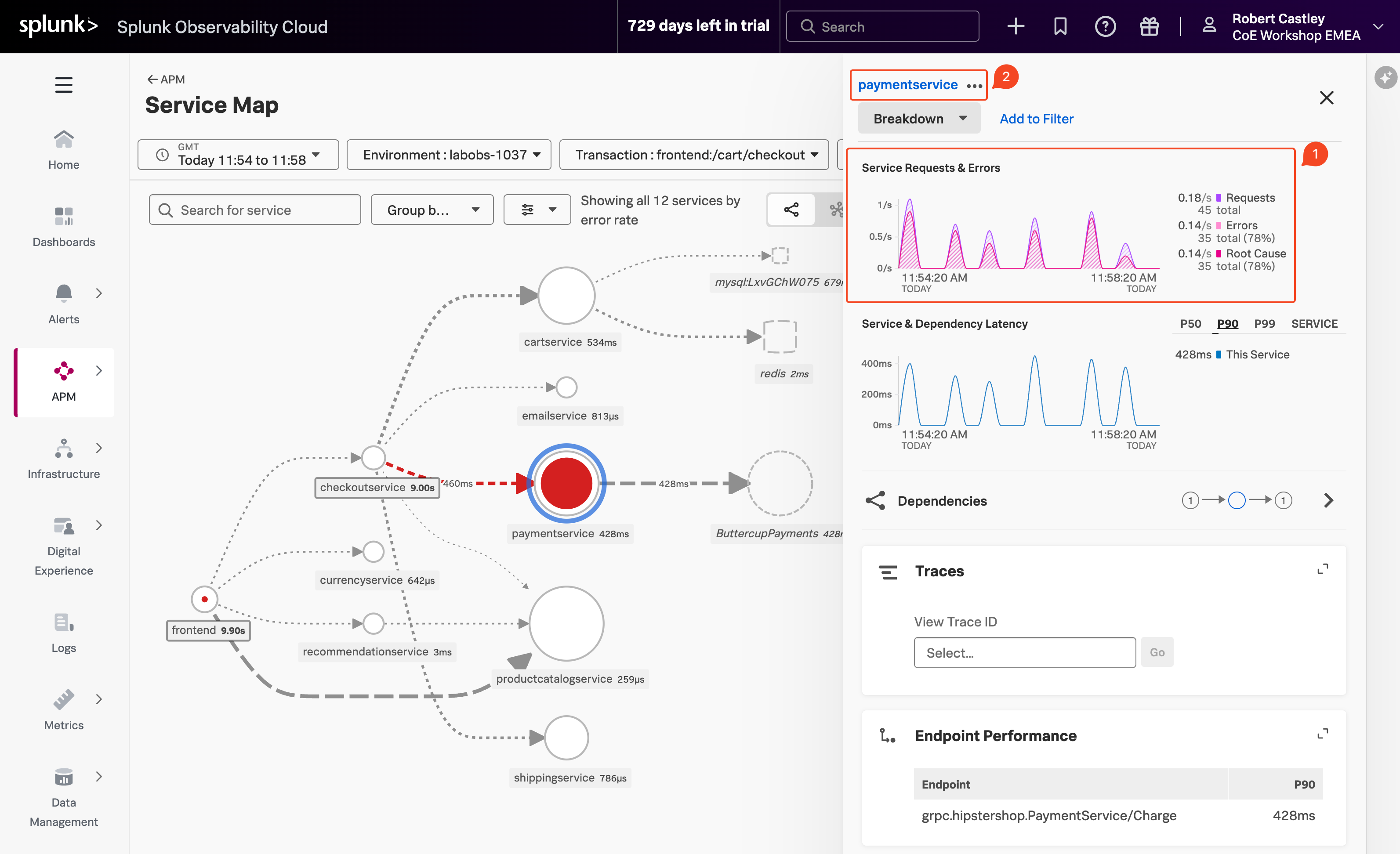
With the paymentservice selected, what can you conclude from the Service Requests & Errors chart in the side pane? (1)
The Errors percentage is very high.
- Splunk APM also provides built-in Service Centric Views to help you see problems occurring in real time and quickly determine whether the problem is associated with a service, a specific endpoint, or the underlying infrastructure. Let’s have a closer look.
- In the right-hand pane, click on paymentservice in blue (2).