5. Create Detector
Exercise
- Go to Digital Experience → Synthetics tests from the main menu.
- Select the workshop test [NAME OF WORKSHOP].
- Click on the test.
- Click button at the top of the page:
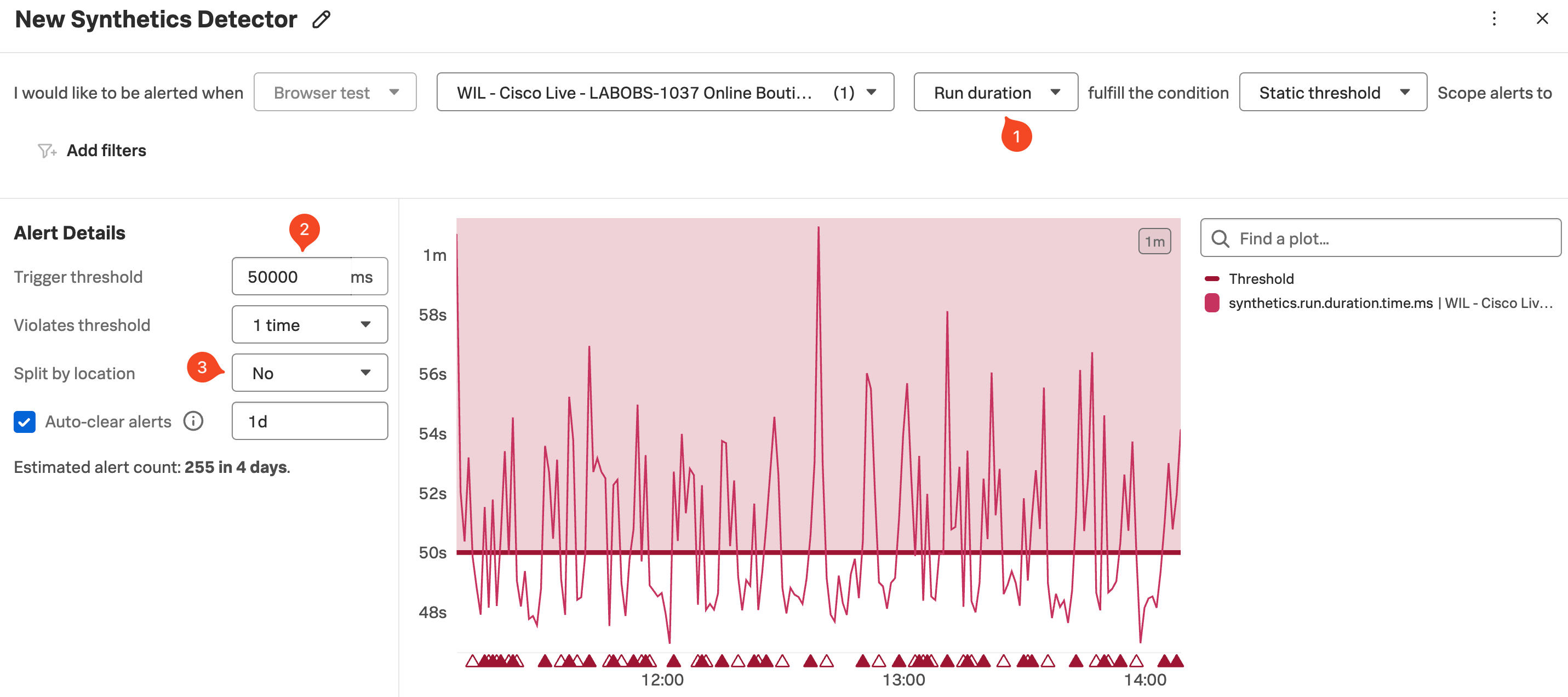
- Change the alert criteria so that the metric is Run Duration (1) (instead of Uptime) and the condition is Static Threshold.
- Set the Trigger threshold (2) to be around
50000ms. - Set Split by location (3) to No.
- Note that there is now a row of red and white triangles appearing below the spikes in the chart.
- The red triangles let you know that your detector found that your test was above the given threshold and the white triangle indicates that the result returned below the threshold. Each red triangle will trigger an alert.
We will not add a recipient or activate the detector as we don’t want to flood your email with alerts.
- This application is designed to fail constantly, hence the large number of alerts that would be generated. In a real-world scenario, you would want to fine-tune the threshold to avoid false positives.