

Splunk APM
4. APM Service Breakdown
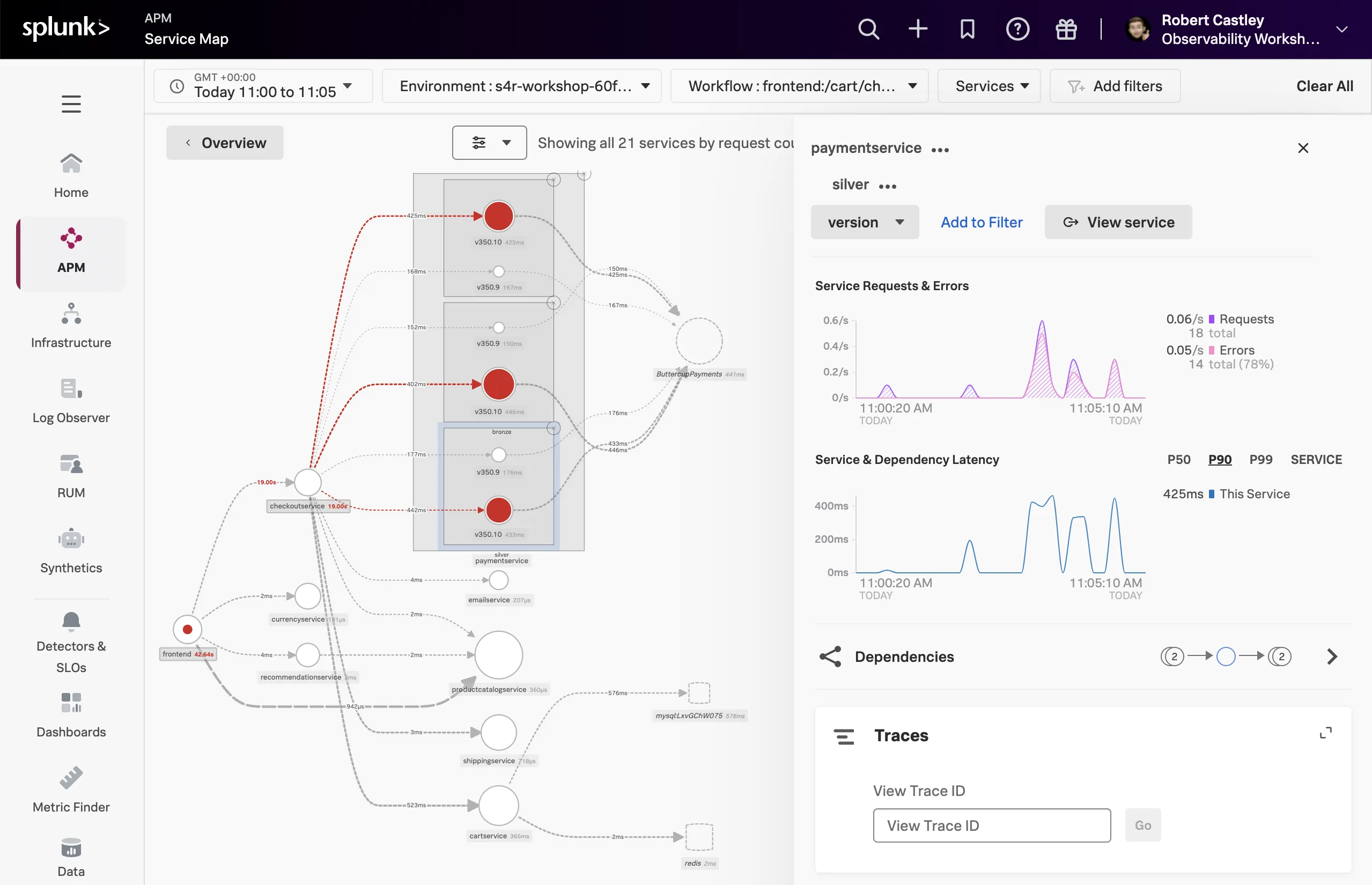
- Select the paymentservice in the Service Map.
- In the right-hand pane click on the .
- Select
tenant.levelin the list. - Back in the Service Map click on gold.
- Click on and select
version, this is the tag that exposes the service version. - Repeat this for silver and bronze.
Quick check
What can you conclude from what you are seeing?
Every
tenant.level is being impacted by v350.10You will now see the paymentservice broken down into three services, gold, silver and bronze. Each tenant is broken down into two services, one for each version (v350.10 and v350.9).
Span Tags
Using span tags to break down services is a very powerful feature. It allows you to see how your services are performing for different customers, different versions, different regions, etc. In this exercise, we have determined that
v350.10 of the paymentservice is causing problems for all our customers.Next, we need to drill down into a trace to see what is going on.