

Build a Distributed Trace in Lambda and Kinesis
Setup
This lab will make a tracing superhero out of you!
In this lab you will learn how a distributed trace is constructed for a small serverless application that runs on AWS Lambda, producing and consuming your message via AWS Kinesis.
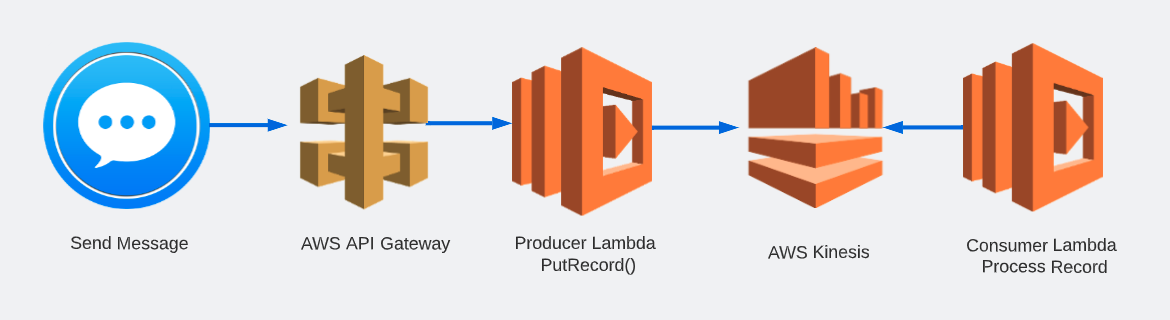
Pre-requisites #
You should already have the lab content available on your EC2 lab host.
Ensure that this lab’s required folder o11y-lambda-lab is on your home directory:
cd ~ && lso11y-lambda-labNote
If you don’t see it, fetch the lab contents by running the following command:
git clone https://github.com/kdroukman/o11y-lambda-lab.gitSet Environment Variables #
In your Splunk Observability Cloud Organisation (Org) obtain your Access Token and Realm Values.
Please reset your environment variables from the earlier lab. Take care that for this lab we may be using different names - make sure to match the Environment Variable names below.
export ACCESS_TOKEN=CHANGE_ME \
export REALM=CHANGE_ME \
export PREFIX=$INSTANCE
Update Auto-instrumentation serverless template #
Update your auto-instrumentation Serverless template to include new values from the Enviornment variables.
cat ~/o11y-lambda-lab/auto/serverless_unset.yml | envsubst > ~/o11y-lambda-lab/auto/serverless.ymlExamine the output of the updated serverless.yml contents (you may need to scroll up to the relevant section).
cat ~/o11y-lambda-lab/auto/serverless.yml# USER SET VALUES =====================
custom:
accessToken: <updated to your Access Token>
realm: <updated to your Realm>
prefix: <updated to your Hostname>
#====================================== Update Manual instrumentation template #
Update your manual instrumentation Serverless template to include new values from the Enviornment variables.
cat ~/o11y-lambda-lab/manual/serverless_unset.yml | envsubst > ~/o11y-lambda-lab/manual/serverless.ymlExamine the output of the updated serverless.yml contents (you may need to scroll up to the relevant section).
cat ~/o11y-lambda-lab/manual/serverless.yml# USER SET VALUES =====================
custom:
accessToken: <updated to your Access Token>
realm: <updated to your Realm>
prefix: <updated to your Hostname>
#====================================== Set your AWS Credentials #
You will be provided with AWS Access Key ID and AWS Secret Access Key values - substitue these values in place of AWS_ACCESS_KEY_ID and AWS_ACCESS_KEY_SECRET in the bellow command:
sls config credentials --provider aws --key AWS_ACCCESS_KEY_ID --secret AWS_ACCESS_KEY_SECRETThis command will create a file ~/.aws/credentials with your AWS Credentials populated.
Note that we are using sls here, which is a Serverless framework for developing and deploying AWS Lambda functions. We will be using this command throughout the lab.
Now you are set up and ready go!