Instrument REVIEWS for Tracing
1. Use Data Setup to instrument a Python application
Within the O11y Cloud UI:
Data Management -> Add Integration -> Monitor Applications -> Python (traces) -> Add Integration
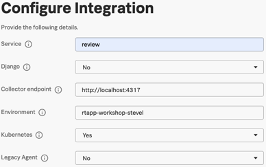
Provide the following to the Configure Integration Wizard:
Service: review
Django: no
collector endpoint:
http://localhost:4317Environment: rtapp-workshop-[YOURNAME]
Kubernetes: yes
Legacy Agent: no
We are instructed to:
- Install the instrumentation packages for your Python environment.
Configure the Downward API to expose environment variables to Kubernetes resources.
For example, update a Deployment to inject environment variables by adding
.spec.template.spec.containers.envlike:
Enable the Splunk OTel Python agent by editing your Python service command.
The actions we must perform include:
- Update the Dockerfile to install the splunk-opentelemetry packages
- Update the deployment.yaml for each service to include these environment variables which will be used by the pod and container.
- Update our Dockerfile for REVIEW so that our program is bootstrapped with splunk-py-trace
Note
We will accomplish this by:
- generating a new requirements.txt file
- generating a new container image with an updated Dockerfile for REVIEW and then
- update the review.deployment.yaml to capture all of these changes.
2. Update the REVIEW container
Generate a new container image
Update the Dockerfile for REVIEW (
/workshop/flask_apps_finish/review)
Note
Note that the only lines, in bold, added to the Dockerfile
- Generate a new container image with docker build in the ‘finished’ directory
- Notice that I have changed the repository name from
localhost:8000/review:0.01tolocalhost:8000/review-splkotel:0.01
Ensure you are in the correct directory.
- Push the image to Docker Hub with docker push command
3. Update the REVIEW deployment in Kubernetes
review.deployment.yaml must be updated with the following changes:
- Load the new container image on Docker Hub
- Add environment variables so traces can be emitted to the OTEL collector
The deployment must be replaced using the updated review.deployment.yaml
Update review.deployment.yaml (updates highlighted in bold)
Apply review.deployment.yaml. Kubernetes will automatically pick up the changes to the deployment and redeploy new pods with these updates
- Notice that the review-* pod has been restarted