

OpenTelemetry、Docker、K8sを実践で学ぶ
.NETアプリケーションのデプロイ
前提条件 #
アプリケーションをデプロイする前に、インスタンスに.NET 8 SDKをインストールする必要があります。
bash
sudo apt-get update && \
  sudo apt-get install -y dotnet-sdk-8.0
bash
Hit:1 http://us-west-1.ec2.archive.ubuntu.com/ubuntu jammy InRelease
Hit:2 http://us-west-1.ec2.archive.ubuntu.com/ubuntu jammy-updates InRelease
Hit:3 http://us-west-1.ec2.archive.ubuntu.com/ubuntu jammy-backports InRelease
Hit:4 http://security.ubuntu.com/ubuntu jammy-security InRelease
Ign:5 https://splunk.jfrog.io/splunk/otel-collector-deb release InRelease
Hit:6 https://splunk.jfrog.io/splunk/otel-collector-deb release Release
Reading package lists... Done
Reading package lists... Done
Building dependency tree... Done
Reading state information... Done
The following additional packages will be installed:
  aspnetcore-runtime-8.0 aspnetcore-targeting-pack-8.0 dotnet-apphost-pack-8.0 dotnet-host-8.0 dotnet-hostfxr-8.0 dotnet-runtime-8.0 dotnet-targeting-pack-8.0 dotnet-templates-8.0 liblttng-ust-common1
  liblttng-ust-ctl5 liblttng-ust1 netstandard-targeting-pack-2.1-8.0
The following NEW packages will be installed:
  aspnetcore-runtime-8.0 aspnetcore-targeting-pack-8.0 dotnet-apphost-pack-8.0 dotnet-host-8.0 dotnet-hostfxr-8.0 dotnet-runtime-8.0 dotnet-sdk-8.0 dotnet-targeting-pack-8.0 dotnet-templates-8.0
  liblttng-ust-common1 liblttng-ust-ctl5 liblttng-ust1 netstandard-targeting-pack-2.1-8.0
0 upgraded, 13 newly installed, 0 to remove and 0 not upgraded.
Need to get 138 MB of archives.
After this operation, 495 MB of additional disk space will be used.
etc.詳細については、Ubuntu に.NET SDK または.NET Runtime をインストールする を参照してください。
.NET アプリケーションの確認 #
ターミナルで、アプリケーションディレクトリに移動します
bash
cd ~/workshop/docker-k8s-otel/helloworldこのワークショップでは、シンプルな「Hello World」.NETアプリケーションを使用します。主要なロジックは HelloWorldController.csファイルにあります
cs
public class HelloWorldController : ControllerBase
{
    private ILogger<HelloWorldController> logger;

    public HelloWorldController(ILogger<HelloWorldController> logger)
    {
        this.logger = logger;
    }

    [HttpGet("/hello/{name?}")]
    public string Hello(string name)
    {
        if (string.IsNullOrEmpty(name))
        {
           logger.LogInformation("/hello endpoint invoked anonymously");
           return "Hello, World!";
        }
        else
        {
            logger.LogInformation("/hello endpoint invoked by {name}", name);
            return String.Format("Hello, {0}!", name);
        }
    }
}
.NET アプリケーションのビルドと実行 #
以下のコマンドを使用してアプリケーションをビルドできます
bash
dotnet buildbash
MSBuild version 17.8.5+b5265ef37 for .NET
  Determining projects to restore...
  All projects are up-to-date for restore.
  helloworld -> /home/splunk/workshop/docker-k8s-otel/helloworld/bin/Debug/net8.0/helloworld.dll

Build succeeded.
    0 Warning(s)
    0 Error(s)

Time Elapsed 00:00:02.04
ビルドが成功したら、次のように実行できます
bash
dotnet runbash
Building...
info: Microsoft.Hosting.Lifetime[14]
      Now listening on: http://localhost:8080
info: Microsoft.Hosting.Lifetime[0]
      Application started. Press Ctrl+C to shut down.
info: Microsoft.Hosting.Lifetime[0]
      Hosting environment: Development
info: Microsoft.Hosting.Lifetime[0]
      Content root path: /home/splunk/workshop/docker-k8s-otel/helloworld
実行したら、UbuntuインスタンスへのSSH接続を2つ目のターミナルで開き、curlを使用してアプリケーションにアクセスします
bash
curl http://localhost:8080/hellobash
Hello, World!名前を渡すこともできます
bash
curl http://localhost:8080/hello/Tombash
Hello, Tom!次のステップに進む前に、Ctrl + C を押して Helloworld アプリを終了してください。
次のステップ #
アプリケーションをOpenTelemetryで計装するために使用できる3つの方法は何でしょうか?
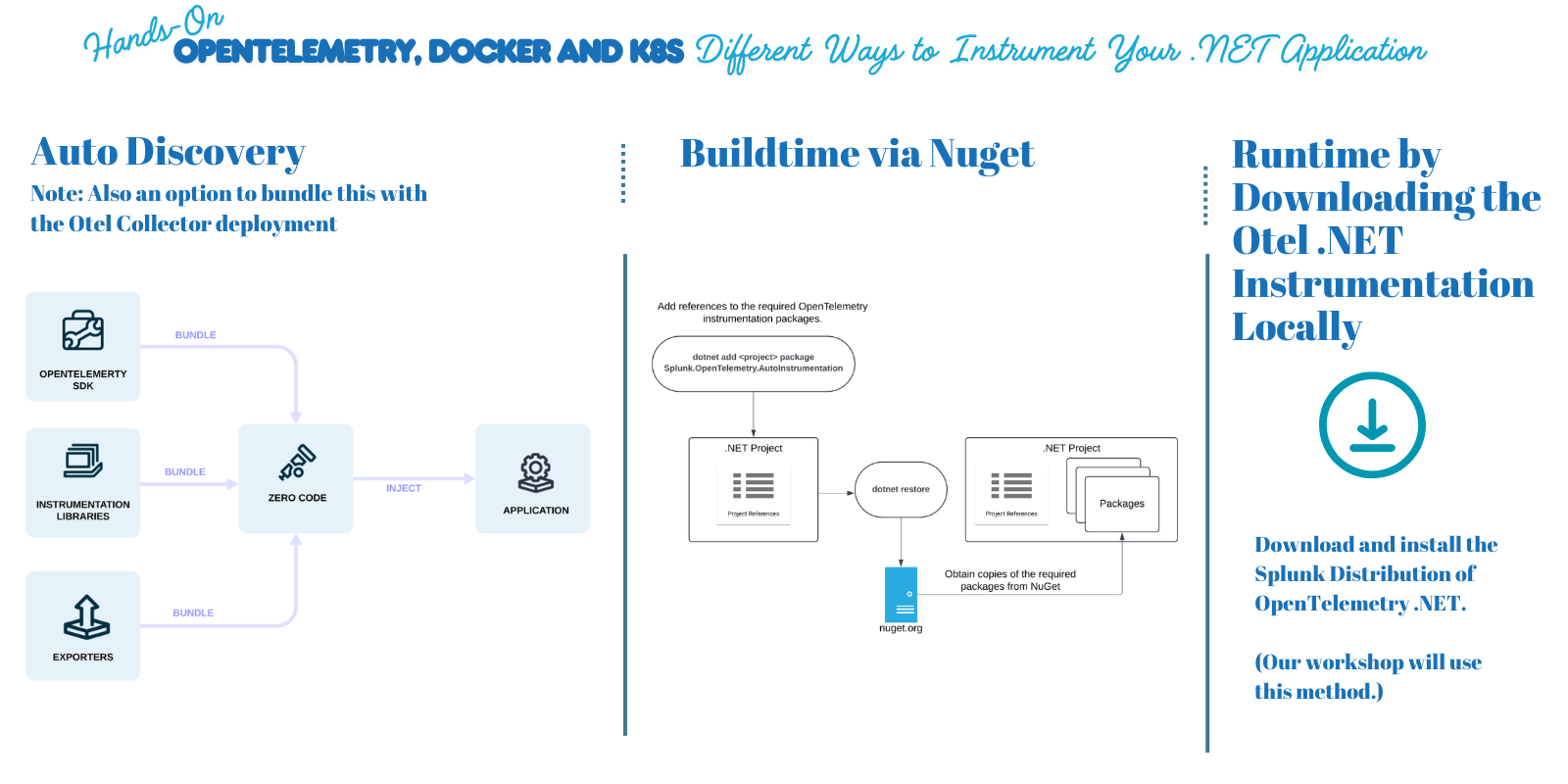
オプションの詳細については、Splunk Observability Cloud 用の.NET アプリケーションの計装 を参照してください。