OpenTelemetry Collector サービス
OTLP HTTP エクスポーター
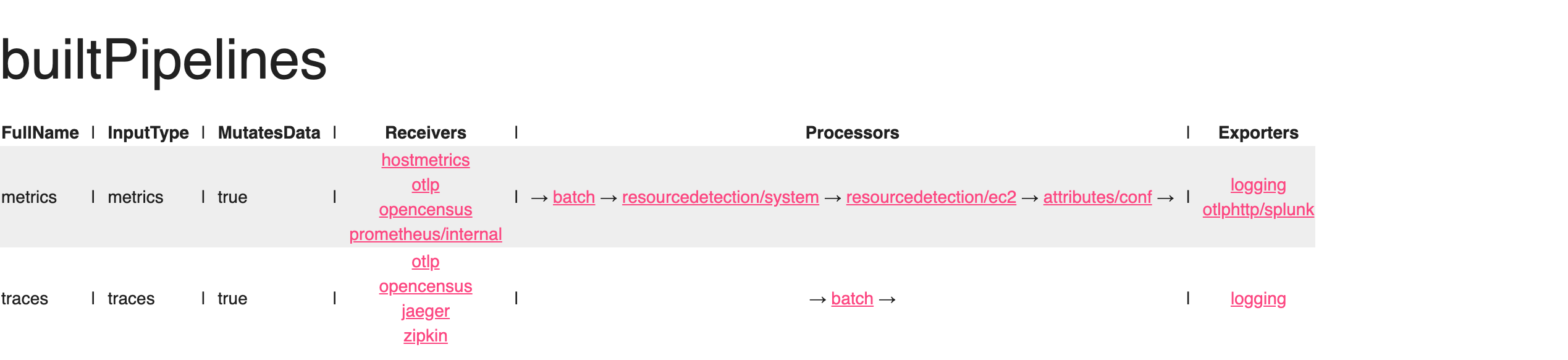
ワークショップのエクスポーターセクションでは、otlphttp エクスポーターを設定して、メトリクスをSplunk Observability Cloudに送信するようにしました。これをメトリクスパイプライン下で有効にする必要があります。
metrics パイプラインの下の exporters セクションを更新して、otlphttp/splunk を追加します
service:

  pipelines:

    traces:
      receivers: [otlp, opencensus, jaeger, zipkin]
      processors: [batch]
      exporters: [logging]

    metrics:
      receivers: [hostmetrics, otlp, opencensus, prometheus/internal]
      processors: [batch, resourcedetection/system, resourcedetection/ec2, attributes/conf]
      exporters: [logging, otlphttp/splunk]
Ninja: コレクターの内部を観測する
コレクターは、その動作に関する内部シグナルを捕捉しています。これには実行中のコンポーネントからの追加されるシグナルも含まれます。これは、データの流れに関する決定を行うコンポーネントが、その情報をメトリクスやトレースとして表面化する方法を必要とするためです。
なぜコレクターを監視するの?
これは「監視者を監視するのは誰か?」という種類の問題ですが、このような情報を表面化できることは重要です。コレクターの歴史の興味深い部分は、GoメトリクスのSDKが安定と考えられる前に存在していたことで、コレクターは当面の間、この機能を提供するためにPrometheusエンドポイントを公開しています。
注意点
組織内で稼働している各コレクターの内部使用状況を監視することは、新しいメトリクス量(MTS)を大幅な増加させる可能性があります。Splunkディストリビューションはこれらのメトリクスをキュレーションしており、増加を予測するのに役立ちます。
Ninja ゾーン
コレクターの内部オブザーバビリティを公開するためには、いくつかの設定を追加することがあります
service:
  telemetry:
    logs:
      level: <info|warn|error>
      development: <true|false>
      encoding: <console|json>
      disable_caller: <true|false>
      disable_stacktrace: <true|false>
      output_paths: [<stdout|stderr>, paths...]
      error_output_paths: [<stdout|stderr>, paths...]
      initial_fields:
        key: value
    metrics:
      level: <none|basic|normal|detailed>
      # Address binds the promethues endpoint to scrape
address: <hostname:port>service:
telemetry:
logs:
level: info
encoding: json
disable_stacktrace: true
initial_fields:
instance.name: ${env:INSTANCE}
metrics:
address: localhost:8888 参照
完成した設定
Check-in完成した設定をレビューしてください
| |
ヒント
コレクターを再起動する前に、設定ファイルを検証することをお勧めします。これは、組み込みの validate コマンドを使用して行うことができます
otelcol-contrib validate --config=file:/etc/otelcol-contrib/config.yamlError: failed to get config: cannot unmarshal the configuration: 1 error(s) decoding:
* error decoding 'processors': error reading configuration for "attributes/conf": 1 error(s) decoding:
* 'actions[0]' has invalid keys: actions
2023/06/29 09:41:28 collector server run finished with error: failed to get config: cannot unmarshal the configuration: 1 error(s) decoding:
* error decoding 'processors': error reading configuration for "attributes/conf": 1 error(s) decoding:
* 'actions[0]' has invalid keys: actions動作する設定ができたので、コレクターを起動し、その後 zPages が報告している内容を確認しましょう。
sudo systemctl restart otelcol-contrib