Multiple topics
Collecting events from multiple topics
The configuration is similar to the default one described here, with the addition of multiple receivers - one for each topic you want to monitor. Thanks to the flexibility of the OpenTelemetry Collector, the setup can be tailored to meet specific requirements. This modular approach allows you to treat the components as building blocks, enabling you to create a pipeline that aligns perfectly with your use case. Depending on your needs, you can either use a single exporter for all receivers or configure a separate exporter for each receiver.
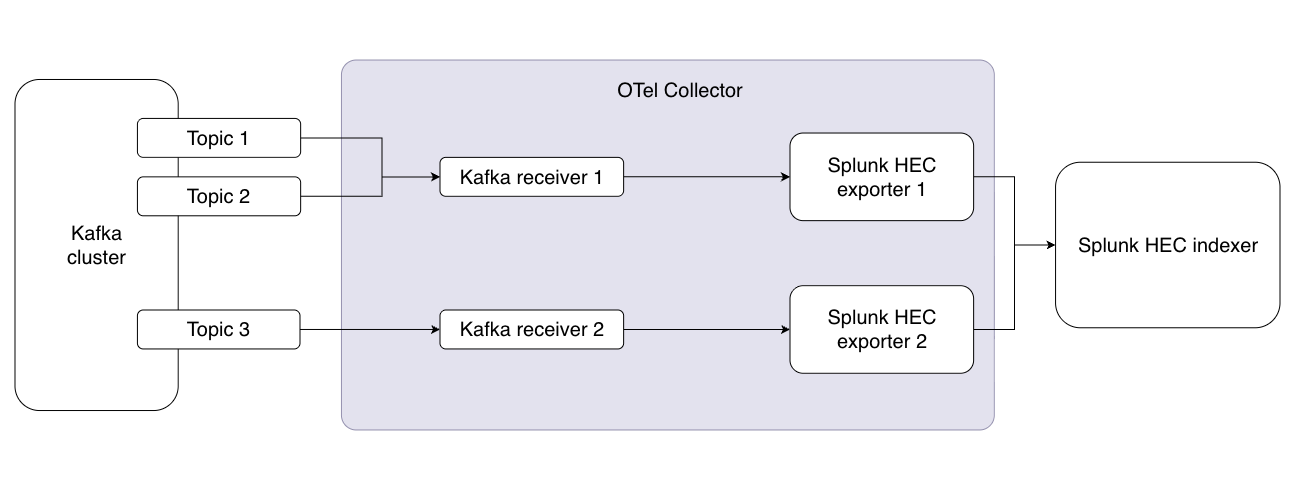
Example config
receivers:
  kafka/example_topic_a:
    brokers: ["localhost:9092"]
    logs:
      topics:
        - "example-topic-a-1"
        - "example-topic-a-2"
      encoding: "text"

  kafka/example_topic_b:
    brokers: ["localhost:9092"]
    logs:
      topics:
        - "example-topic-b-1"
      encoding: "text"

exporters:
  splunk_hec/a:
    token: "your-splunk-hec-token"
    endpoint: "https://splunk-hec-endpoint:8088/services/collector"
    source: my-kafka
    sourcetype: kafka-otel
    index: kafka_otel_index_a
    splunk_app_name: "soc4kafka"
    sending_queue:
      enabled: true
      num_consumers: 10
      queue_size: 10000
      block_on_overflow: true
      sizer: items
      batch:
        min_size: 1000

  splunk_hec/b:
    token: "your-splunk-hec-token"
    endpoint: "https://splunk-hec-endpoint:8088/services/collector"
    source: my-kafka
    sourcetype: kafka-otel
    index: kafka_otel_index_b
    splunk_app_name: "soc4kafka"
    sending_queue:
      enabled: true
      num_consumers: 10
      queue_size: 10000
      block_on_overflow: true
      sizer: items
      batch:
        min_size: 1000

service:
  pipelines:
    logs/a:
      receivers: [kafka/example_topic_a]
      exporters: [splunk_hec/a]
    logs/b:
     receivers: [kafka/example_topic_b]
     exporters: [splunk_hec/b]