About Splunk for SAP LogServ
Current release: AI Assistant LLM functionality intentionally disabled pending review
The current release ships with the AI Assistant’s LLM-driven path disabled at compile time pending internal review of the OWASP LLM Top 10 controls. The predefined-prompt path + Splunk MCP Server integration + 21 dashboards + 1 Environment Topology view + audit log are all fully active. The free-form chat input is disabled, the model picker is hidden, and the Provider Credentials Settings tab is hidden. See Templates-only Build for the build mechanism. The LLM-driven path will be re-enabled in a future release once review concludes.
Introduction
SAP offers its customers ECS (fka RISE) with SAP S/4HANA Cloud Private Edition. This is an IaaS model (on a very basic level) from SAP’s vendor perspective, where SAP hosts customers’ SAP S/4HANA and other SAP systems in the customer’s choice of public cloud providers (AWS, Microsoft Azure, GCP, etc.), in accounts owned and managed by SAP itself. SAP LogServ provides logs from all SAP systems and layers (OS, database, etc.), and the logs can be integrated to be available to the customer’s security information and event management (SIEM) solution.
Splunk for SAP LogServ provides multiple mechanisms to access the logs from LogServ, ingest them into Splunk, and map the various log types to Splunk sourcetypes — plus a React-based UI App with 21 dashboards, a graph-based Environment Topology view, and an LLM-aware AI Assistant that lets analysts run pre-canned investigations without leaving Splunk.
Two Packages
The solution is delivered as two separately installable packages:
| Package | App ID | Install On | Role |
|---|---|---|---|
| Data TA | splunk_ta_sap_logserv |
Deployment Server, Heavy Forwarders, Indexer (or single instance) | Data collection, sourcetype routing, index-time filtering, DS automation, ships the indexes.conf for sap_logserv_logs + logserv_ai_assistant_audit |
| LogServ App | splunk_app_sap_logserv |
Search Head only (or single instance) | Dashboards, AI Assistant, Environment Topology view, search-time extractions |
The Data TA ingests log data, routes it to the right sourcetype, and ships the indexes.conf for both the SAP data index (sap_logserv_logs) and the AI Assistant audit index (logserv_ai_assistant_audit) — Splunk auto-creates them when the Data TA loads on an indexer, no separate Index App required. The LogServ App provides the analytics layer the user interacts with. Both index names are configurable via search macros (sap_logserv_idx_macro, sap_logserv_audit_idx_macro).
For details on which package goes where, see Architecture.
Key Features
- Multi-cloud ingest — supports both AWS S3 (via the Splunk Add-on for AWS) and Microsoft Azure Blob Storage (via the LogServ Data TA’s built-in
azure_queue_input, no separate add-on). Same downstream sourcetypes, dashboards, ES integration, and AI Assistant regardless of ingest channel. Every event carries an indexedcloud_providerfield (awsorazure) for cross-cloud reporting; the Multi-Cloud Overview dashboard surfaces the per-provider split. See Azure Setup Guide. - Index-time filtering — control which log types are indexed and drop stale data, all configured through Splunk Web with zero license cost for filtered events.
- Deployment Server automation — automatically stages filter configurations for distribution to Heavy Forwarders with a one-click deploy button.
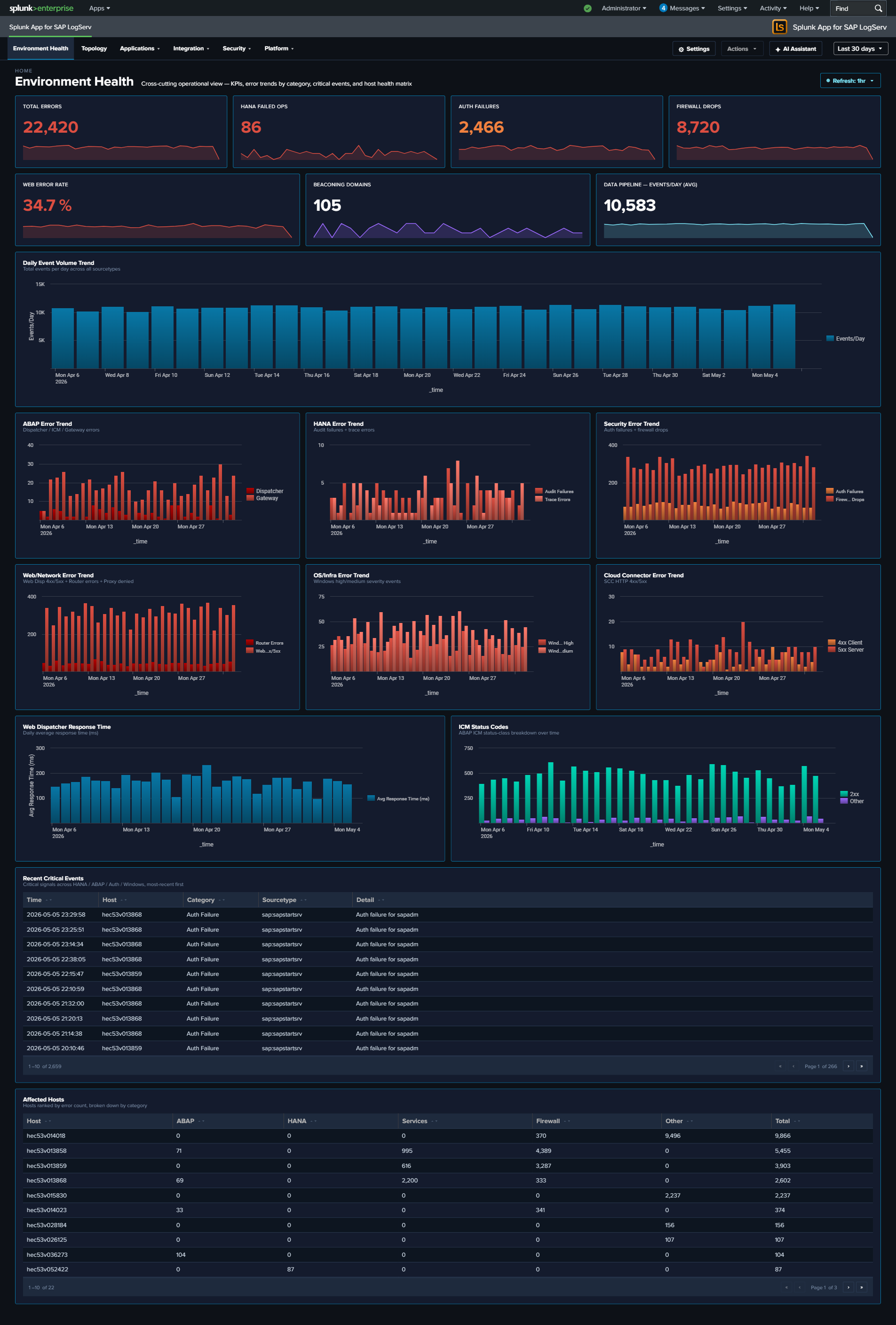
- 21 React-based dashboards — organized as one top-level Environment Health landing page plus four purpose-driven navigation groups: Applications (5 dashboards: ABAP runtime, work-process performance, HANA audit + trace), Integration (5 dashboards: SAP Services, Router, Cloud Connector, Web Dispatcher, Web/API Performance), Security (3 dashboards: Network Perimeter, Cross-Stack Authentication, Change & Configuration), and Platform (7 dashboards including the multi-tab Host Details view, multi-tab Data Pipeline Overview, and Multi-Cloud Overview). Every dashboard ships with cross-dashboard drill-downs (time range preserved), per-dashboard auto-refresh picker, and built-in Download PNG export.
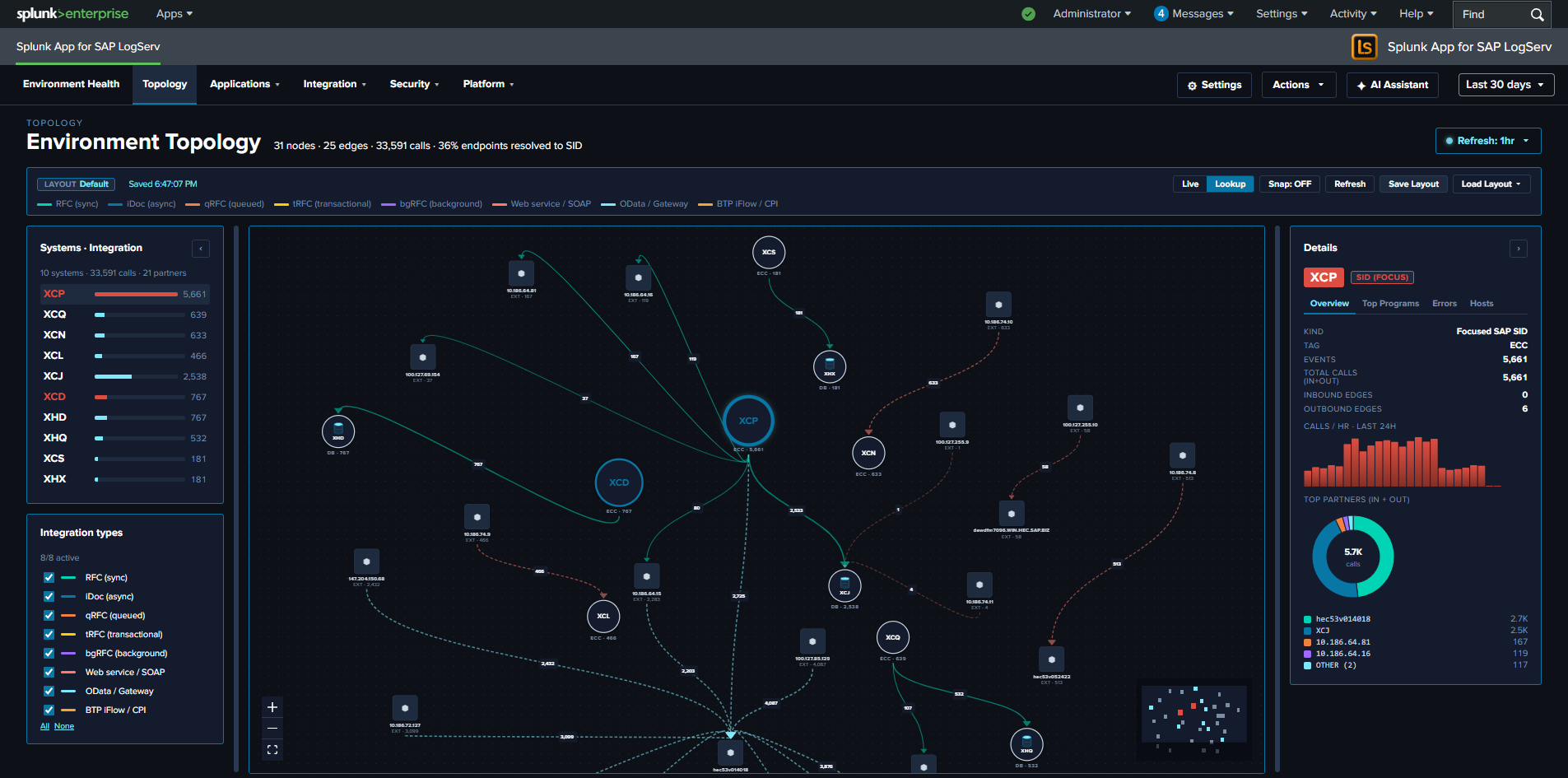
- Environment Topology — interactive graph view of SAP systems, integration partners, and endpoints; built on
@xyflow/reactwith self-derived IP→SID inventory and saved layouts (KV Store). Hourly KV Store refresh via scheduled saved searches plus a manual Refresh button. - Splunk Enterprise Security integration — out-of-the-box CIM tagging across Authentication / Change / Network_Sessions / Web data models for ~9 SAP-specific event categories; 5 starter correlation searches that emit notable events for SAP-specific threat patterns (HANA privilege escalation, cross-stack auth-failure burst, ABAP gateway anomalous peer, SCC ACCESS_DENIED burst, HANA failed CONNECT spike); a tier-2 Risk Notable that fires on accumulated risk; auto-feed of SAP system inventory + user identities into ES Identity Management. Dual-mode: works with or without ES installed. See Enterprise Security Integration.
- AI Assistant — Splunk-aware chat panel with two paths: a predefined-prompt browser (48 saved searches across sap_basis / security / operations packs, dispatched via the Splunk MCP Server with no LLM call), and a free-form prompt path that adds vendor-LLM synthesis on top. Three privacy tiers (Tier 0 air-gapped, Tier 1 default, Tier 2 admin opt-in). The privacy invariant is type-system-enforced: no event data from your Splunk instance is ever transmitted to any AI vendor.
- OWASP LLM Top 10 (2025) compliance — every item in the top-10 has a matching control: prompt-injection sanitization, type-bounded data redaction, supply-chain SBOM, audit hash-chain, per-user rate limit, USD spend cap, SPL static-analysis guard, jailbreak pattern detection, PII redaction, and a tamper-evident audit log forwarder over HEC.
- Templates-only build variant — a deployable variant of the LogServ App that disables the LLM-driven flow at compile time. The MCP path + canned prompts stay fully active so the solution can be demonstrated end-to-end without enabling any LLM provider.
- Search-time field extractions — ~176 search-time directives (EXTRACT, EVAL, FIELDALIAS) across 31 SAP-specific sourcetypes.
| Version | 0.0.6.0 |
| Supported vendor products | SAP LogServ for SAP ECS in Amazon Web Services (AWS) and Microsoft Azure |
| Splunk platform versions | 9.4.3 and later |
| CIM | 5.1.1 and later |