Work Process Performance
Why This Dashboard Matters
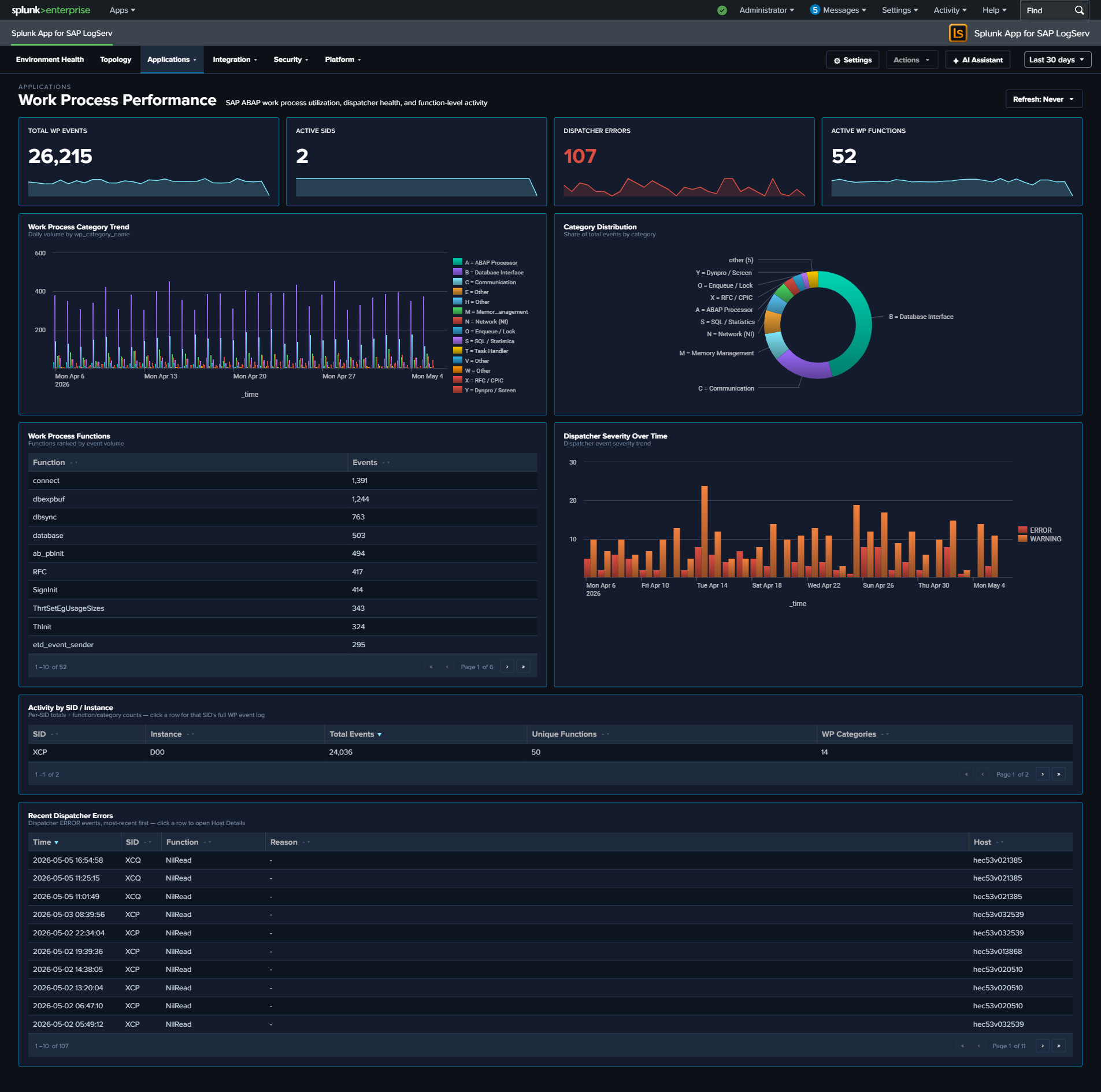
Work Process Performance focuses specifically on the ABAP work process layer: the finite pool of processes that execute every dialog request, background job, and RFC call. When work processes are exhausted, users see “no free work process” errors; when a specific category is saturated, symptoms manifest differently (e.g., database interface saturation causes SQL timeouts; memory category issues cause roll-area swaps). This dashboard breaks activity down by the 13 SAP-standard dev_w* trace component categories so you can target remediation to the right subsystem.
Panels
- Total WP Events – Aggregate event count from
sap:abap:workprocessandsap:abap:dispatcher - Active SIDs – Count of distinct SAP System IDs reporting work process data
- Dispatcher Errors – Count of dispatcher severity ERROR/FATAL events
- Active WP Functions – Count of distinct work process function codes observed
- Work Process Category Trend – Stacked column chart showing daily activity by category, with all 13 friendly-named codes (uses the shared
wp_category_namefield) - Category Distribution – Donut chart showing the overall category mix across the time range (same 13-code legend)
- Top Work Process Functions – Horizontal bar of the most-seen function codes (top 15)
- Dispatcher Severity Over Time – Stacked column of dispatcher severity levels over time
- Activity by SID / Instance – Table ranking each SAP system/instance by event count, with drilldown to filter
- Recent Dispatcher Errors – Table of the 25 most recent dispatcher ERROR/FATAL events with host and severity, with drilldown to the full event
What to Look For
- Category saturation – If a single category (e.g.,
B = Database InterfaceorM = Memory Management) dominates the Category Distribution donut when it historically didn’t, that subsystem may be a bottleneck. Check the associated detail dashboards (HANA Audit/Trace for database; Linux/ABAP Operations for memory). - Trend shifts between categories – A gradual increase in
N = Network (NI)orC = Communicationevents can indicate network degradation between the ABAP server and HANA/other SAP systems. - Dispatcher error bursts – Spikes in the Dispatcher Severity Over Time chart are often the first user-visible symptom of work process exhaustion. Correlate with Category Distribution to identify which category filled up first.
- Instance imbalance – If one instance’s WP activity is an order of magnitude higher than its peers in the Activity by SID/Instance table, investigate whether that instance is handling disproportionate load or experiencing a local issue.
- Function-code hotspots – The Top Work Process Functions bar surfaces which ABAP functions are running most often; an unexpected code at the top can indicate a runaway background job or custom transaction generating excessive traces.