Audit Log
Every action the AI Assistant takes — predefined-prompt dispatches, free-form vendor calls, security blocks, privacy-tier elevations, legal acknowledgements — produces an audit event in a dedicated logserv_ai_assistant_audit index. The audit trail is the evidence layer for compliance reviews, SOC investigations, and tamper-resistance posture.
The Twelve Audit Categories
| Category | When | Key fields |
|---|---|---|
local_only |
Predefined-prompt dispatch (no LLM call). | promptId, spl, rowCount, executionMs, ok |
vendor_tier1 |
Free-form prompt at Tier 1 (count + timing only summary sent to vendor). | provider, model, inputTokens, outputTokens, vendorCostEstimateUsd, outboundBytes, promptLength, turnCount, powerMode |
vendor_tier2 |
Free-form prompt at Tier 2 (aggregated metadata sent). | Same as vendor_tier1 plus tier2RedactionsApplied (count of PII redactions on this turn) |
vendor_tier2_elevation |
Admin saves Settings with tier changing from 1 → 2. |
Admin user, previousTier, newTier |
security_blocked_spl |
SPL static-analysis guard rejected an AI-authored splunk_run_query. |
spl (truncated to 1000 chars), operator (the offending command name) |
rate_limited_prompt |
Per-user rate limit denied a free-form prompt. | cap, attemptedCount, windowSeconds |
user_prompt_jailbreak_flag |
Jailbreak-pattern analyzer flagged a user prompt (flag-and-proceed; the prompt still ran). | promptHash, promptLength, matchedGroups, charClassFingerprint |
session_tool_cap_hit |
Per-session tool-dispatch cap reached; dispatch refused. | cap, attemptedCount, toolName |
daily_spend_cap_hit |
Daily USD spend cap reached; vendor call refused. | cap, currentSpend, attemptedSpend |
audit_forwarder_failure |
HEC forwarder POST failed (DNS, network, 4xx/5xx response). | destinationUrl (sanitized), reason, batchSize |
forwarder_disabled_acceptance |
Admin acknowledged the forwarder-disabled legal modal. | Admin user, host (Splunk-stamped IP), tcVersion, optInChoice, disclaimerHash |
ai_assistant_enable_acceptance |
Admin acknowledged the AI-Assistant-enable legal modal. | Same as forwarder acceptance, plus the seven-clause enable-disclaimer hash |
Every event also carries a small set of common fields:
timestamp— ISO-8601 UTC.user— Splunk username (fromservices/authentication/current-context).sessionId— Per-tab session id baked at AI Assistant init.seq— Monotonic per-session sequence number, useful for ordering events within a session even when timestamps tie.
The In-App Audit Log Viewer
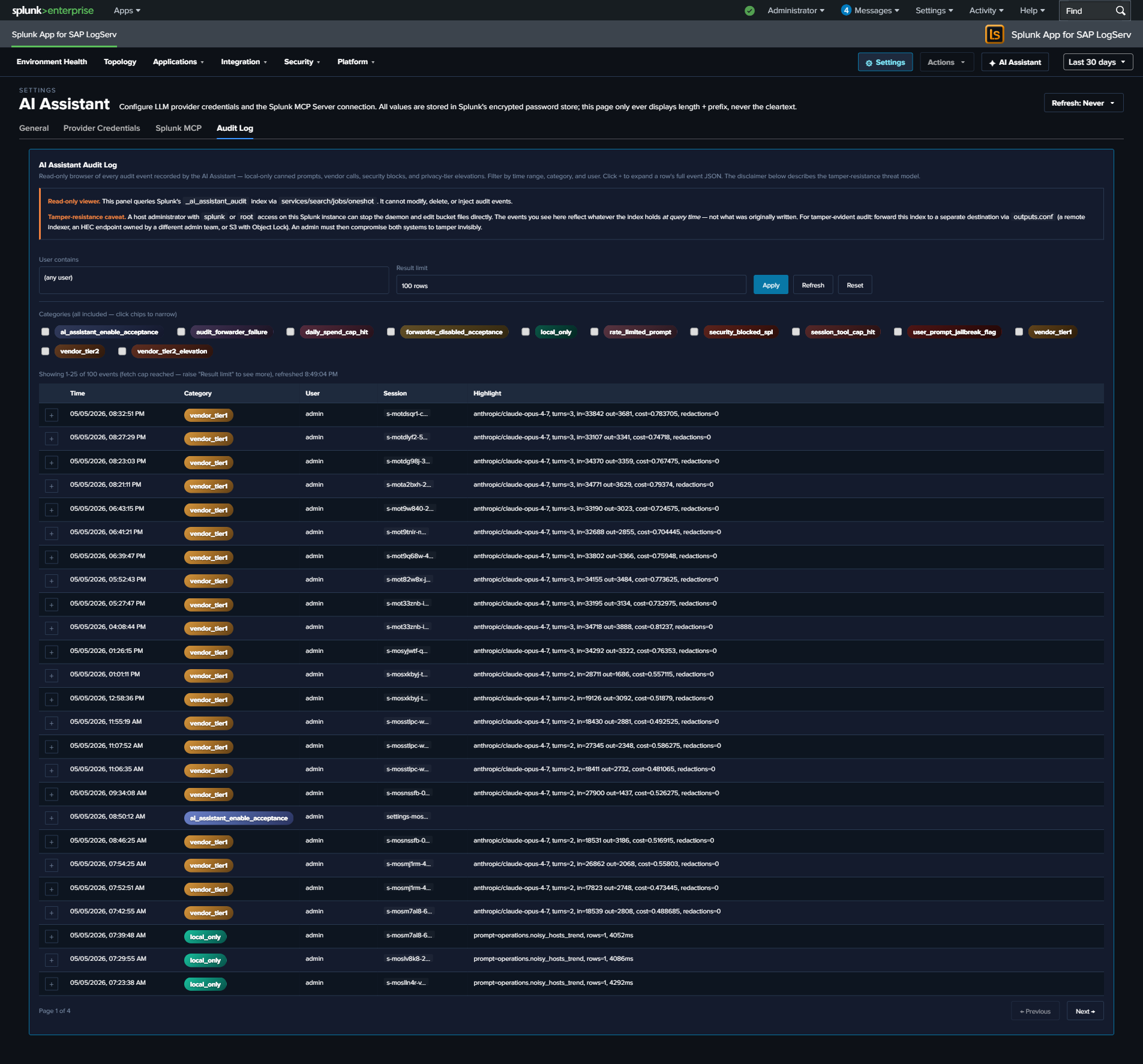
The Audit Log tab in Settings → AI Assistant provides a read-only browser of the index. Filters:
| Filter | Default | Notes |
|---|---|---|
| Time range | Last 7 days | Reads from the global TimeRange picker; not a separate field. Re-runs on picker change. |
| Category | (all 12) | Multi-select with colored chips. Each category has its own gradient (cyan-light SAP-Basis-style for local_only, gold-orange for vendor calls, red for security blocks, etc.). |
| User contains | (empty) | Substring filter on the user field. Useful for “what did admin X do?” reviews. |
| Limit | 100 | One of 25 / 100 / 500 / 1000. Larger values slow page rendering. |
The table renders 25 rows per page (PAGE_SIZE = 25); footer shows “Page X of Y” + Previous / Next buttons (only when total exceeds 25). Clicking a row’s + button expands to show the full event JSON.
Splunk reserved-field gotcha: the category field on these events is a Splunk reserved name. The viewer’s SPL uses | eval category=json_extract(_raw, "category") after spath to retrieve the audit-event category from the raw JSON, because spath does NOT overwrite reserved fields. If you write your own searches against this index, replicate this pattern.
Tamper-Resistance Threat Model
Audit events live in a Splunk index on the same host as the LogServ App. A host-root admin can edit the underlying bucket files — they can delete events, rewrite events, replay old events, or delete the entire index. The audit log is NOT tamper-evident on the local instance alone.
Mitigation: forward audit events to a separate Splunk / SIEM / S3-with-Object-Lock destination owned by a different admin team. The HEC forwarder (below) provides this. The threat model assumes a malicious or compromised insider with admin rights to the LogServ Splunk instance but NOT to the destination instance.
Disclaimer text shown at the top of the Audit Log tab:
Audit events live in a Splunk index. A host-root admin can edit the bucket files. Mitigation: forward audit events to a separate Splunk instance / SIEM / S3-with-Object-Lock owned by a different admin team. Configure the HEC forwarder under Settings → General → Audit & Telemetry.
HEC Forwarder
Optional admin-configurable forwarding of audit events to a separate Splunk / SIEM via Splunk’s HTTP Event Collector. When enabled:
- Browser-side dual-write at flush. The
AuditWriter.flush()path (and the per-eventpostOneOff()path) sends to BOTH the locallogserv_ai_assistant_auditindex (via the standardservices/receivers/simpleREST endpoint) AND the configured HEC URL. The two writes are independent — local-index failure doesn’t block forwarder write, and vice versa. - Failure visibility. When the HEC POST fails (DNS error, network timeout, 4xx/5xx response), an
audit_forwarder_failureevent is generated locally. So a disabled / down forwarder is visible in the local audit log itself, not silently failing. - Auth. The HEC token is sent on every POST as
Authorization: Splunk <token>header. Token is stored in Splunk’s encrypted password store at realmlogserv_ai_assistant_forwardernamehec_tokenand never displayed in cleartext. - Sanitized URL in failure events. When a forwarder failure event records the
destinationUrl, query strings + fragments are stripped to prevent accidental exposure of any auth-bearing URL params.
Configuring the forwarder
- Open Settings → AI Assistant → General.
- Find the Audit & Telemetry subsection.
- Set
audit_forwarder_urlto the HEC endpoint (e.g.,https://siem.example.com:8088/services/collector). - Optionally set
audit_forwarder_index(recommended: a dedicated index likesplunk_auditon the destination). - Optionally set
audit_forwarder_source(defaults tologserv:ai_assistant:audit). - Set
audit_forwarder_enabled = true. - Open Settings → AI Assistant → Splunk MCP → Audit Log Forwarder panel.
- Click Set next to the HEC token field.
- Paste the HEC token from your destination Splunk’s HEC input.
- Save. The next audit event triggers a forwarder POST.
- Check the destination Splunk for events arriving at the configured index/source.
When the admin saves with the forwarder OFF
A forwarder-disabled-acceptance modal blocks the save until the admin acknowledges the integrity-mitigation responsibility. The acceptance is recorded as a forwarder_disabled_acceptance audit event with admin identity, Splunk-stamped IP, timestamp, and SHA-256 of the disclaimer revision.
Audit Index Provisioning
The logserv_ai_assistant_audit index is defined in the Data TA’s default/indexes.conf and created automatically when the Data TA is installed on the indexer / search head. No customer-side provisioning needed.
The index name is macro-configurable — see Renaming an index for the procedure (update the sap_logserv_audit_idx_macro macro definition for reads, plus the audit_index_name field in Settings → AI Assistant → General → Audit & Telemetry for writes).
Retention uses the system default unless the customer overrides it on their indexer’s indexes.conf — for compliance reviews going back > 90 days, override frozenTimePeriodInSecs accordingly. Recommended retention for compliance use cases: 2 years to cover annual audit cycles plus a buffer. For SOX / PCI / HIPAA contexts where regulator records-retention requirements apply, follow the regulator’s spec.
Querying the Audit Index Directly
You can query the audit index from any search bar — the in-app viewer is just a curated UX over the same SPL. The starter searches below use the \sap_logserv_audit_idx_macro`` macro so they continue to work after a rename:
All Tier 2 calls in the last 7 days, with USD cost summed by user:
`sap_logserv_audit_idx_macro` earliest=-7d
| spath
| eval category=json_extract(_raw, "category")
| where category="vendor_tier2"
| stats sum(vendorCostEstimateUsd) as total_usd, count by user
| sort - total_usd
All security blocks in the last 30 days, grouped by user + offending operator:
`sap_logserv_audit_idx_macro` earliest=-30d
| spath
| eval category=json_extract(_raw, "category")
| where category="security_blocked_spl"
| stats count by user, operator
| sort - count
All Tier 2 elevation events ever (compliance review):
`sap_logserv_audit_idx_macro` earliest=0
| spath
| eval category=json_extract(_raw, "category")
| where category="vendor_tier2_elevation"
| table _time, user, previousTier, newTier
Forwarder failures grouped by reason (operational health):
`sap_logserv_audit_idx_macro` earliest=-7d
| spath
| eval category=json_extract(_raw, "category")
| where category="audit_forwarder_failure"
| stats count by reason, destinationUrl
Audit Modal in the AI Assistant Panel
The privacy banner at the top of the AI Assistant chat panel includes an Audit this session button. Clicking it opens a per-session audit modal:
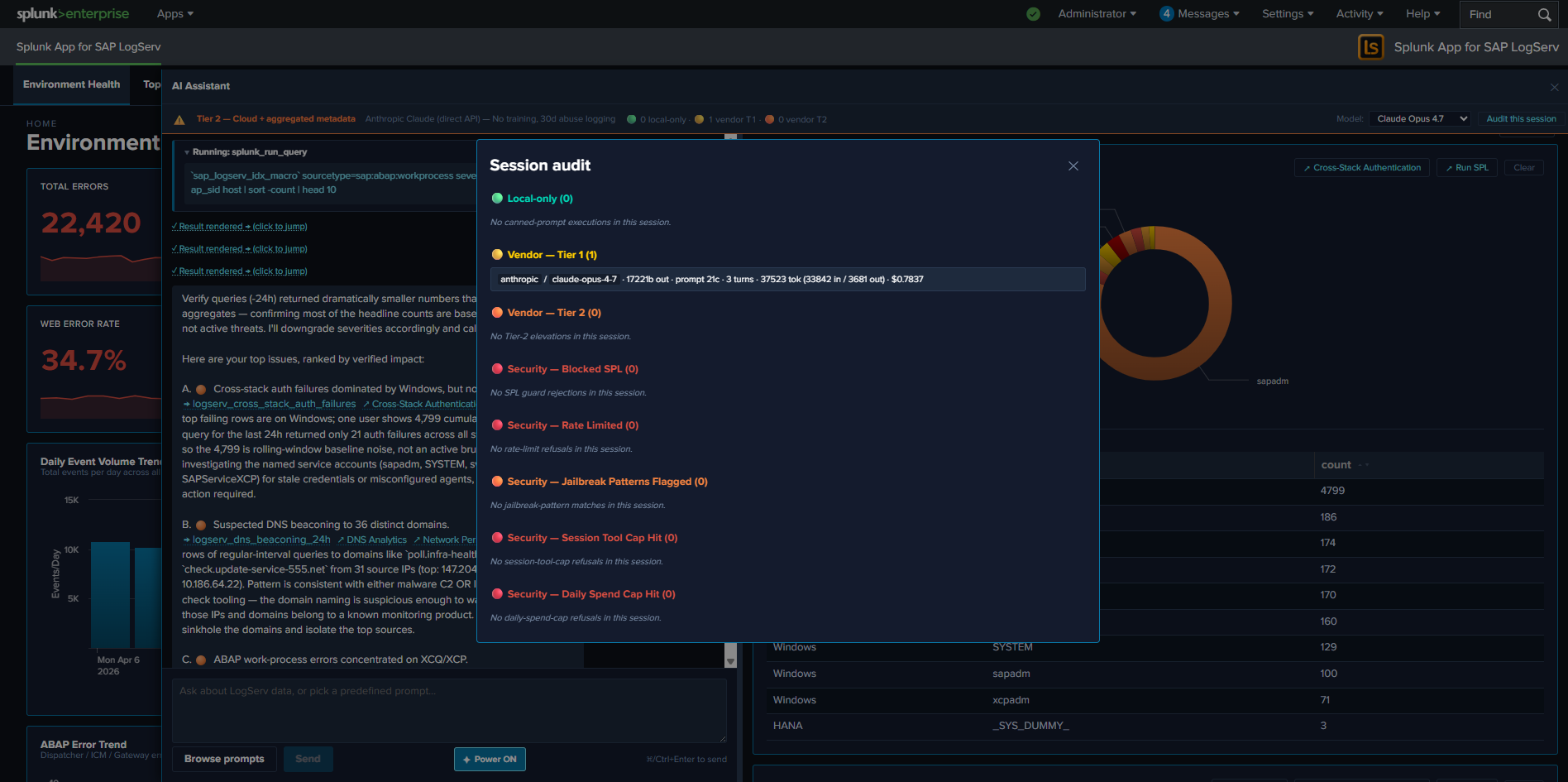
The modal shows a chronological list of every audit event for the current session (matched on sessionId). Useful for users who want to confirm what their last few prompts triggered without leaving the AI Assistant panel. The modal is the in-pane equivalent of the Settings → Audit Log tab, scoped to the current session.