Templates-only Build Variant
Current release: the templates-only build IS the default ship — LLM functionality intentionally disabled pending review
In the current release, the templates-only build is not just a partner-only variant — it is the only released build. The LLM-driven path is disabled at compile time pending internal review of the OWASP LLM Top 10 controls. Once review concludes, a future release will publish the regular variant alongside the templates-only variant. Until then, every customer running the current release — production, partner, demo — runs the templates-only build.
The templates-only build is a variant of the LogServ App that has the AI Assistant’s free-form / LLM-driven path disabled at compile time — and, because the cloud LLM provider implementations are physically removed from the build’s source, no configuration change can restore LLM functionality. A templates_only_mode config field does exist in the bundle, but flipping it (or any other setting) cannot re-enable the LLM path when the provider code isn’t present to call. The MCP path + 61 canned prompts + tool tiles + drill-down chips + audit log all stay fully active, so the LogServ solution can be run end-to-end without an LLM provider. In the current release, this is the only released build; in future releases it will continue to exist as a deployable variant alongside the regular LLM-enabled build.
Why a Compile-Time Variant
The runtime alternative — an admin toggle in Settings that disables the LLM path — would let any local Splunk admin flip it back on. For deployments where the LLM dispatch path is intentionally not available — such as the current release (pending review), demonstration environments, or restricted-environment customers — a compile-time variant is the right shape: the bundle has no code path that reaches an LLM (the provider implementations are physically removed from the source), so no runtime setting could enable one.
What Changes in the Templates-only Build
UI gating (visible to the user)
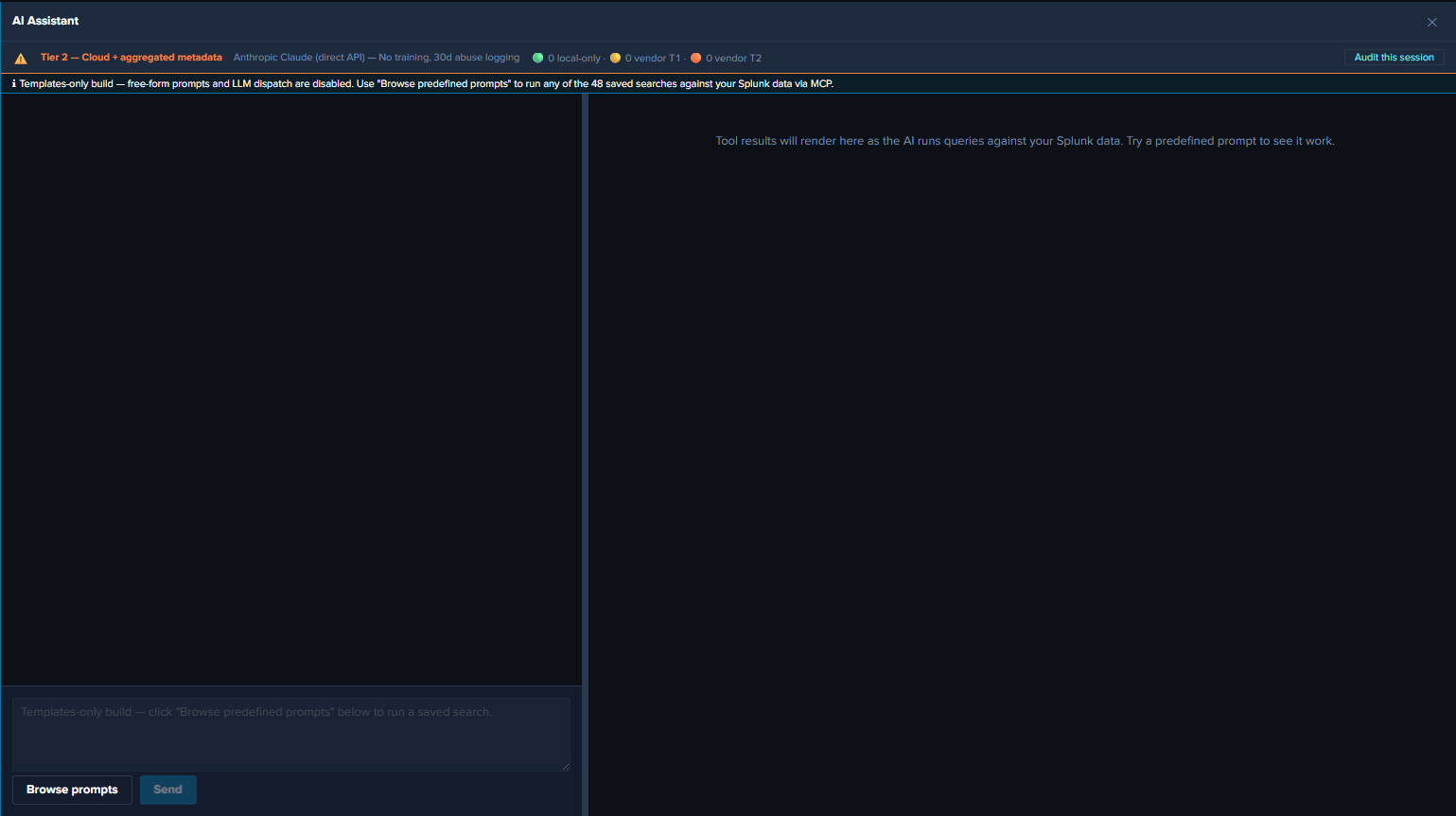
- Chat input text field — disabled, with placeholder “Templates-only build — click ‘Browse predefined prompts’ below to run a saved search.”
- Send button — unconditionally disabled (in addition to the existing
!text.trim() || busyguard). - Power Mode toggle — hidden (forced-RAG is meaningless when there’s no LLM call to force a saved-search before).
- Browse prompts button — fully enabled. The only entry point in this build.
- Privacy banner model picker — hidden (no model = no picker).
- Top-of-chat info banner — cyan-info-tone banner reads: “Templates-only build — free-form prompts and LLM dispatch are disabled. Use ‘Browse predefined prompts’ to run any of the 61 saved searches against your Splunk data via MCP.”
- Settings page — the Provider Credentials tab is hidden entirely. Top-of-page info banner explains the build mode. Other tabs (General / Splunk MCP / Audit Log) remain fully visible since partners need MCP config + audit visibility.
Defense-in-depth runtime guard
Even if a future code path reaches the LLM dispatch entry point (keyboard shortcut, programmatic dispatch from a future feature, etc.), a runtime guard short-circuits with a system notice — the UI gating is the primary defense, and the function-level guard is the safety net. For the guard’s exact location and code shape, see AI Assistant Implementation Reference.
What’s Still Active in Templates-only
- All 61 predefined prompts. Click any card in the prompt browser to dispatch.
- Tool tiles in the right pane. Tables, charts, KPIs, pies — all rendered identically to the regular build.
- Static interpretation + suggested-next-steps cards. Per-prompt guidance from the intent map.
- Drill-down chips.
↗ Dashboard(one per related dashboard) +↗ Run SPLon every tile. - Audit log. All
local_onlyevents for canned-prompt dispatches, plusaudit_forwarder_failureevents if the forwarder is configured. Novendor_tier1/vendor_tier2events because there are no vendor calls. - HEC audit forwarder. Same dual-write behavior as the regular build.
- All dashboards. Environment Health, Applications, Integration, Security, Platform — all 21 dashboards plus the Environment Topology view.
- Per-dashboard auto-refresh picker, Download PNG, time-range URL preservation. All identical to the regular build.
- Settings → General, Splunk MCP, Audit Log. Visible and functional; admin can configure MCP, audit forwarder, etc.
What’s Disabled in Templates-only
- Free-form prompts. Chat input greyed; Send disabled. The defense-in-depth guard short-circuits any code path that reaches the LLM dispatch entry point.
- Power Mode. Toggle hidden; the forced-RAG rule has nothing to enforce since there’s no LLM dispatch.
- Provider Credentials tab. Hidden entirely.
- Model picker in privacy banner. Hidden.
- Vendor calls.
vendor_tier1/vendor_tier2audit categories are never emitted.
End-User Experience
After the templates-only build is installed, the user opens Splunk Web → clicks the ✦ AI Assistant button. The cyan “Templates-only build” banner renders at the top of the chat panel. The user opens the prompt browser, runs prompts, sees tiles + drill-down chips, and navigates dashboards. The full LogServ analytics experience is available, just without the free-form / LLM-driven path.
The destination Splunk search head needs the Splunk MCP Server installed for prompt dispatch to work.