Change & Configuration Activity
Why This Dashboard Matters
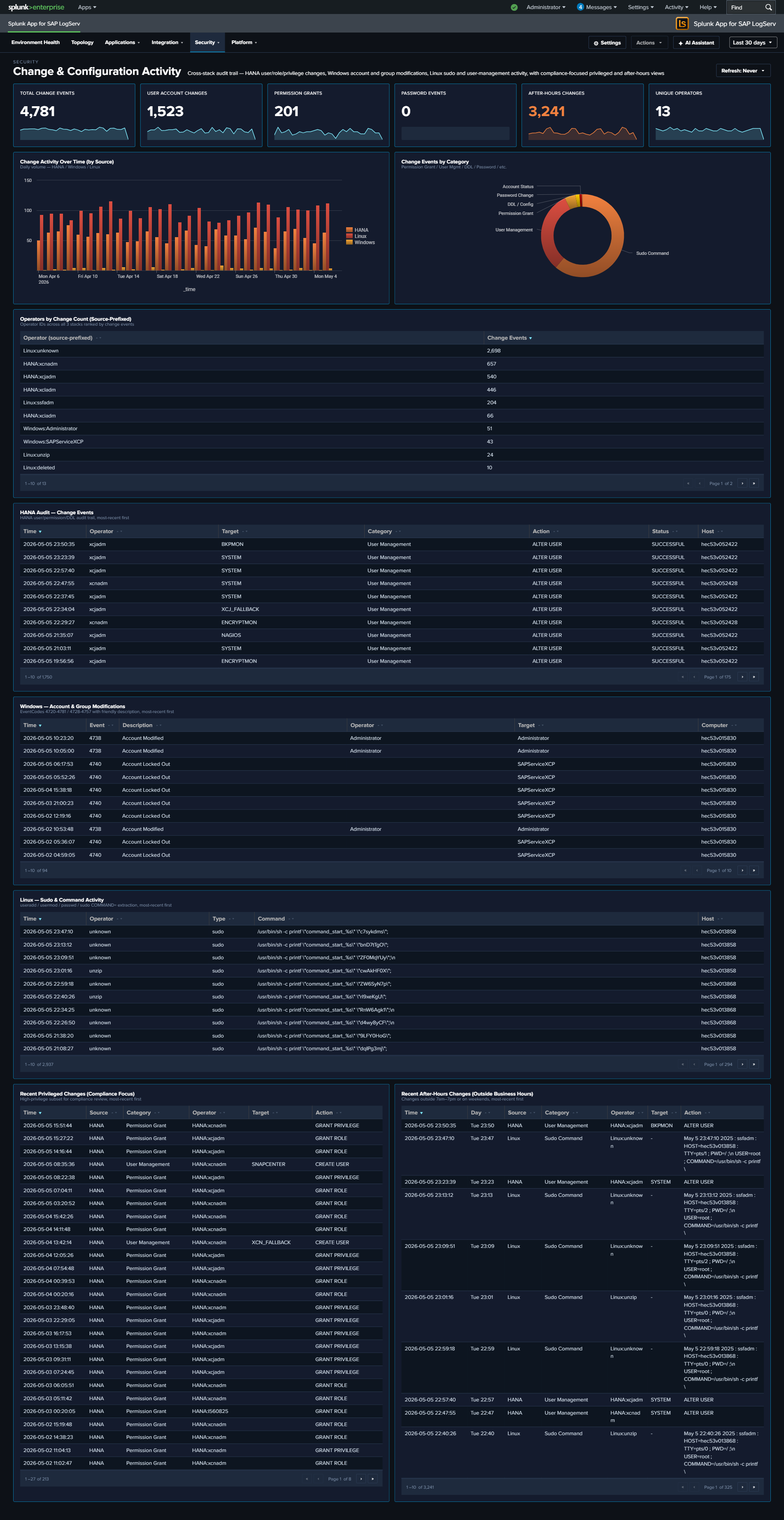
Compliance conversations (SOX, PCI, internal change management) all require evidence that configuration changes are (1) authorized, (2) attributable to a specific operator, and (3) happening in approved maintenance windows. That evidence lives scattered across three audit trails: HANA audit logs (user/role/privilege/password operations and DDL), Windows Security Event Log (account and group modifications), and Linux syslog (sudo commands plus useradd/usermod/userdel/passwd events). This dashboard unifies the three into a single audit trail with a consistent operator column and category taxonomy, plus two compliance-focused “recent” tables: one filtered to privileged actions, one filtered to after-hours activity.
Panels
- Total Change Events – Aggregate count of change events across all three sources
- User Account Changes – Count of user-management actions (HANA
User Management/User Creation/User Deletion; Windows EventCodes 4720/4722/4725/4726/4738/4781; Linuxuseradd/usermod/userdel) - Permission Grants (red) – Count of privilege/group-membership grants (HANA
Permission Grant; Windows EventCodes 4728/4732/4756 – “added to group”) - Password Events – Count of password changes and resets (HANA
Password Management/Password Reset; Windows EventCode 4724; Linuxpasswd) - After-Hours Changes (red) – Count of change events occurring outside business hours (weekday 7am-7pm) or on weekends; HANA events use the pre-computed
is_business_hours/is_weekendflags, other sources compute from_time - Unique Operators – Distinct count of source-prefixed operator identities (e.g.,
HANA:XCPADM,Windows:domain\admin,Linux:ops-user) - Change Activity Over Time – Full-width stacked column by day, series split by source (HANA / Windows / Linux). Same-day spikes across two or three series often line up with maintenance windows; isolated spikes in one source worth investigating.
- Change Events by Category – Donut showing the category mix: Permission Grant, Permission Revoke, User Management, Password Change, Group Membership, Account Status, Sudo Command, DDL / Config, Other.
- Top Operators by Change Count – Horizontal bar chart of the 15 operators generating the most change events, with source-prefixed identities so operator activity is clearly scoped to each system.
- HANA Audit – Change Events – Full-width table of the 50 most recent HANA user/role/privilege/password/DDL actions with Operator, Target, Category, Action, Status, Host.
- Windows – Account & Group Modifications – Full-width table of the 50 most recent Windows Security events across all 15 canonical account/group EventCodes, with human-readable Description column derived from EventCode.
- Linux – Sudo & Command Activity – Full-width table of the 50 most recent sudo commands +
useradd/usermod/userdel/groupadd/groupmod/groupdel/passwdactivity, with Operator (extracted from sudo prefix or PAM(user)pattern) and Command. - Recent Privileged Changes (Top 25, Compliance Focus) – Full-width table filtered to the highest-risk subset: HANA Permission Grants + User Creations + Audit Policy changes; Windows account creation/enable/password-reset + local-group additions; Linux
useradd/visudo/admin-group modifications. This is the “who gave themselves or others more access” report. - Recent After-Hours Changes (Top 25) – Full-width table of any change event filtered to
is_after_hours=1. This is the “who was working outside the change window” report – high compliance value.
What to Look For
- Rows in the Privileged Changes table with unfamiliar operators – The “headline” compliance question. A permission grant or group-addition you don’t recognize is the first thing to investigate.
- After-Hours activity on business days – The After-Hours table surfaces all outside-window activity. Weekend entries are often planned maintenance; weekday late-night or early-morning entries warrant a check against your change tickets.
- Single operator dominating the Top Operators bar – One identity generating most changes can be legitimate (an admin performing a large rollout) or concerning (an account being abused). The source prefix tells you which system to look at first.
- Category-mix drift – If the Change Events by Category donut suddenly shows a large “Permission Grant” slice where it’s historically been minor, someone has been handing out privileges. Check the HANA Audit table for details.
- Source asymmetry – The stacked column should show all three sources over time. If one source goes silent, it’s likely a logging-pipeline issue rather than “no changes happened”. Correlate with Data Pipeline Overview.
- Linux sudo commands starting with useradd/usermod/visudo/passwd – These are the Linux equivalent of admin changes; they show up in both the Linux table and the Privileged Changes table for visibility.
Compliance-focused exception: no row drill-downs on the After-Hours and Privileged Changes tables
Two compliance-focused tables on this dashboard intentionally have no row drill-downs — the After-Hours Changes and Recent Privileged Changes tables. Clicking through to raw events from a compliance audit-trail report would pollute the trail with the reviewer’s own search activity in subsequent compliance reports. Per-source operational tables on the same dashboard (HANA Audit, Windows Account & Group Modifications, Linux Sudo & Command Activity) DO get drill-downs.