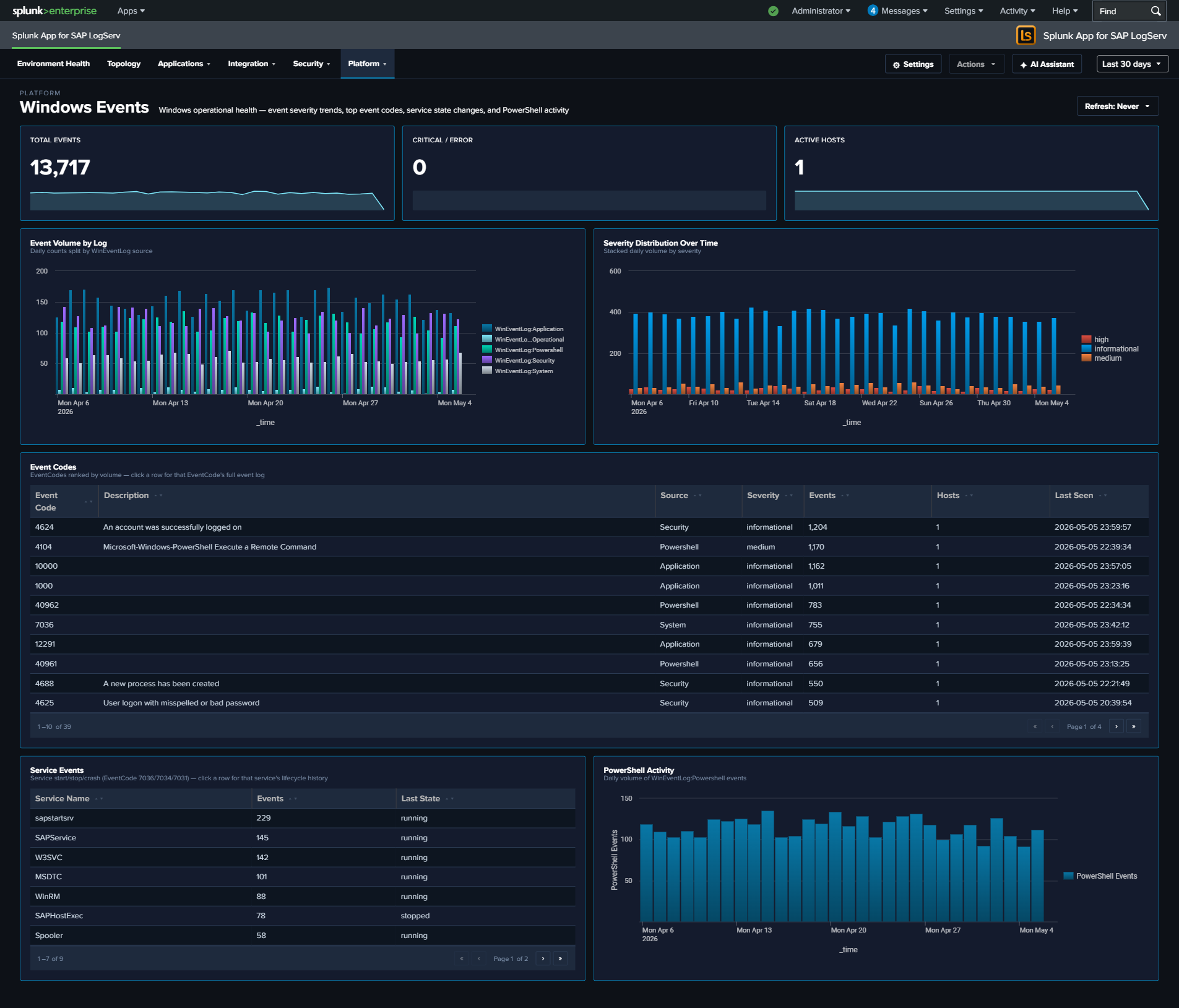
Windows Events
Why This Dashboard Matters
The Windows Events dashboard monitors Windows hosts in the SAP landscape, which commonly run SAP application servers, database instances, and management consoles. Windows Event Logs capture service health, PowerShell execution, and system errors that indicate Windows-specific operational issues. This dashboard focuses on operational health and service state – the authentication-failure story is owned by the Cross-Stack Authentication dashboard so that all three layers (SAP / HANA / Windows) can be investigated together.
Requires the Splunk Add-on for Microsoft Windows on the Search Head
Several panels here depend on the Splunk Add-on for Microsoft Windows (Splunkbase 742) being installed on the Search Head tier. The LogServ App ships no XmlWinEventLog field extraction of its own — EventCode and severity are search-time fields provided by add-on 742 (its xmlwindows_severities.csv lookup maps the event <Level> to severity: 1→critical, 2→high, 3→medium, 0/4/5→informational).
Without add-on 742 on the search tier, Windows events still index fine and the Total Events, Event Volume by Log, Active Hosts, and PowerShell Activity panels populate (they read envelope fields), but the Top Event Codes table shows EventCode=(none) for every row and the Severity Distribution, Critical / Error, and Service Events panels stay empty.
Tier matters: EventCode/severity are search-time extractions, so add-on 742 must be on the Search Head — installing it on a Heavy Forwarder or indexer does nothing for these panels. On Splunk Cloud, install it on the Cloud SH via self-service app management (it is replicated to the indexer search peers through the knowledge bundle). After installing it, re-run the Windows and Environment Health rollups (Settings → Dashboard Data → Run backfill) so the cached panels pick up the now-extracted fields. See the Quick Install Reference package matrix.
Panels
- Total Events – Aggregate Windows event count
- Critical / Error – Count of critical and error severity events
- Active Hosts – Count of distinct Windows hosts reporting data
- Event Volume by Log – Daily trend by Windows log source (Application, Security, System, PowerShell)
- Severity Distribution Over Time – Stacked column chart of severity levels
- Top Event Codes – Featured full-width table of the most frequent EventCodes with 7 enriched columns: Event Code, Description (signature), Source log, Severity, Events, Hosts (distinct count), Last Seen. Row drilldown opens the search app filtered by that event code.
- Service Events – Table of Windows service start/stop activity with latest state
- PowerShell Activity – Line chart trending PowerShell event volume
What to Look For
- High-frequency Event Codes – The Top Event Codes table is the primary starting point. EventCode 7031 / 7034 (service terminated unexpectedly), 1000 (application crash), and 41 (unexpected shutdown) are high-priority. Click through to see every occurrence of a specific code.
- Service crashes – EventCode 7031 (service terminated unexpectedly) in either the Top Event Codes table or the Service Events panel indicates a critical service failure. For SAP services (sapstartsrv, SAPService), this requires immediate attention.
- PowerShell activity spikes – Sudden increases in PowerShell execution may indicate lateral movement by an attacker using PowerShell-based attack tools. Correlate with the Cross-Stack Authentication dashboard to see whether any Windows logons were concurrent.
- Critical/error severity trends – A rising trend in critical and error events over multiple days indicates accumulating system health issues that need proactive investigation.
- Event Code hosts expanding – The Hosts column on the Top Event Codes table makes it obvious when a normally-host-isolated error starts appearing on multiple hosts – a sign the underlying cause is environmental (failed update, domain policy change) rather than local.