ABAP Network & Security
Why This Dashboard Matters
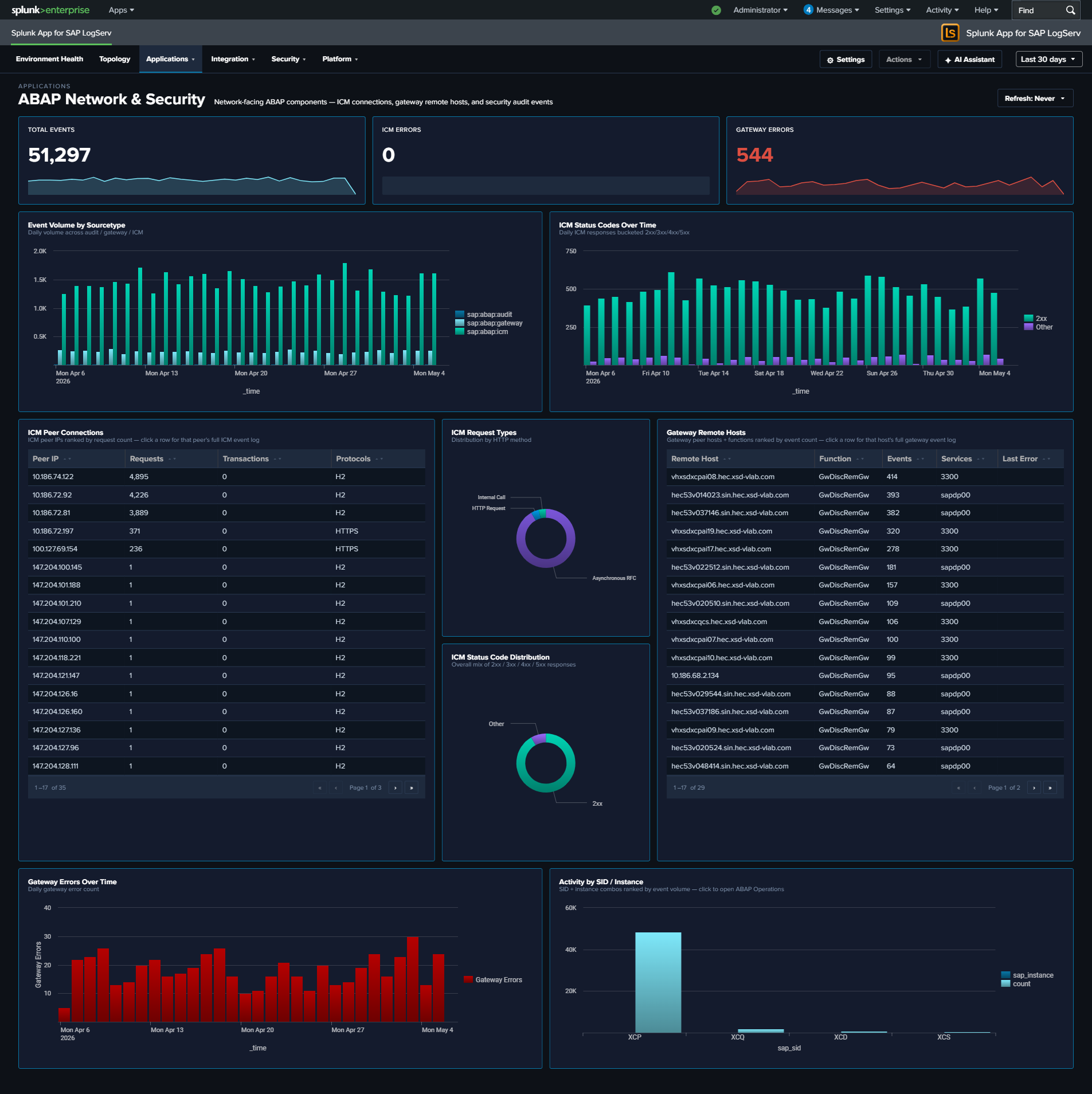
The ABAP Network & Security dashboard monitors the network-facing components of SAP ABAP systems. The Internet Communication Manager (ICM) handles all HTTP/HTTPS traffic into and out of ABAP, while the Gateway controls RFC connections between SAP systems. Together, these are the primary attack surface for ABAP-based landscapes and the first place where performance degradation manifests during connectivity issues.
Panels
- Total Events – Aggregate event count across ICM, Gateway, and Audit sourcetypes
- ICM Errors – Count of ICM events flagged as errors
- Gateway Errors – Count of Gateway events with error details
- Event Volume by Sourcetype – Daily trend of each sourcetype
- ICM Status Codes Over Time – Stacked column chart of 2xx, 3xx, 4xx, and 5xx responses
- ICM Peer Connections – Table of top peer IPs by request count with protocol details
- ICM Request Types – Pie chart breakdown of ICM request types
- Gateway Remote Hosts – Table of gateway connections by remote host, function, and service
- Gateway Errors Over Time – Timeline of gateway error events
- Activity by SID / Instance – Column chart showing event distribution across SAP systems
What to Look For
- ICM 4xx/5xx spikes – A sudden increase in client errors (4xx) may indicate application misconfigurations or scanning activity. Server errors (5xx) suggest backend failures or resource exhaustion.
- Unfamiliar peer IPs – New IP addresses appearing in the ICM Peer Connections table warrant investigation, especially if they generate high request volumes or connect using unusual protocols.
- Gateway connections from unknown hosts – The Gateway Remote Hosts table should show expected RFC partners. Unknown remote hosts or unusual service names may indicate unauthorized access attempts.
- Error rate trends – A gradually increasing error rate across days can signal infrastructure degradation (disk space, memory pressure, certificate expiry) before it becomes an outage.