Settings & Configuration
Current release: the Provider Credentials tab is hidden — LLM dispatch is disabled
The current release ships with the LLM-driven path disabled at compile time pending internal review. The Provider Credentials tab is hidden entirely in current builds, and the model picker on the General tab is non-functional even though the underlying setting persists. The General tab’s provider, default_model, tier, power_user_roles, tier2_pii_redaction, tier2_redact_hostname, rate_limit_per_hour, daily_spend_cap_usd, and session_tool_call_cap fields are documented for the future release that re-enables the LLM path; in the current release, only enabled, mcp_required, mcp_server_url, and the audit-forwarder fields under Audit & Telemetry are operationally meaningful.
The Application Settings page is at #/settings within the LogServ App (the old #/settings/ai-assistant URL still works and redirects here). Admin-only. The page is organized as a two-level tab hierarchy:
Application Settings
├── AI Assistant            (top-level tab)
│   ├── General             (sub-tab)
│   ├── Provider Credentials(sub-tab)
│   ├── Splunk MCP          (sub-tab)
│   └── Audit Log           (sub-tab)
└── Dashboard Data          (top-level tab)
The two top-level tabs render with the standard tab chrome; the AI Assistant sub-tabs render as a lighter, secondary text-tab row beneath them.
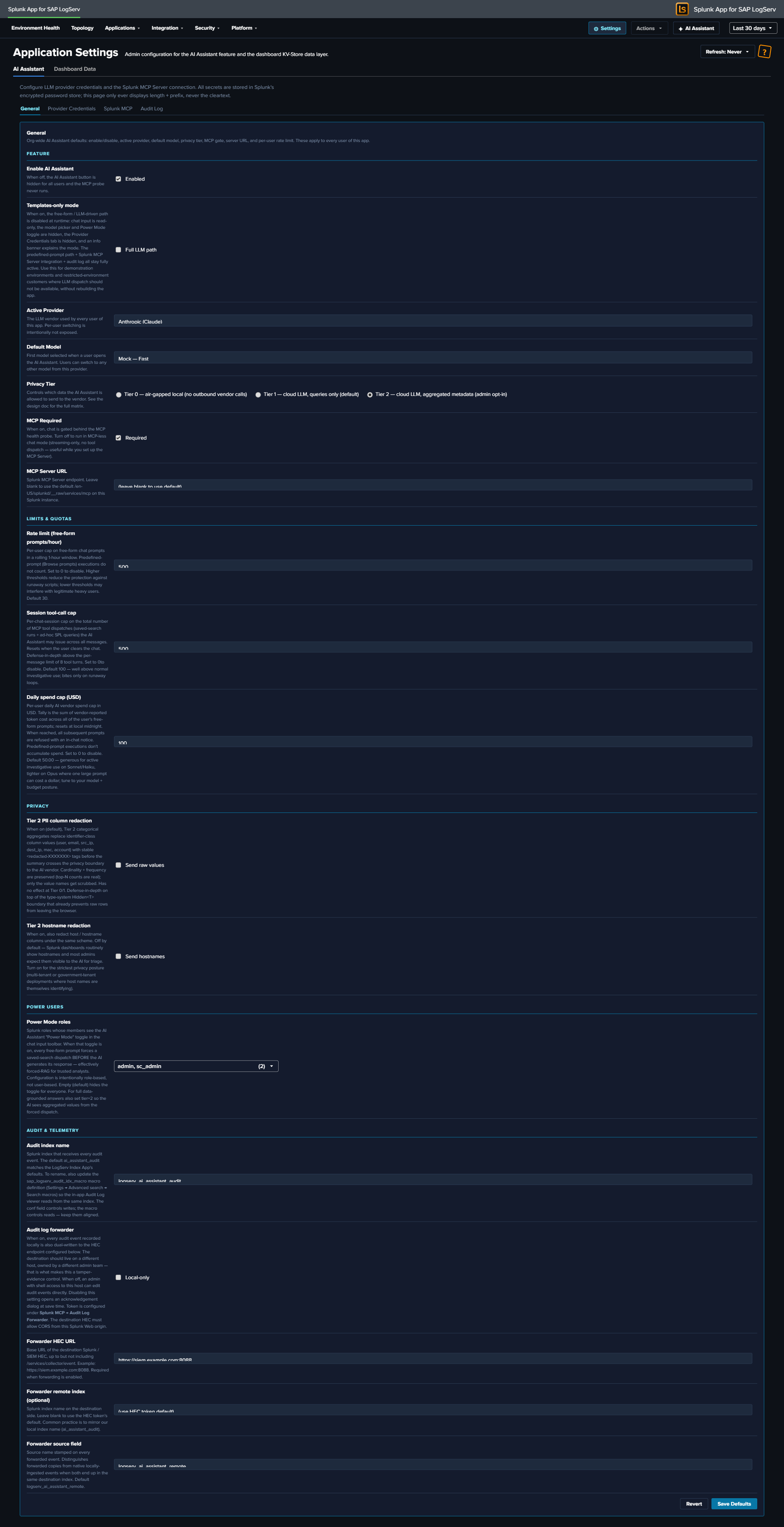
The Two Top-Level Tabs
| Tab | Scope |
|---|---|
| AI Assistant | Everything specific to the AI Assistant feature, split across four sub-tabs (below). |
| Dashboard Data | App-wide admin controls for the KV-Store rollup data layer that powers every dashboard and the Environment Topology view — aggregation master switch, retention, one-time backfill, per-rollup status, and clear (see below). |
AI Assistant sub-tabs
| Sub-tab | Scope |
|---|---|
| General | Org-wide AI Assistant defaults (enable/disable, provider, model, tier, MCP gate, server URL, rate limit, spend cap, Power Users, audit forwarder) |
| Provider Credentials | LLM provider API keys (Anthropic / OpenAI / Azure OpenAI / AWS Bedrock) |
| Splunk MCP | MCP Server bearer token + Audit Forwarder HEC token |
| Audit Log | Read-only browser of every audit event in the logserv_ai_assistant_audit index |
In the Templates-only build variant, the Provider Credentials sub-tab is hidden entirely (no LLM provider needed) and an info banner at the top of the AI Assistant tab explains the build mode.
General Tab
The General tab is divided into four semantic subsections: Feature, Limits & Quotas, Privacy, Audit & Telemetry.
Feature
| Field | Default | Description |
|---|---|---|
enabled |
false |
Master switch. When false, the ✦ AI Assistant button in the nav is hidden and no AI traffic flows. The first time an admin flips this to true, an enable-acceptance modal blocks the save until acknowledged. |
provider |
mock |
Active LLM vendor: mock / anthropic / openai / azure_openai / bedrock / ollama (future release). |
default_model |
per-provider | Default model id for the active provider. Per-user model picker in the chat panel can switch within the same provider’s models[]. |
tier |
1 |
Privacy tier 0 / 1 / 2. See Privacy Tiers. Elevating to Tier 2 records a vendor_tier2_elevation audit event. |
mcp_required |
true |
When false, runs MCP-less chat mode (streaming-only, no tool dispatch). |
mcp_server_url |
blank | MCP server endpoint. Blank uses the scheme-relative /en-US/splunkd/__raw/services/mcp. See Splunk MCP Setup. |
power_user_roles |
empty CSV | Comma-separated Splunk roles allowed to see the ✦ Power toggle. See Power Mode. |
Limits & Quotas
| Field | Default | Description |
|---|---|---|
rate_limit_per_hour |
30 |
Per-user rolling-1-hour rate limit on free-form prompts. 0 = disabled. Maps to LLM10. Canned prompts are never rate-limited. |
session_tool_call_cap |
100 |
Per-chat-session cap on tool dispatches to prevent infinite tool loops. 0 = disabled. Maps to LLM06. |
daily_spend_cap_usd |
per-org | Cumulative-cost cap on free-form vendor spend per app instance per UTC day. Resets at 00:00 UTC. Maps to LLM10. |
Privacy
| Field | Default | Description |
|---|---|---|
tier2_pii_redaction |
true |
When Tier 2 is active, redact known identifier columns (email, user(name), *_ip, mac, account) before sending to the LLM. Stable per-value <redacted-XXXXXXX> tags so cardinality reasoning still works. |
tier2_redact_hostname |
false |
Whether to redact hostname columns under the Tier 2 PII rule. Default off — hostname is often non-sensitive in SAP environments. |
Audit & Telemetry
| Field | Default | Description |
|---|---|---|
audit_forwarder_enabled |
false |
Forward audit events to a separate Splunk / SIEM via HEC for tamper-evidence. When the admin saves with this off, a forwarder-disabled-acceptance modal blocks the save until acknowledged. |
audit_forwarder_url |
blank | HEC endpoint URL (e.g., https://siem.example.com:8088/services/collector). |
audit_forwarder_index |
blank | Optional index field to send with each event. |
audit_forwarder_source |
logserv:ai_assistant:audit |
source field for forwarded events. |
Provider Credentials Tab
One panel per provider. Each panel has the credential fields for that provider — typically just an API key, plus per-provider extras (Azure deployment URL, Bedrock region, etc.). Credentials are stored in Splunk’s encrypted password store via /servicesNS/nobody/<app>/storage/passwords. The Settings page only ever displays length + prefix, never the cleartext.
The realm convention is logserv_ai_assistant_<provider> and the credential name corresponds to the field. So Anthropic’s API key lives at realm logserv_ai_assistant_anthropic name api_key; OpenAI’s at logserv_ai_assistant_openai name api_key; etc.
Setting a credential (admin-only):
- Pick the provider’s panel on this tab.
- Click Set next to the field.
- Paste the credential.
- Click Save.
- The Settings page records a
local_onlyaudit event with the realm + name + length + prefix (never the cleartext).
Deleting a credential:
- Click Delete next to the field.
- Confirm.
- The credential is removed from Splunk’s encrypted password store.
If the active provider field on the General tab points at a provider whose credentials aren’t set, the AI Assistant produces an error on the first free-form prompt: “Provider ‘X’ has no credentials configured. Open Settings → Provider Credentials to set them.”
In the Templates-only build variant, this entire tab is hidden.
Splunk MCP Tab
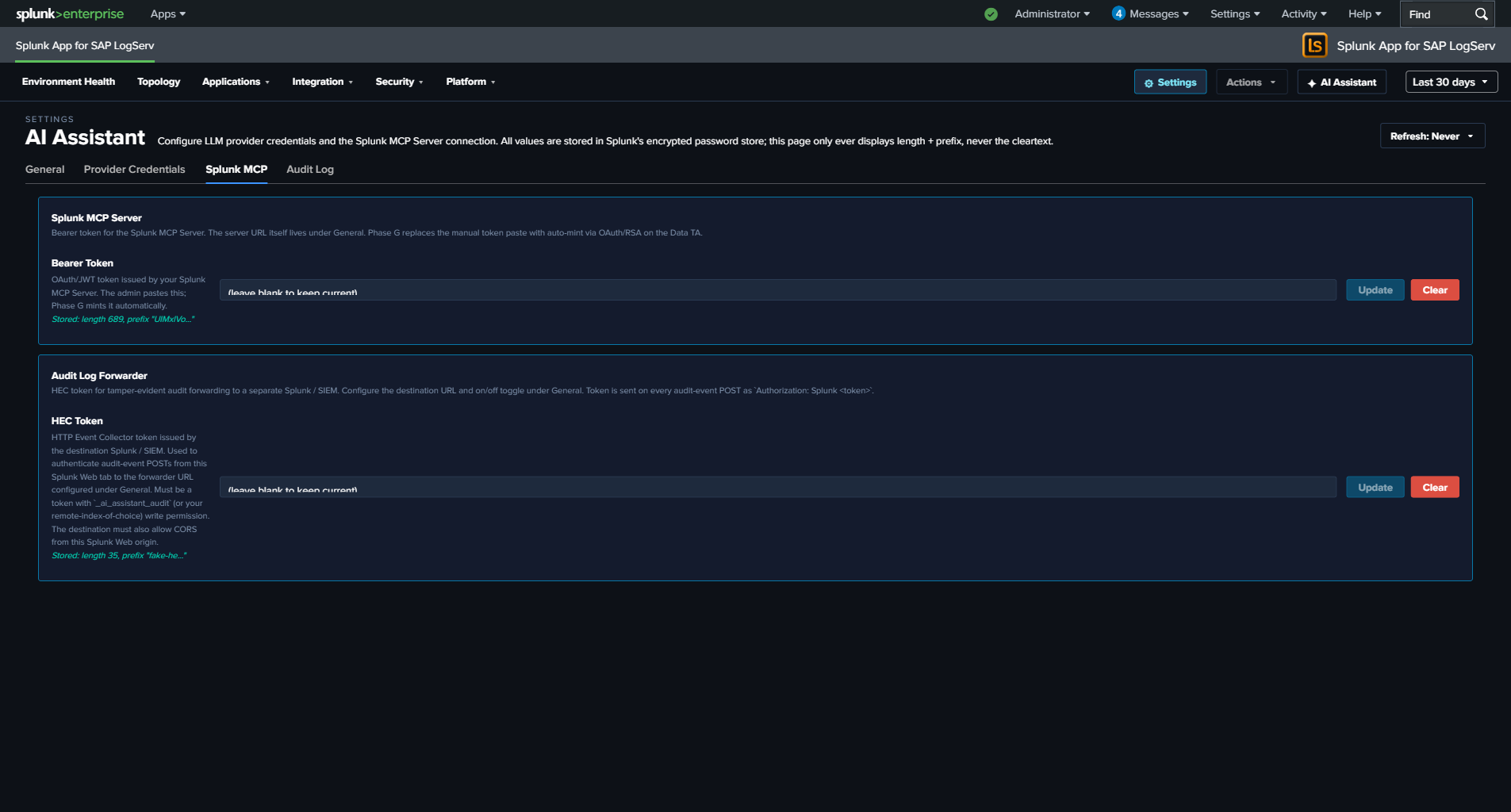
Two panels:
Splunk MCP Server
| Field | Realm | Name |
|---|---|---|
bearer_token |
logserv_ai_assistant_mcp |
bearer_token |
OAuth/JWT token issued by your Splunk MCP Server. The admin pastes this. Optional — cookie auth from the same Splunk Web session works by default for HTTP-only Splunk.
Audit Log Forwarder
| Field | Realm | Name |
|---|---|---|
hec_token |
logserv_ai_assistant_forwarder |
hec_token |
HEC token for tamper-evident audit forwarding to a separate Splunk / SIEM. The destination URL + on/off toggle live under General → Audit & Telemetry. The token is sent on every audit-event POST as Authorization: Splunk <token>. See Audit Log → HEC Forwarder.
Audit Log Tab
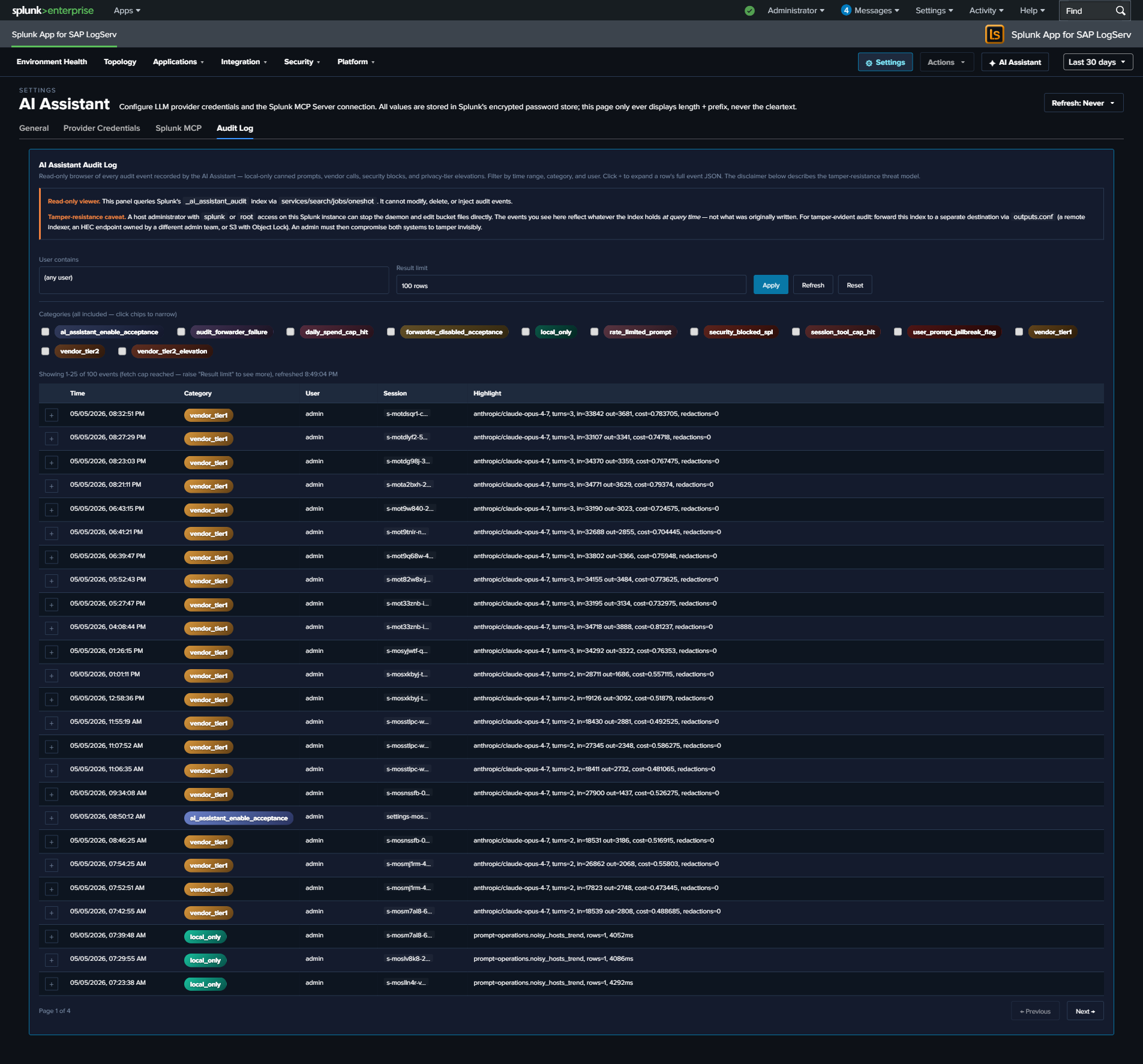
Read-only browser of every event in the logserv_ai_assistant_audit index. The search window is driven by the global TimeRange picker in the navigation bar — the viewer re-runs on every picker change, and there is no separate time-range control. Filters: category multi-select (12 categories — local_only, vendor_tier1, vendor_tier2, security_blocked_spl, rate_limited_prompt, user_prompt_jailbreak_flag, session_tool_cap_hit, daily_spend_cap_hit, audit_forwarder_failure, vendor_tier2_elevation, forwarder_disabled_acceptance, ai_assistant_enable_acceptance), user-contains text filter, result limit (25 / 100 / 500 / 1000).
Clicking a row’s + expand button reveals the full event JSON. The page is paginated client-side at 25 rows per page; “Showing N-M of T events” + Previous / Next buttons render below the table when T > 25.
Tamper-resistance disclaimer at the top of the panel:
Audit events live in a Splunk index. A host-root admin can edit the bucket files. Mitigation: forward audit events to a separate Splunk instance / SIEM / S3-with-Object-Lock owned by a different admin team. Configure the HEC forwarder under Settings → General → Audit & Telemetry.
See Audit Log for the threat model + forwarder configuration.
Dashboard Data Tab
The Dashboard Data top-level tab is the admin control surface for the entire KV-Store rollup data layer that powers every dashboard and the Environment Topology view — a global hourly-aggregation master switch, a 365-day retention display, the one-time backfill, a per-rollup status + action table, and a global clear.
Because it manages the dashboard data layer (not the AI Assistant feature), its controls are documented alongside that architecture: see Dashboard Performance & Data Freshness → The Dashboard Data settings tab.
Legal Acknowledgement Modals
Two compile-time legal modals gate specific Settings save flows. Both follow Splunk’s splunk_instrumentation optInVersion framework — once acknowledged at version V, future saves with the same disclaimer revision skip the modal; bumping the version forces re-ack.
Enable Acceptance Modal (orange-bordered)
Triggers when:
- saved.enabled === false && draft.enabled === true (every “I’m turning this on” deliberate action), OR
- The current optInVersion of the enable-TC stanza is higher than the user’s last acknowledgement.
The modal disclaimer covers seven clauses: data egress acknowledgement, customer responsibility, AS-IS warranty disclaimer, indemnification, limitation of liability, authority warrant, record-of-acknowledgement. Aligned to Splunk MSA + Cisco EULA conventions.
User identity, Splunk-stamped IP (host field), timestamp, and SHA-256 of the disclaimer revision are recorded in an ai_assistant_enable_acceptance audit event. Yes path: save proceeds + bumps the user’s optInVersionAcknowledged. No path: save aborts + records the No choice.
Forwarder Disabled Acceptance Modal (cyan-bordered)
Triggers when:
- saved.audit_forwarder_enabled === true && draft.audit_forwarder_enabled === false (every “I’m turning this protection off” deliberate action), OR
- The current optInVersion of the forwarder-TC stanza is higher than the user’s last acknowledgement.
The disclaimer covers integrity-mitigation responsibility: with the forwarder off, audit events are recoverable only from the local index, which a host-root admin can edit. Same identity + IP + timestamp + disclaimer-hash recording as the enable modal. Records forwarder_disabled_acceptance audit event.
Why the hybrid trigger logic
Pure optInVersion-only gating (acknowledge once, never prompted again until the version bumps) is what Splunk’s stock telemetry uses. We added the deliberate-toggle-transition trigger because re-enabling the AI Assistant after a disable, or re-disabling the forwarder after enabling, are deliberate user actions that warrant re-acknowledgement of the legal posture each time. Pure version-only gating would let these toggle-flips slip without re-ack.
Live UI Refresh on Save
When the admin saves a config change in the General tab that affects what users see (master enabled toggle, mcp_required, power_user_roles, etc.), the AI Assistant re-applies the new config to the running session within a few seconds. No page reload required.
For example: disabling the AI Assistant via the master toggle and clicking Save Defaults — the ✦ AI Assistant button in the top-right nav disappears within ~4 seconds, no browser refresh needed. Similarly, re-enabling re-shows the button immediately. For the callback wiring, see AI Assistant Implementation Reference.